Week Introduction
Software vulnerabilities are not random bugs — they're flaws in how programs handle unexpected input, manage memory, or enforce security boundaries. Attackers exploit the gap between what developers intended and what the code actually does.
This week explores the software security lifecycle: how bugs emerge during development, how they become exploitable vulnerabilities, and why secure development practices are essential defensive controls. You'll learn to think about code from an attacker's perspective — where assumptions break down.
Learning Outcomes (Week 8 Focus)
By the end of this week, you should be able to:
- LO6 - Software Security: Explain how common vulnerability classes (injection, memory errors, logic flaws) arise and how they're exploited
- LO2 - Technical Foundations: Connect software behavior to security outcomes (understand "why" exploits work, not just "what" they do)
- LO4 - Risk Reasoning: Prioritize software vulnerabilities using CVSS, exploitability, and business context
Lesson 8.1 · From Bug to Vulnerability: When Mistakes Become Security Flaws
Definition: Bug vs Vulnerability
-
Bug: Any deviation from intended program behavior (functional error)
Example: Calculator displays wrong result, button doesn't respond, formatting error
Impact: Usability issue, incorrect output, annoying but not exploitable -
Vulnerability: A bug that can be exploited to violate security
properties (CIA triad)
Example: Input validation bug allows SQL injection, memory error enables code execution
Impact: Confidentiality breach, integrity violation, availability disruption
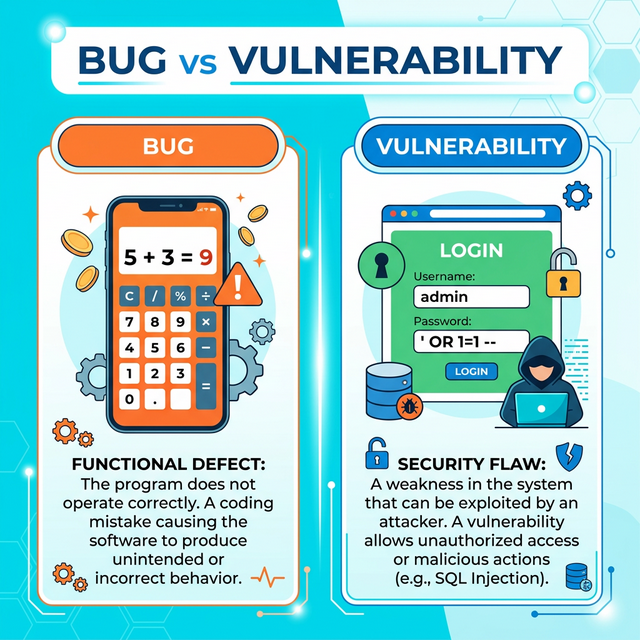
Critical insight: Context determines if bug becomes vulnerability
The same bug can be:
- Harmless in offline calculator app (no security boundary)
- Critical vulnerability in web payment system (handles untrusted input, processes money)
How bugs arise (common root causes):
-
1. Incorrect assumptions about input
Developer assumes: "Users will only enter numbers in this field"
Reality: Attacker enters' OR '1'='1(SQL injection)
Why it happens: Developers think about valid use cases, not adversarial input -
2. Boundary condition errors
Developer assumes: "This array will never have more than 100 items"
Reality: Attacker sends 1000 items, overflows buffer
Why it happens: Edge cases not tested, assumptions not validated -
3. Race conditions and timing issues
Developer assumes: "These two operations will happen in order"
Reality: Concurrent requests create race condition, bypass security check
Why it happens: Complexity of multi-threaded systems -
4. Logic errors in security checks
Developer assumes: "If user is authenticated, they can access this resource"
Reality: Missing authorization check — any authenticated user accesses any resource
Why it happens: Confusion between authentication and authorization -
5. Dependency vulnerabilities
Developer assumes: "This third-party library is secure"
Reality: Library has known CVE, app inherits vulnerability
Why it happens: Unpatched dependencies, transitive dependencies
Why software bugs are inevitable:
- Complexity: Modern apps = millions of lines of code, hundreds of dependencies
- Time pressure: Ship fast vs test thoroughly trade-off
- Human fallibility: Developers make mistakes, miss edge cases
- Evolving requirements: Code changes introduce regressions
Lesson 8.2 · Common Vulnerability Classes (OWASP/CWE Perspective)
Core principle: Most vulnerabilities fall into recurring patterns. Understanding vulnerability classes helps predict and prevent them.
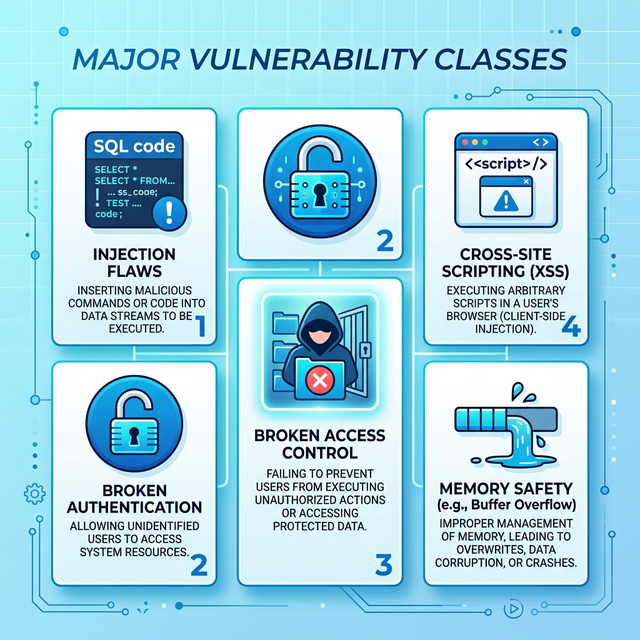
Major vulnerability categories (from OWASP Top 10 / CWE):
-
1. Injection Flaws (SQL, Command, LDAP, etc.)
Root cause: Untrusted data interpreted as code/commands
How it works: Attacker inserts malicious input that gets executed by interpreter
Example: SQL injection —username: admin' OR '1'='1bypasses login
Impact: Data breach, authentication bypass, remote code execution
Defense: Parameterized queries, input validation, least privilege database accounts -
2. Broken Authentication / Session Management
Root cause: Weak credential handling, predictable sessions, missing MFA
How it works: Attacker guesses/steals credentials or hijacks sessions
Example: Session tokens in URL, weak password reset, no account lockout
Impact: Account takeover, identity theft, unauthorized access
Defense: Strong password policies, MFA, secure session management (HTTPOnly cookies, short expiry) -
3. Broken Access Control (Authorization Failures)
Root cause: Missing or incorrect permission checks
How it works: Authenticated user accesses resources they shouldn't (IDOR, privilege escalation)
Example: Change URL from/user/123/profileto/user/456/profile— access other user's data
Impact: Unauthorized data access, privilege escalation
Defense: Server-side authorization checks, deny-by-default, access control testing -
4. Cross-Site Scripting (XSS)
Root cause: Unescaped user input displayed in web pages
How it works: Attacker injects JavaScript that executes in victim's browser
Example: Comment field contains<script>steal(cookie)</script>— executes when others view comment
Impact: Session hijacking, credential theft, malware delivery
Defense: Output encoding, Content Security Policy (CSP), HTTPOnly cookies -
5. Memory Safety Issues (Buffer Overflow, Use-After-Free)
Root cause: Unsafe memory operations in languages like C/C++
How it works: Attacker overflows buffer to overwrite adjacent memory (code pointers, return addresses)
Example: Send 1000 bytes to function expecting 100 — overflow overwrites return address, hijacks control flow
Impact: Remote code execution, privilege escalation
Defense: Memory-safe languages (Rust, Go), bounds checking, ASLR, DEP -
6. Insecure Deserialization
Root cause: Trusting serialized data from untrusted sources
How it works: Attacker crafts malicious serialized object that executes code when deserialized
Example: Java deserialization gadget chains leading to RCE
Impact: Remote code execution, authentication bypass
Defense: Avoid deserializing untrusted data, integrity checks, least privilege
Pattern recognition for defenders:
When reviewing code or assessing systems, ask:
- Where does untrusted input enter? (Web forms, APIs, file uploads, network packets)
- Is input validated before use? (Allow-list, sanitization, encoding)
- Where are authorization checks? (Server-side, per-resource, least privilege)
- How is memory managed? (Bounds checking, safe languages, automated tools)
- Are sessions/credentials secure? (MFA, secure storage, proper expiry)
Lesson 8.3 · What Is an Exploit? From Vulnerability to Attack
Definition: An exploit is a technique or code that takes advantage of a vulnerability to achieve an attacker's goal (data theft, code execution, privilege escalation, denial of service).
Vulnerability vs Exploit vs Payload:
-
Vulnerability: The weakness in the software (the "what")
Example: Buffer overflow in login function (CWE-120) -
Exploit: The method to trigger the vulnerability (the "how")
Example: Crafted username with 500 'A' characters overflows buffer -
Payload: The malicious code delivered via exploit (the "goal")
Example: Shellcode that spawns reverse shell, giving attacker remote access
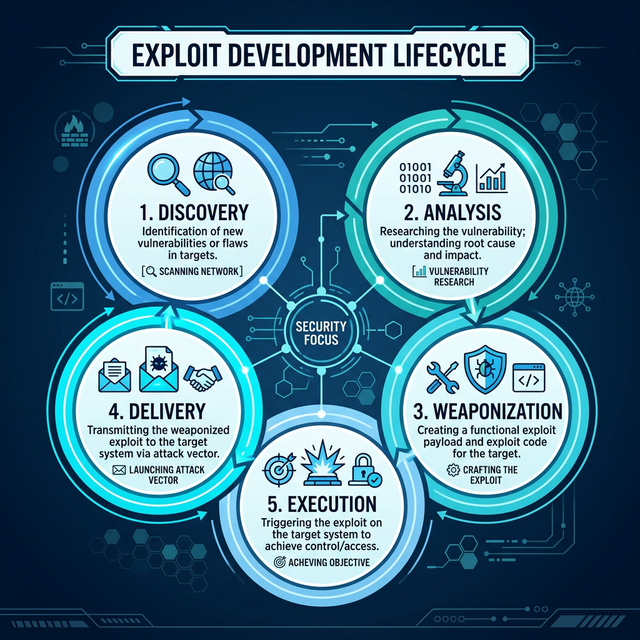
Exploit development lifecycle (attacker perspective):
- Discovery: Find vulnerability (fuzzing, code review, public disclosure)
- Analysis: Understand root cause and exploitability (can I control execution?)
- Weaponization: Develop reliable exploit (bypasses ASLR/DEP, works across versions)
- Delivery: Get exploit to target (phishing, watering hole, direct attack)
- Execution: Trigger vulnerability, deliver payload, establish persistence
Why exploits are difficult (defender advantage):
- Reliability: Exploits often crash systems before succeeding (gets detected)
- Defenses: ASLR, DEP, CFI, stack canaries make exploitation harder
- Patching: Window of exploitability closes once patch is released
- Detection: IDS/IPS, endpoint protection can catch exploit attempts
Types of exploits (by delivery/scope):
-
Remote exploits: Triggered over network without authentication
Example: EternalBlue (WannaCry) — SMB vulnerability, no user interaction
Risk level: Critical (wormable, massive scale) -
Local exploits: Require existing access to escalate privileges
Example: Privilege escalation from standard user to root/admin
Risk level: High (used for lateral movement after initial compromise) -
Client-side exploits: Require user action (click link, open file)
Example: Malicious PDF exploiting Adobe Reader vulnerability
Risk level: Medium-High (requires social engineering)
Exploit maturity levels (how easy is exploitation?):
- Theoretical: Vulnerability exists but no exploit code available
- Proof-of-Concept (PoC): Demonstrates vulnerability, unreliable/crashes
- Functional: Works reliably in controlled environment
- Weaponized: Production-ready, bypasses defenses, used in the wild
Lesson 8.4 · Secure Software Development Lifecycle (SSDLC)
Core insight: Finding and fixing bugs after deployment is 10-100x more expensive than preventing them during development. Security must be built in, not bolted on.
Why "security as afterthought" fails:
- Architectural flaws can't be patched (require redesign)
- Deployed code is in attacker's hands (reverse engineering, fuzzing)
- Legacy systems accumulate vulnerabilities faster than they're patched
- Users delay updates (unpatched systems remain vulnerable for years)
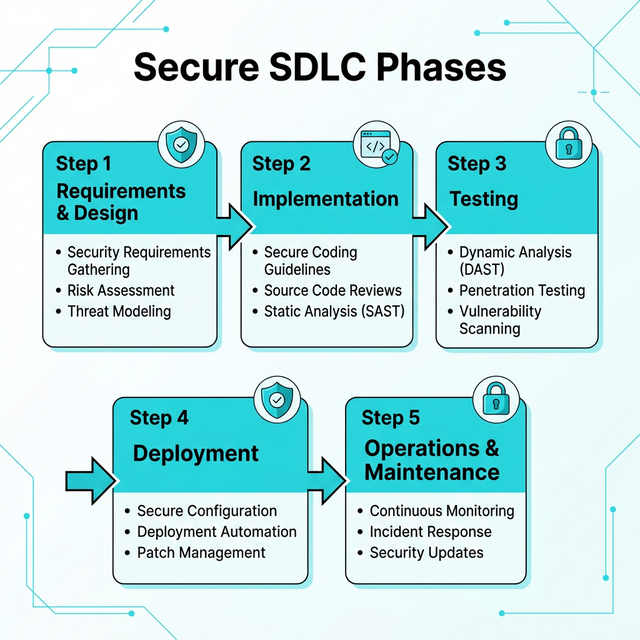
Secure SDLC phases (security at each stage):
-
1. Requirements & Design
Security activities: Threat modeling, security requirements, abuse cases
Goal: Identify security boundaries, trust assumptions, high-risk components
Example: "Payment processing must use end-to-end encryption, not store full card numbers" -
2. Implementation (Coding)
Security activities: Secure coding standards, code review, static analysis (SAST)
Goal: Prevent common vulnerability classes (injection, XSS, memory errors)
Example: Mandatory use of parameterized queries, input validation frameworks -
3. Testing
Security activities: Dynamic testing (DAST), penetration testing, fuzzing
Goal: Find vulnerabilities in running application before attackers do
Example: Automated scanners test for OWASP Top 10, manual pentest simulates attacker -
4. Deployment
Security activities: Security configuration review, secrets management, least privilege
Goal: Deploy securely configured, harden production environment
Example: Disable debug modes, rotate credentials, enable security logging -
5. Operations & Maintenance
Security activities: Patch management, monitoring, incident response, dependency updates
Goal: Maintain security posture over time, respond to new threats
Example: Monthly patching cycle, SIEM alerts for anomalies, CVE monitoring
Key secure development practices:
- Input validation: Never trust user input — validate type, length, format, range
- Output encoding: Escape data before rendering (HTML, SQL, shell contexts)
- Least privilege: Code runs with minimum necessary permissions
- Defense in depth: Multiple layers of security (authentication + authorization + encryption + logging)
- Fail securely: Errors deny access by default, don't leak sensitive info
- Security by design: Consider security from day one, not after features are built
Modern tooling for secure development:
- SAST (Static Application Security Testing): Analyze source code for vulnerabilities (SonarQube, Checkmarx)
- DAST (Dynamic Application Security Testing): Test running app for vulnerabilities (OWASP ZAP, Burp Suite)
- SCA (Software Composition Analysis): Identify vulnerable dependencies (Snyk, Dependabot)
- Secret scanning: Detect hardcoded credentials in code (GitGuardian, TruffleHog)
- Fuzzing: Automated testing with malformed inputs (AFL, libFuzzer)
Lesson 8.5 · Why Software Security Is Hard (and Getting Harder)
Fundamental challenges that make secure software difficult:
-
1. Complexity is the enemy of security
Reality: Modern apps = millions of lines of code + hundreds of dependencies
Problem: Bugs hide in complexity, interactions create emergent vulnerabilities
Example: Average web app uses 100+ npm packages, each with their own dependencies (supply chain risk) -
2. Defenders must be right every time, attackers only once
Reality: One missed input validation can compromise entire system
Problem: Exhaustive testing is impossible (infinite input combinations)
Example: Equifax breach — one unpatched Apache Struts vulnerability -
3. Legacy code and technical debt
Reality: Production systems run code written 10-20 years ago
Problem: Unsafe languages (C/C++), outdated libraries, no security reviews
Example: Critical infrastructure still runs COBOL, Windows XP in medical devices -
4. Speed vs security trade-off
Reality: Business pressure to ship fast (features > security)
Problem: Security testing cut to meet deadlines, technical debt accumulates
Example: "Move fast and break things" culture deprioritizes security -
5. Evolving attack surface
Reality: Cloud, mobile, IoT, AI create new vulnerability classes
Problem: Defenders must learn new platforms faster than attackers exploit them
Example: AI prompt injection, cloud misconfigurations, IoT botnets
Why perfect code is impossible:
- Humans write code, humans make mistakes (cognitive limitations)
- Requirements change, code rots (today's secure code becomes tomorrow's legacy)
- Emergent behavior from component interactions (works individually, fails together)
- Zero-days exist (unknown vulnerabilities in "secure" code)
Realistic security posture:
Accept that vulnerabilities will exist. Focus on:
- Reducing vulnerability density: Secure coding, code review, testing
- Reducing time to patch: Fast incident response, automated updates
- Limiting blast radius: Least privilege, sandboxing, segmentation
- Detecting exploitation early: Monitoring, logging, anomaly detection
Self-Check Questions (Test Your Understanding)
Answer these in your own words (2-3 sentences each):
- What is the difference between a bug and a vulnerability? Give one example of each.
- Explain one common vulnerability class (injection, XSS, broken access control, etc.). How does it arise and what's the impact?
- What is an exploit? How does it differ from the vulnerability itself?
- Why is security "by design" cheaper than security "by patch"? Connect to SDLC phases.
- Why is achieving "perfect software security" impossible? Name at least two fundamental challenges.
Lab 8 · Vulnerability Analysis and Secure Design
Time estimate: 40-50 minutes
Objective: Analyze how coding errors become security vulnerabilities. You will trace the path from bug to exploit to impact, then propose secure development practices that would have prevented the vulnerability.
Step 1: Choose Your Application Feature (5 minutes)
Select one common software feature:
- User login system: Username/password authentication, session management
- File upload: Users upload profile pictures, documents, attachments
- Search function: Users search database (products, users, documents)
- Comment/review system: Users post text content visible to others
- Password reset: Users request password reset via email
- API endpoint: Mobile app sends/receives data from server
Why it matters: Same vulnerability classes appear across different features — pattern recognition is key.
Step 2: Identify a Coding Error (10 minutes)
Describe a realistic coding mistake for your chosen feature:
- What did developer intend? (Expected behavior)
- What assumption did they make? (About input, users, system state)
- What did they forget/miss? (Validation, sanitization, authorization check)
- Where is the code? (Client-side, server-side, database query)
Example for search function:
- Developer intent: Allow users to search product catalog by name
- Assumption: "Users will only enter product names (text)"
- Mistake: Directly concatenated user input into SQL query without validation
- Code location: Server-side search endpoint builds dynamic SQL query
Example vulnerable code (pseudocode):
query = "SELECT * FROM products WHERE name = '" + userInput + "'"
database.execute(query)
Step 3: Map Bug to Vulnerability Class (10 minutes)
Categorize the vulnerability using OWASP/CWE taxonomy:
- Vulnerability class: (Injection, XSS, Broken Access Control, etc.)
- CWE number (if known): (e.g., CWE-89 for SQL Injection)
- Why this class? What security property failed? (Input validation, output encoding, authorization)
Example classification:
- Class: SQL Injection (A03:2021 in OWASP Top 10)
- CWE: CWE-89 (Improper Neutralization of Special Elements in SQL Command)
- Root cause: Input validation failure — untrusted data treated as SQL code
Step 4: Describe the Exploit (10 minutes)
Explain how an attacker would exploit this vulnerability:
- Malicious input: What would attacker enter?
- How it triggers bug: What happens when system processes this input?
- What attacker achieves: Data access? Code execution? Bypass security?
Example SQL injection exploit:
-
Attacker input:
' OR '1'='1 -
Resulting query:
SELECT * FROM products WHERE name = '' OR '1'='1' -
Effect:
'1'='1'is always true → returns ALL products (bypasses search logic) -
Escalation: Attacker uses
UNION SELECTto extract data from other tables (users, passwords)
Step 5: Assess Impact (5 minutes)
Evaluate consequences if exploit succeeds:
- Confidentiality impact: What data is exposed?
- Integrity impact: Can attacker modify data?
- Availability impact: Can attacker disrupt service?
- Business impact: Financial loss, regulatory fines, reputational damage?
Example impact assessment:
- Confidentiality: High — Entire user database exposed (emails, hashed passwords)
- Integrity: High — Attacker can INSERT/UPDATE/DELETE records
- Availability: Medium — Could DROP tables, cause denial of service
- Business: GDPR fines (data breach), customer churn, class action lawsuit
Step 6: Propose Secure Development Fix (10 minutes)
Identify at least two preventive measures from SDLC phases:
- Design phase: What architectural decision would prevent this class of vulnerability?
- Implementation phase: What coding practice eliminates the bug?
- Testing phase: What test would have caught this before deployment?
Example secure development fixes:
- Design: Use ORM (Object-Relational Mapper) that abstracts SQL — developers never write raw queries
-
Implementation: Parameterized queries (prepared statements) — user input never
concatenated into SQL
// Secure version query = "SELECT * FROM products WHERE name = ?" database.execute(query, [userInput]) // Input treated as data, not code -
Testing: SAST tool (static analysis) flags string concatenation in SQL queries
DAST tool (dynamic testing) sends SQL injection payloads, detects vulnerability
Success Criteria (What "Good" Looks Like)
Your lab is successful if you:
- ✅ Identified a realistic coding error (not "attacker breaks in somehow")
- ✅ Correctly classified vulnerability using OWASP/CWE taxonomy
- ✅ Described concrete exploit technique (specific malicious input)
- ✅ Assessed impact across CIA triad + business consequences
- ✅ Proposed preventive measures from multiple SDLC phases (not just "validate input")
Extension (For Advanced Students)
If you finish early, explore these questions:
- Research one real CVE in your vulnerability class. What was the root cause? How was it discovered?
- How would defense-in-depth limit damage even if this vulnerability exists? (Least privilege DB account, WAF, monitoring)
- What's the difference between blacklist input filtering vs whitelist validation? Which is more secure?
🎯 Hands-On Labs (Free & Essential)
Practice how software bugs become exploitable vulnerabilities. Complete these labs before moving to reading resources.
🎮 TryHackMe: OWASP Top 10 (Intro)
What you'll do: Explore real-world vulnerability classes and see how insecure code
becomes exploitable.
Why it matters: Understanding vulnerability patterns is the fastest way to spot
risky software behavior.
Time estimate: 1.5-2 hours
🎮 TryHackMe: Vulnversity
What you'll do: Practice identifying and exploiting beginner-friendly web
vulnerabilities in a guided environment.
Why it matters: Seeing how vulnerabilities are exploited helps you understand why
secure coding practices matter.
Time estimate: 2-3 hours
🏁 PicoCTF Practice: Web Exploitation (Beginner)
What you'll do: Solve beginner web challenges that highlight common coding mistakes and
their impact.
Why it matters: Reinforces how small coding errors can lead to real exploits.
Time estimate: 1-2 hours
💡 Lab Tip: For each vulnerability you see, note the assumption the developer made that failed. That habit is key to secure coding.
Resources (Free + Authoritative)
Work through these in order. Focus on vulnerability patterns and secure development practices.
📘 OWASP Top 10 (Latest)
What to read: Browse all 10 categories, read detailed explanations for A01
(Broken Access Control), A03 (Injection).
Why it matters: Industry-standard risk ranking based on real-world breach
data. Used globally for web app security.
Time estimate: 30 minutes (don't memorize — understand the patterns)
🎥 Computerphile - Buffer Overflows Explained (Video)
What to watch: Full video on how buffer overflows work and why they're
dangerous.
Why it matters: Classic vulnerability class — understanding memory
corruption builds foundation for modern exploits.
Time estimate: 15 minutes
📘 CWE Top 25 Most Dangerous Software Weaknesses
What to read: Overview and top 5 CWEs (SQL Injection, XSS, Buffer Overflow,
etc.).
Why it matters: Standardized vulnerability taxonomy — CWE IDs used in CVEs,
security tools, research.
Time estimate: 20 minutes
📘 OWASP Secure Coding Practices Cheat Sheet
What to read: Input Validation, Output Encoding, Authentication sections.
Why it matters: Practical defensive coding patterns. Quick reference for
developers.
Time estimate: 20 minutes
Tip: Completion and XP persist via localStorage. If progress doesn't update immediately, refresh once.
Weekly Reflection Prompt
Aligned to LO6 (Software Security) and LO4 (Risk Reasoning)
Write 200-300 words answering this prompt:
Explain how coding errors become security vulnerabilities. Use your Lab 8 vulnerability analysis as an example.
In your answer, include:
- The coding mistake/assumption that created the vulnerability
- Which vulnerability class it belongs to (injection, XSS, broken access control, etc.)
- How an attacker would exploit it (concrete attack technique)
- The impact across CIA triad (confidentiality, integrity, availability)
- Which SDLC phase(s) could have prevented it (design, coding, testing)
- Why "security by design" is more effective than "security by patch"
What good looks like: You demonstrate understanding that vulnerabilities aren't random — they emerge from specific developer assumptions and missing security controls. You explain the exploit mechanism (not just "attacker breaks in"). You connect technical vulnerability to business impact. You show that prevention during development is cheaper and more effective than fixing after deployment.