Week Introduction
Identity is the new security perimeter. In cloud and remote work environments, "inside the network" no longer means "trusted." Every access decision must verify identity and enforce least privilege.
This week explores how systems establish identity (authentication), decide what identities can do (authorization), and why identity compromise is the most common initial attack vector. You'll learn why passwords fail, what makes authentication strong, and how to design access control that balances security with usability.
Learning Outcomes (Week 7 Focus)
By the end of this week, you should be able to:
- LO5 - Identity & Access: Distinguish authentication from authorization and explain why both are critical security boundaries
- LO3 - Threat Landscape: Identify credential-based attacks (phishing, stuffing, brute force) and their defenses
- LO4 - Risk Reasoning: Apply least privilege principle to access control design
Lesson 7.1 · The Identity Stack: Identity → Authentication → Authorization
Core distinction: These three concepts form a security chain. Each must work correctly or the entire access control system fails.
1. Identity (Who are you claiming to be?)
-
Definition: A unique identifier representing a user, device, or service
Examples: Username, email address, employee ID, device serial number, service account name -
Key property: Identities are claimed, not proven (anyone can type
"admin")
Security implication: Identity alone grants nothing — must be verified
2. Authentication (Prove you are who you claim to be)
-
Definition: Process of verifying claimed identity using credentials
Examples: Password check, biometric scan, hardware token, certificate validation -
Key property: Authentication proves identity but doesn't define permissions
Security implication: Authenticating as "alice" doesn't mean you can access admin functions
3. Authorization (What are you allowed to do?)
-
Definition: Process of determining what an authenticated identity can
access/modify
Examples: Read file, write database, execute command, approve transaction -
Key property: Authorization decisions happen after authentication
succeeds
Security implication: Most privilege escalation attacks exploit authorization flaws, not authentication
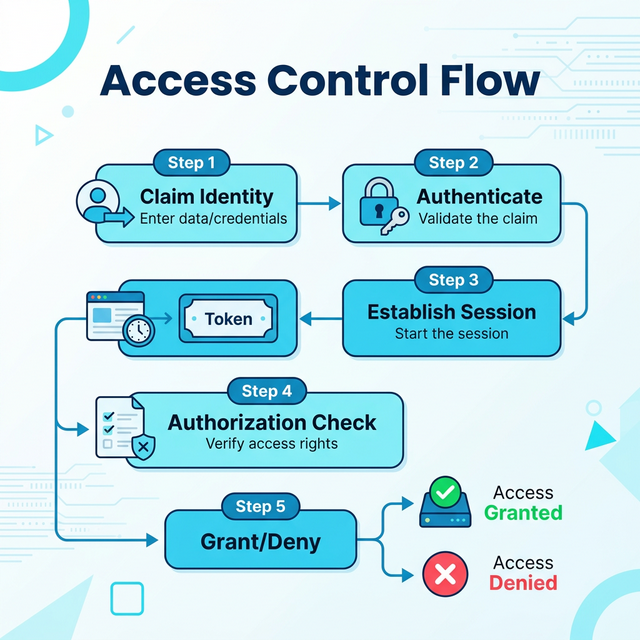
The complete access control flow:
- Claim identity: User enters "alice@company.com"
- Authenticate: System verifies password + MFA token
- Establish session: System issues session token (proof of successful authentication)
- Authorization check: For each action, system asks: "Is alice@company.com allowed to delete this file?"
- Grant or deny: Based on policies (role-based, attribute-based, etc.)
Common failure pattern: Broken authorization
Many breaches occur because authentication works but authorization doesn't:
- Insecure Direct Object Reference (IDOR): User authenticated, but can access other users' data by changing URL parameter
- Privilege escalation: Standard user authenticated, but can call admin-only API endpoints
- Missing function-level access control: UI hides admin buttons, but API doesn't check permissions
Example: Facebook photo privacy bug — users authenticated correctly, but authorization check failed, allowing anyone to view "private" photos by guessing photo IDs.
Lesson 7.2 · Authentication Factors and Multi-Factor Authentication (MFA)
Core principle: Authentication strength depends on the type and number of factors used. Each factor type addresses different attack vectors.
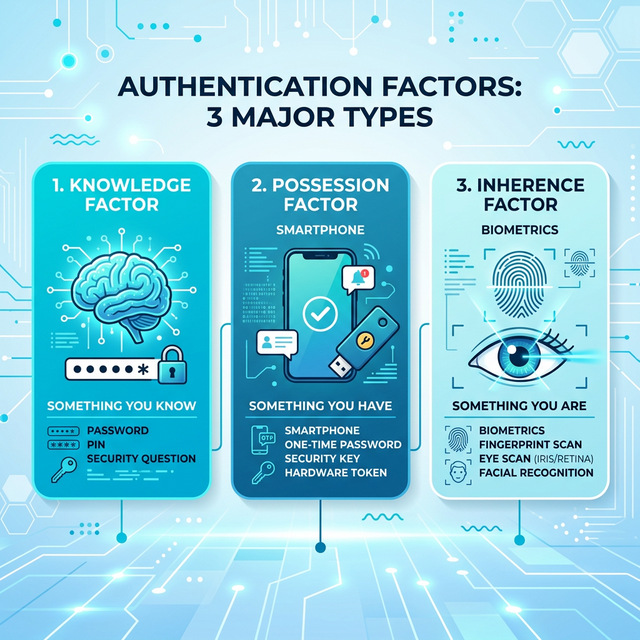
The three authentication factor types:
-
1. Something You Know (Knowledge Factor)
Examples: Password, PIN, security questions, passphrase
Strengths: Easy to implement, no special hardware required, users already understand
Weaknesses: Can be guessed (brute force), phished (social engineering), stolen (keyloggers), reused across sites
Attack vectors: Password spraying, credential stuffing, dictionary attacks, phishing -
2. Something You Have (Possession Factor)
Examples: Hardware token (YubiKey), smartphone (authenticator app), smart card, SMS codes
Strengths: Harder to steal remotely, time-limited codes (TOTP), physical possession required
Weaknesses: Can be lost/stolen, SMS vulnerable to SIM swapping, requires device/network access
Attack vectors: SIM swapping (SMS), device theft, malware on phone -
3. Something You Are (Inherence Factor / Biometrics)
Examples: Fingerprint, facial recognition, iris scan, voice recognition
Strengths: Can't be forgotten, difficult to transfer to attacker, convenient (always with you)
Weaknesses: Can't be changed if compromised, false positives/negatives, privacy concerns, spoofing (photos, molds)
Attack vectors: Facial photo attacks, fingerprint lifting, deepfake voice
Why Multi-Factor Authentication (MFA) Matters:
Using factors from different categories dramatically reduces risk:
- Single factor (password only): Vulnerable to phishing, brute force, credential stuffing
- Two factors (password + SMS): Attacker needs password AND phone access (much harder)
- Two factors (password + hardware token): Even stronger — hardware token resists phishing
Real-world impact of MFA:
- Microsoft: Accounts with MFA are 99.9% less likely to be compromised
- Google: MFA (especially hardware keys) blocks 100% of automated bot attacks
- Verizon DBIR: MFA is the single most effective control against credential theft
MFA hierarchy (weakest to strongest):
- SMS codes: Vulnerable to SIM swapping, but still far better than password-only
- Authenticator apps (TOTP): More secure than SMS, resistant to interception
- Push notifications: Convenient, but vulnerable to "MFA fatigue" attacks (spamming approvals)
- Hardware security keys (FIDO2/WebAuthn): Strongest — phishing-resistant, cryptographic proof
Critical insight: Two passwords ≠ MFA
Multi-factor means factors from different categories. Using two passwords is still single-factor (both are "something you know"). True MFA combines knowledge + possession, or knowledge + biometric.
Lesson 7.3 · Credential-Based Attacks: Why Identity Is the New Perimeter
Core reality: Stealing credentials is easier than exploiting technical vulnerabilities. Once attackers have valid credentials, they bypass most security controls — they look like legitimate users.
Common credential attack patterns:
-
1. Phishing (Most Common)
Method: Fake login page, malicious email link, urgent pretext ("verify your account now!")
Why it works: Exploits human psychology (urgency, authority, fear)
Example: Email claims "suspicious activity" → victim enters password on attacker-controlled site
Defense: Security training, anti-phishing tools, MFA (especially phishing-resistant hardware keys) -
2. Credential Stuffing
Method: Automated login attempts using username/password pairs from previous breaches
Why it works: Password reuse across sites (LinkedIn breach credentials → try on banking sites)
Scale: Billions of stolen credentials available on dark web
Defense: Unique passwords per site (password managers), breach monitoring, account lockouts, CAPTCHA -
3. Password Spraying
Method: Try common passwords against many accounts (avoid account lockout by staying under threshold)
Common passwords: "Password123", "Summer2024", "CompanyName2024"
Why it works: Many users choose predictable passwords
Defense: Password complexity requirements, ban common passwords, MFA -
4. Brute Force
Method: Systematically try all possible password combinations
Why it's less common: Time-consuming, easily detected (many failed attempts)
When it works: Weak passwords (4-6 characters), no account lockout, offline attacks (stolen password hashes)
Defense: Account lockout, rate limiting, strong password requirements, password hashing (bcrypt, Argon2) -
5. Session Hijacking / Token Theft
Method: Steal session tokens (cookies, API keys) instead of passwords
Attack vectors: Cross-site scripting (XSS), man-in-the-middle, malware
Why it works: Session tokens often long-lived, not always bound to device/IP
Defense: HTTPOnly cookies, secure flags, short token expiry, device binding
Why credentials are attacker gold:
- Legitimate access: Bypass firewalls, IDS, endpoint protection (looks normal)
- Lateral movement: Use compromised account to access other systems
- Persistence: Create backdoor accounts, change passwords
- Data exfiltration: Download files without triggering alerts (authorized user)
Lesson 7.4 · Least Privilege and Access Control Models
Principle of Least Privilege: Grant the minimum permissions necessary to perform a task, for the minimum time required. Every additional permission is potential attack surface.
Why least privilege matters:
- Limits blast radius: Compromised low-privilege account can't access crown jewels
- Reduces insider threat: Employees can't abuse permissions they don't have
- Simplifies auditing: Easier to detect anomalies when permissions are minimal
- Compliance requirement: Many regulations mandate least privilege (PCI-DSS, HIPAA)
Common access control models:
-
1. Discretionary Access Control (DAC)
How it works: Resource owner decides who can access (e.g., file permissions in Windows/Linux)
Pros: Flexible, intuitive, user-controlled
Cons: Hard to manage at scale, users make mistakes (oversharing), no central policy
Example: Alice creates document, sets permissions to "share with Bob and Carol" -
2. Mandatory Access Control (MAC)
How it works: System enforces strict policy based on security labels (Top Secret, Secret, Confidential)
Pros: Strong security, centrally managed, users can't override
Cons: Inflexible, complex to implement, primarily government/military use
Example: SELinux, classified document systems -
3. Role-Based Access Control (RBAC) — Most Common
How it works: Assign users to roles (Admin, Manager, Employee), roles have predefined permissions
Pros: Scalable, easier to manage than per-user permissions, reflects org structure
Cons: Role explosion (too many roles), doesn't handle exceptions well
Example: "Sales Manager" role gets read access to CRM, write access to quotes, no access to HR data -
4. Attribute-Based Access Control (ABAC) — Modern Approach
How it works: Policy based on attributes (user dept, data classification, time of day, location, device)
Pros: Very flexible, context-aware, handles complex scenarios
Cons: Complex to design and debug, requires policy engine
Example: "Allow if: user.dept == 'Finance' AND data.classification == 'Internal' AND time == business_hours AND device.managed == true"
Implementing least privilege in practice:
- Default deny: Start with no access, explicitly grant only what's needed
- Just-in-time access: Temporary elevation for specific tasks, auto-revoke after time limit
- Regular access reviews: Quarterly audit — does Bob still need admin access?
- Separation of duties: No single person can complete sensitive transaction alone (requires approval)
Lesson 7.5 · Identity as the New Perimeter (Zero Trust)
Paradigm shift: Traditional security assumed "trusted internal network" vs "untrusted internet." Modern reality: work from anywhere, cloud services, BYOD — network location no longer indicates trust.
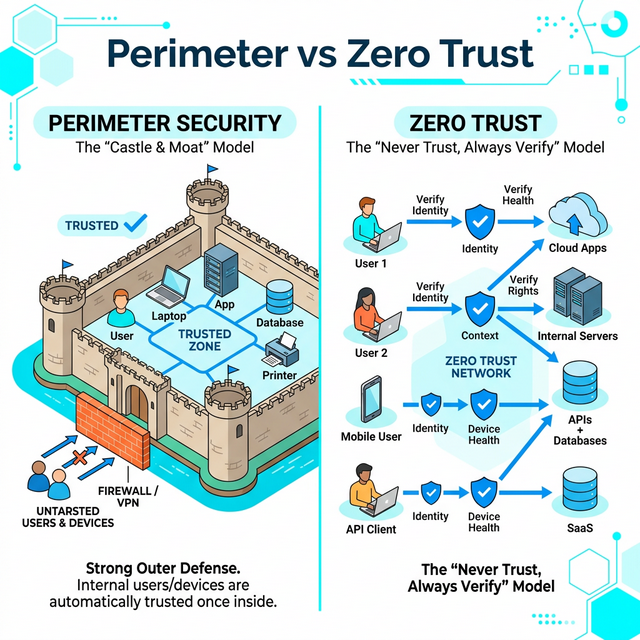
Old model (Perimeter-Based Security):
- Assumption: Inside corporate network = trusted, outside = untrusted
- Control point: Firewall at network edge
- Why it fails: VPNs give external access, cloud apps bypass perimeter, lateral movement after breach
New model (Zero Trust / Identity-Centric):
- Core principle: "Never trust, always verify" — verify identity for every access attempt
- Control point: Identity and context (who, what device, from where, when)
- Key components: Strong authentication (MFA), least privilege, micro-segmentation, continuous verification
Zero Trust principles:
- Verify explicitly: Always authenticate and authorize based on all available data points
- Use least privilege access: Limit user access with Just-In-Time and Just-Enough-Access (JIT/JEA)
- Assume breach: Minimize blast radius, segment access, verify end-to-end encryption, use analytics for threat detection
Why identity became the perimeter:
- Remote work is permanent (COVID accelerated shift)
- SaaS applications live outside corporate network
- Mobile devices access corporate resources
- Cloud infrastructure has no "network perimeter"
Practical example: Instead of "VPN = full network access," Zero Trust grants access per-application based on identity, device posture, and context. Sales rep on personal laptop gets CRM access (read-only) but not internal HR systems.
Self-Check Questions (Test Your Understanding)
Answer these in your own words (2-3 sentences each):
- What is the difference between authentication and authorization? Give one example of each failing independently.
- Explain the three authentication factor types. Why is password + security question NOT multi-factor?
- Why are credentials more valuable to attackers than exploiting technical vulnerabilities?
- What is the principle of least privilege? How does it limit blast radius when compromise occurs?
- What does "identity is the new perimeter" mean? Why did network-based perimeter security become insufficient?
Lab 7 · Identity and Access Control Design
Time estimate: 40-50 minutes
Objective: Design an identity and access control system for a real application. You will map identity types, define authentication requirements, implement least privilege, and identify credential-based attack risks.
Step 1: Choose Your Application (5 minutes)
Select one application context:
- Healthcare patient portal: Patients, doctors, nurses, admin staff, billing
- E-learning platform: Students, instructors, TAs, administrators, course designers
- Corporate collaboration tool: Employees, managers, external contractors, IT admins
- Banking mobile app: Customers, tellers, loan officers, compliance auditors, IT support
- SaaS project management tool: Team members, project managers, clients (view-only), admins
Why it matters: Different user types need different permissions — access control must match business roles.
Step 2: Map Identity Types and Permissions (15 minutes)
Create a table mapping at least 4 identity types to their permissions:
| Identity Type | Authentication Required | Permissions (What they can do) | Restrictions (What they cannot do) |
|---|---|---|---|
| Patient | Password + SMS MFA | View own records, request appointments, message own doctor | Cannot view other patients, cannot modify medical records, cannot access billing system |
| Doctor | Password + Hardware Key (FIDO2) | View assigned patients, update medical records, prescribe medications | Cannot access patients outside assignment, cannot modify billing, cannot access other doctors' notes |
| Admin | Password + Hardware Key + Approval | Manage users, configure system, access audit logs | Cannot view patient medical records (separation of duties), actions are logged |
Create your own table with at least 4 identity types, applying least privilege principle.
Step 3: Design Authentication Requirements (10 minutes)
For each identity type, justify authentication strength:
- Low-risk identities: Password only (read-only access, low-value data)
- Medium-risk identities: Password + MFA (standard users, some write access)
- High-risk identities: Password + Hardware MFA (admins, sensitive data access)
- Critical identities: MFA + approval workflow (privileged access, financial transactions)
Example justification for healthcare portal:
- Patients: Password + SMS MFA (Medium) — Access own sensitive health data, moderate risk if compromised
- Doctors: Password + Hardware Key (High) — Access many patients, HIPAA liability, high-value target
- Admins: Hardware Key + Approval (Critical) — System-wide access, separation of duties required
Step 4: Identify Credential Attack Risks (10 minutes)
For each identity type, identify the most likely credential attack and mitigation:
- Attack vector: Phishing, credential stuffing, password spraying, session hijacking, insider threat?
- Why this identity is targeted: What would attacker gain?
- Mitigation: What control reduces this risk?
Example for e-learning platform:
-
Students:
Attack: Credential stuffing (password reuse from other breaches)
Target value: Access to exams, grade tampering
Mitigation: Require unique passwords (breach monitoring), MFA during high-stakes events (exams) -
Instructors:
Attack: Phishing (fake "update your gradebook" email)
Target value: Modify grades, steal exam content
Mitigation: Hardware MFA (phishing-resistant), security training, anomaly detection (grade changes from unusual location)
Step 5: Apply Least Privilege (10 minutes)
Review your permissions table and identify at least two improvements using least privilege:
- Excessive permission: What permission is broader than necessary?
- Restricted alternative: How could you narrow it?
- Justification: Why does this reduce risk?
Example improvements:
-
Original: "IT Admin can access all patient records"
Improved: "IT Admin can access audit logs and system configs, but patient records require approval + logging"
Justification: Separation of duties, reduces insider threat, compliance requirement (HIPAA) -
Original: "Doctors can prescribe any medication"
Improved: "Doctors can prescribe within specialty, controlled substances require dual authorization"
Justification: Limits blast radius if account compromised, prevents prescription fraud
Success Criteria (What "Good" Looks Like)
Your lab is successful if you:
- ✅ Mapped identity types with clear role-based permissions (not "everyone can do everything")
- ✅ Justified authentication strength based on risk (not arbitrary)
- ✅ Identified realistic credential attacks for each identity type
- ✅ Applied least privilege principle (minimal necessary permissions)
- ✅ Explained separation of duties where appropriate (no single person has dangerous combinations)
Extension (For Advanced Students)
If you finish early, explore these questions:
- How would you implement Just-In-Time (JIT) access for privileged operations? (Temporary elevation, auto-revoke)
- Design an attribute-based access control (ABAC) policy for one scenario (context-aware: time, location, device)
- What audit logging would you implement? What events must be logged for compliance?
🎯 Hands-On Labs (Free & Essential)
Practice authentication and access control concepts with hands-on labs. Complete these before moving to reading resources.
🎮 TryHackMe: Password Security
What you'll do: Explore password storage, hashing basics, and common password
weaknesses.
Why it matters: Weak authentication is the most common initial access vector.
Understanding password security is foundational.
Time estimate: 1-1.5 hours
🎮 TryHackMe: Authentication Bypass
What you'll do: Practice common authentication failure patterns and how attackers
bypass weak login logic.
Why it matters: Seeing real authentication bypasses makes it easier to design
robust access controls.
Time estimate: 1.5-2 hours
🏁 PicoCTF Practice: Cryptography (Hashes + Passwords)
What you'll do: Solve beginner challenges that involve hashing, basic crypto, and
password patterns.
Why it matters: Authentication depends on secure credential storage and
verification. Crypto basics support that.
Time estimate: 1-2 hours
💡 Lab Tip: When practicing authentication, always ask: "What identity is being proven, and what access does that identity unlock?"
Resources (Free + Authoritative)
Work through these in order. Focus on authentication best practices and access control principles.
📘 NIST SP 800-63 - Digital Identity Guidelines
What to read: Executive Summary and Section 4 "Digital Identity Model" (pages
6-15).
Why it matters: Authoritative framework for authentication strength and
identity assurance levels. US government standard, widely adopted.
Time estimate: 25 minutes
🎥 Computerphile - Authentication Explained (Video)
What to watch: Full video on authentication factors and why passwords fail.
Why it matters: Clear explanation of authentication fundamentals and common
vulnerabilities.
Time estimate: 15 minutes
📘 OWASP - Broken Access Control
What to read: Overview and examples of authorization failures (from OWASP Top
10).
Why it matters: Authorization bugs are #1 web application risk. Real-world
attack patterns and defenses.
Time estimate: 20 minutes
📘 Microsoft - Zero Trust Security Model
What to read: Introduction to Zero Trust principles and identity-centric
security.
Why it matters: Explains why identity replaced network perimeter as primary
security boundary.
Time estimate: 15 minutes
Tip: Completion and XP persist via localStorage. If progress doesn't update immediately, refresh once.
Weekly Reflection Prompt
Aligned to LO5 (Identity & Access) and LO4 (Risk Reasoning)
Write 200-300 words answering this prompt:
Explain why identity has become "the new security perimeter" in modern systems. Use your Lab 7 access control design as an example.
In your answer, include:
- The difference between authentication (proving identity) and authorization (granting permissions)
- Why credential-based attacks are more common than exploiting technical vulnerabilities
- How you applied least privilege principle in your access control design
- Why MFA significantly reduces credential theft risk (even if one factor is compromised)
- What "Zero Trust" means and why network location no longer indicates trust level
What good looks like: You demonstrate understanding that identity controls are now the primary security boundary (not network firewalls). You explain why attackers target credentials over code vulnerabilities (easier, bypasses most controls). You show that effective access control requires both strong authentication (MFA) AND proper authorization (least privilege). You connect technical controls to business reality (remote work, cloud, BYOD).