Opening Framing: Why This Unit Exists
In CSY101, you learned how cybersecurity professionals think: threats, risk, trust, ethics, adversaries, and the human side of security decisions. But there was something deliberately missing. We talked about systems, without yet stepping inside them.
That omission was intentional. The moment you touch a real system, cybersecurity stops being clean. It becomes contextual. It becomes full of trade-offs that no single definition can settle for you.
CSY102 is the bridge. It answers a deceptively simple question:
Where do those cybersecurity ideas actually live?
They live inside operating systems — and if you don't understand how operating systems behave, then every security decision you make is built on assumptions you cannot verify.
1) The Operating System Is Not a Security Tool
Many beginners treat the operating system as a neutral stage on which software performs. That is incorrect. An operating system is an active decision-maker.
Every time a program runs, every time a file is opened, every time a user logs in, the operating system is making judgments on your behalf:
- Who is allowed to do this?
- What resources can be used?
- How long can it run?
- What happens if it fails?
In other words, the operating system enforces policy — whether you like its decisions or not. Security doesn't sit on top of the OS. Security is embedded into the OS's design assumptions.
2) Why Security Fails Even When "Nothing Is Hacked"
One of the most dangerous misconceptions is that security failures only happen when attackers do something clever. In reality, many failures happen because:
- The system behaved exactly as designed
- Humans misunderstood what the system would do
- Security assumptions were implicit, not explicit
A process runs with more privilege than intended. A service starts automatically and is never reviewed. A file remains accessible long after it should not exist. Nothing was "exploited". The system simply followed its rules.
This is why professionals must understand system behavior, not just threats.
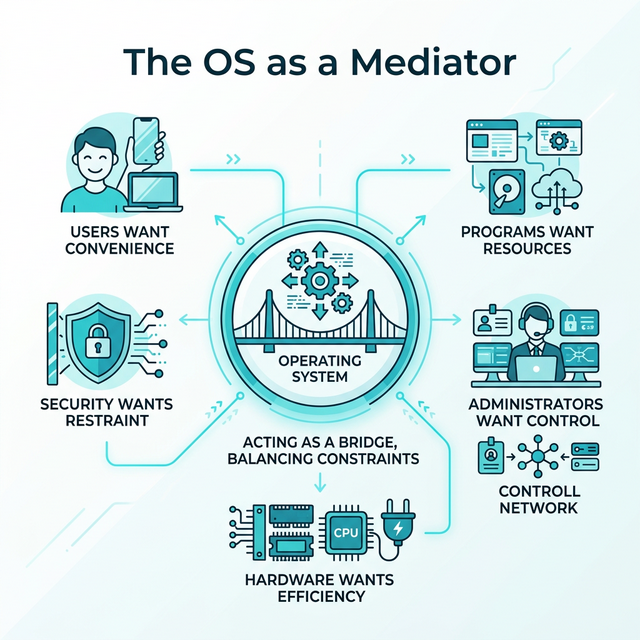
3) Mental Model: The OS as a Mediator
To reason correctly about security, you need a correct mental model. Think of the operating system as a mediator between competing interests:
- Users want convenience
- Programs want resources
- Administrators want control
- Hardware wants efficiency
- Security wants restraint
The OS does not exist to make any one group happy. It balances constraints. Security is never absolute — it is negotiated.
Over the next 12 weeks, we will dissect the structures through which that negotiation happens: processes, permissions, memory, filesystems, services, and configuration.
Today, you will do one thing: enter the system and observe.
4) A Warning About Tools
From this week onward, you will use virtual machines, Linux command line, and system inspection tools. These are not "skills" in isolation. They are instruments for observation.
If you ever find yourself typing commands without knowing:
- What question you are asking
- What outcome you expect
- What assumption you are testing
…then you are no longer learning cybersecurity. You are performing rituals. This unit will never reward ritual.
Real-World Context: Why System Understanding Matters
The gap between "knowing about security" and "understanding systems" has real consequences:
The 2017 Equifax Breach: 147 million records were exposed not because attackers used novel techniques, but because a known vulnerability in Apache Struts went unpatched. The system behaved exactly as designed — it ran the software it was told to run. The failure was human: no one understood which systems were running which software, or which needed updates. System visibility was the missing piece.
The 2020 SolarWinds Compromise: Attackers inserted malicious code into legitimate software updates. Organizations installed the updates because that's what systems are supposed to do. The compromise spread through normal system behavior — services starting, processes running, scheduled tasks executing. Defenders who understood system baselines detected anomalies faster than those who didn't.
Misconfiguration as Root Cause: Industry reports consistently show that misconfigurations — not sophisticated exploits — cause the majority of cloud breaches. Storage buckets left public. Services exposed to the internet. Default credentials unchanged. These aren't "hacks." They're systems doing exactly what they were configured to do.
Common thread: in each case, the system worked as designed. The failure was in understanding what the system was actually doing. CSY102 builds that understanding.
Guided Lab: Entering a Real System (Without Securing It)
This lab is intentionally non-defensive. You are not hardening anything yet. You are not protecting anything. You are observing.
Lab Objective
Become familiar with the existence of core system structures — users, processes, files, and resources — and begin noticing the trust assumptions implied by their presence.
Environment
- A Linux virtual machine (any modern distribution is acceptable)
- Terminal recommended (GUI is allowed)
Step 1: Identify Yourself to the System
Ask the system: who does it think you are, and what context are you operating under? Observe your username, groups, and home directory. Do not change anything.
Write down: what surprised you, and what felt implicit rather than explicit.
Step 2: Observe Running Processes
Ask the system: what is currently executing, and which processes exist without you starting them? Pay attention to ownership, longevity, and names you don't recognise.
Ask yourself: who decided these should run, and what trust is implied by their existence?
Step 3: Explore the Filesystem Hierarchy
Navigate the filesystem and notice where user data lives versus where system data lives. You are not memorising paths. You are asking:
What does this structure say about how the system thinks?
Step 4: Stop and Reflect (Mandatory)
Before moving on, answer in writing:
Which parts of the system appear designed for humans, and which appear designed for the system itself?
Weekly Reflection
Reflection Prompt (200-300 words):
Before this week, you likely thought of computers in terms of applications: browsers, documents, games, tools. Now you've begun to see the operating system as an active decision-maker that mediates everything.
Reflect on this shift in perspective:
- What assumptions did you have about "the system" before this lab?
- Which assumptions were challenged simply by observing what's running?
- What surprised you most about the number of processes running without your involvement?
- How might misunderstanding system behavior lead to security failures — even without attackers?
Connect your observations to this week's core idea: the operating system enforces policy whether you understand it or not. What does this mean for your role as a future security professional?
A strong response will identify specific assumptions that were challenged, reference concrete observations from the lab, and demonstrate understanding of why system behavior matters for security.
Week 1 Outcome Check
By the end of this week, you should be able to say:
"I no longer think of a computer as a black box. I see a system making decisions."
If you cannot say that yet, do not rush ahead. Understanding systems is cumulative.
Next week: Processes, execution, and trust — what it means for code to run, and why that is the first security boundary.
📚 Building on Prior Knowledge
Use CSY101 foundations to make OS concepts actionable:
- CSY101 Week 01 (CIA Triad): Map OS assets to confidentiality, integrity, and availability.
- CSY101 Week 01 (Risk Framing): Identify how OS decisions create or reduce risk.
🎯 Hands-On Labs (Free & Essential)
Enter a real system and build OS confidence before moving to reading resources.
🎮 TryHackMe: Linux Fundamentals Part 1
What you'll do: Navigate the filesystem, inspect users/groups, and run core commands.
Why it matters: You can't secure a system you can't observe. This lab builds basic
OS literacy.
Time estimate: 1.5-2 hours
🔐 HackTheBox Academy: Linux Fundamentals
What you'll do: Work through structured lessons on Linux architecture, permissions, and
system basics.
Why it matters: HTB Academy reinforces OS concepts with real-world security
context.
Time estimate: 2-3 hours
🏁 PicoCTF Practice: General Skills (Linux Basics)
What you'll do: Complete beginner challenges that require terminal navigation and basic
commands.
Why it matters: CTF-style practice builds confidence with the command line.
Time estimate: 1-2 hours
💡 Lab Tip: Keep a command journal. Write what you ran, what it did, and what you learned.
🛡️ Secure Configuration & OS Security Architecture
Before you harden a system, you need to understand how the OS separates trust. The core boundary is user mode vs kernel mode, enforced by privilege levels and system calls.
Privilege layers (simplified):
- Ring 0: Kernel (highest privilege)
- Ring 3: User processes (restricted)

Security implications:
- Kernel compromise = total system compromise
- User processes must be isolated from each other
- System calls are the controlled bridge
Baseline security mechanisms:
- Process isolation (memory boundaries, scheduling)
- Access control enforcement (DAC/MAC policies)
- Memory protection (NX/DEP, ASLR)
- Driver and kernel module validation
Hardening references: CIS Benchmarks and DISA STIGs define secure configuration baselines for real systems. Even at Week 1, you should know these exist and how they guide secure defaults.
📚 Building on CSY101 Week-13: Threat model OS attack surfaces before choosing controls. CSY201: Advanced hardening builds directly on these foundations. CSY204: Forensics relies on understanding processes, files, and logs at this layer.
Resources
Mark the required resources as complete to unlock the Week completion button.
- Remzi & Andrea Arpaci-Dusseau — Operating Systems: Three Easy Pieces (Ch. 1–2 recommended) · 45-60 min · 50 XP · Resource ID: csy102_w1_r1 (Required)
- MIT OpenCourseWare — Operating System Engineering (Intro / Overview) · 30-45 min · 50 XP · Resource ID: csy102_w1_r2 (Required)
- Linux Foundation — Introduction to Linux (Optional background) · 60-90 min · 25 XP · Resource ID: csy102_w1_r3 (Optional)
Lab: Seeing a Real System (Observation, Not Hacking)
Goal: connect the Week 1 mental models to a real OS by observing what is present, what is running, and what is trusted.
Setup (choose one):
- Linux: Ubuntu in VirtualBox (recommended), or any Linux environment you already have.
- Windows: your normal Windows machine is fine for observation tasks.
Tasks (do what you can):
- Identify your OS version and device name (screenshot or write it down).
- List 10 background processes/services that are running right now.
- Pick 2 of them and answer: What do you think this component is trusted to do?
- Find one security-relevant setting (e.g., user accounts, permissions, firewall state) and describe what it protects.
Deliverable (submit):
- 1 page: observations + short explanations (no screenshots required, but allowed).
Checkpoint Questions
- What is the difference between "a threat" and "an attack surface" in an operating system?
- Why does "running in the background" often imply higher security impact than a normal user application?
- Give one example of a security assumption a user makes about the OS without realizing it.
- Explain (in your own words) what "trust" means at the system level.
- How does this week's "OS as mediator" mental model help you think about security decisions?
Verified Resources & Videos
- Free course (Linux basics): LinuxFoundationX — Introduction to Linux (edX) (audit is typically free; certificate optional)
- Alternative free course page (Linux Foundation): Linux Foundation — Introduction to Linux (LFS101)
- University-grade OS depth (reference): MIT 6.S081 — Operating System Engineering (course site)
- Security framework (MITRE ATT&CK): MITRE ATT&CK — Adversarial Tactics, Techniques & Common Knowledge (Introduction to the framework we'll reference throughout CSY102)
Optional video:
Use these as authority anchors. You are not expected to complete MIT 6.S081 — it is a depth reference that validates our concepts. MITRE ATT&CK will be referenced throughout CSY102 to connect system behaviors to real-world attacker techniques.