Opening Framing: What Does It Mean for Code to Run?
Last week, you crossed an important threshold: you stopped thinking of "the computer" as a black box. You saw that an operating system is a system of decisions — policies enforced through structure.
This week we focus on the first and most dangerous boundary in cybersecurity: execution.
When code runs, the system is not merely "doing something." It is granting a request: CPU time, memory, access to files, access to network, access to devices — sometimes with privileges the user does not fully understand.
So the real question is not "What does this program do?" The real question is:
Who is the system acting on behalf of when it runs this code?
1) A Process Is Not a Program
In everyday language, people treat "program" and "process" as the same thing. In security, that mistake is costly.
A program is a static artifact: a file on disk. It can be copied, renamed, scanned, archived, and forgotten.
A process is a living instance: an active execution context with memory, permissions, open files, and relationships to other processes.
Security incidents rarely happen because a program exists on disk. They happen because a program becomes a process — because the system agrees to run it.
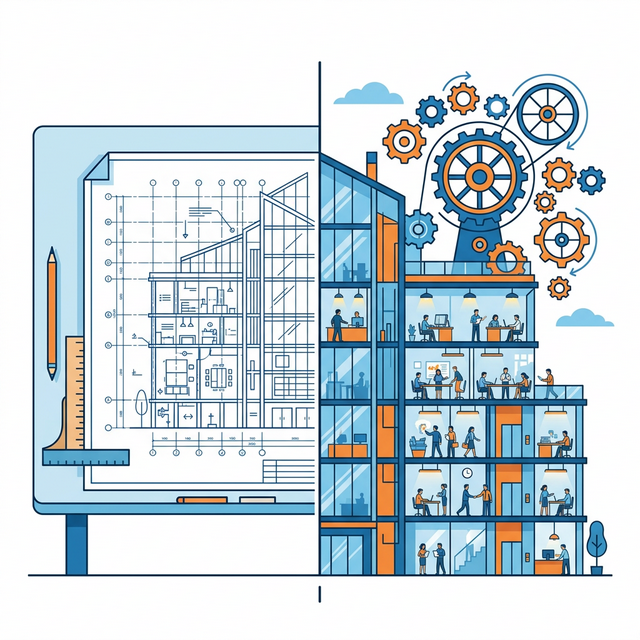
Mental model: A program is a blueprint. A process is the building that is currently occupied. Security cares about the occupied building.
2) Execution Is Delegated Trust
When you execute software, you are delegating trust through the operating system. You might believe you are asking for one thing — "open this app" — but the OS is authorizing a chain of actions that includes:
- Loading code into memory
- Allocating CPU time and scheduling priority
- Assigning identity (user, group, privileges)
- Allowing access to files, devices, and networks (directly or indirectly)
- Allowing the process to spawn other processes
This matters because most "attacks" are not a single clever act. They are a sequence of granted permissions that were never reviewed as a sequence.
Professionals therefore learn to ask:
- What is the actual execution context?
- What privileges were inherited?
- What resources became reachable?
- What new actions became possible?
3) The OS Runs More Than You Think
A common early misconception is that "things run because I started them." In reality, most of what runs on a system is running because:
- the system started it at boot
- a service manager restarted it after failure
- another process spawned it
- a scheduled task triggered it
This is not an edge case. It is normal system behavior. And it creates a central security fact:
If you don't know what should be running, you can't know what is suspicious.
4) Process Relationships: Parents, Children, and Trust Chains
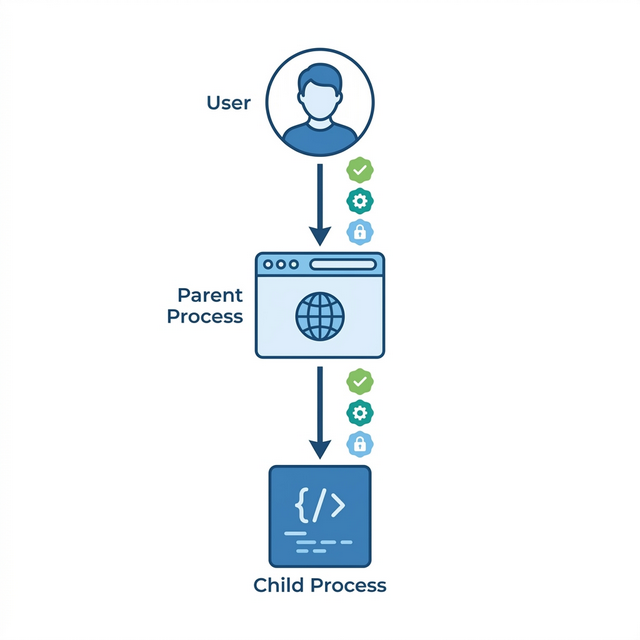
Processes do not exist in isolation. Every process (except the first) was created by another process — its parent. This creates a family tree of execution.
Security implications of parent-child relationships:
- Identity inheritance: child processes often inherit the user identity, environment variables, and permissions of their parent
- Trust propagation: if you trust a parent process, you implicitly trust what it spawns — which attackers exploit
- Visibility: defenders can trace suspicious processes back to their origin by following the parent chain
- Detection: unusual parent-child relationships (e.g., Word spawning PowerShell) are strong indicators of compromise
On Linux, you can observe this with ps -ef --forest or pstree.
On Windows, tools like Process Explorer show the process tree visually.
Key insight: processes form trust chains. Following those chains — forward and backward — is a core defensive skill.
Real-World Context: Execution as the Attack Surface
Understanding processes and execution is not academic. It's how real attacks work:
Process Injection Attacks: Attackers frequently inject malicious code into legitimate processes. The malware runs under the identity of a trusted process — your browser, a system service, or an update tool. Security tools looking for "bad programs" miss the attack because the program is legitimate; only the execution context is compromised. MITRE ATT&CK documents this as technique T1055.
Living Off the Land (LOLBins): Sophisticated attackers avoid dropping new executables entirely. Instead, they abuse built-in system tools — PowerShell, WMI, certutil, mshta — that already exist and are already trusted. The attack happens through execution of legitimate programs with malicious parameters. No new files, no obvious signatures, just processes doing unexpected things.
Parent-Child Process Abuse: Security tools often trust processes based on their parent. If Word spawns a child process, that might be normal. If Word spawns PowerShell which spawns cmd.exe which downloads a file — that's suspicious. Attackers exploit this by carefully constructing process trees that look legitimate.
Common thread: attacks target execution, not just files. Understanding what processes should be running, who should spawn them, and what they should do is defensive knowledge.
Guided Lab: Observing Execution (Concept → Evidence)
This lab is still observation-focused. We are not "hardening" yet. We are training your ability to see execution as the OS sees it: processes, owners, parent-child relationships, and resource usage.
Lab Objective
Build a mental picture of what changes in the system when code runs: what appears, who owns it, what it inherits, and how it relates to what was already running.
Environment
- Linux VM
- Terminal
Step 1: Create a "known" process
Run a simple long-lived command so you have a process you can reliably observe. For example, in one terminal window:
sleep 300This is not about the command. It is about creating a stable target for observation.
Step 2: Find it and identify its owner
In a second terminal, list processes and locate your "sleep" process:
ps aux | grep sleepObserve: the user, the PID (process ID), and anything else the system records by default.
Step 3: Observe parent-child relationships
Now ask: who started this process? Every process has a parent. Observe the parent PID:
ps -o pid,ppid,user,cmd -p <PID>Replace <PID> with the process ID you observed. You are not "doing Linux commands". You are answering: what created this?
Step 4: Compare your process to a system process
Choose a process that looks like it existed before you logged in (a service or daemon). Observe its owner and parent relationships:
ps -o pid,ppid,user,cmd -p <SYSTEM_PID>Ask: why does it have that owner? What trust does the system grant it?
Step 5: Reflection (write this down)
- What is the difference between "a command ran" and "a process exists"?
- What does ownership of a process imply?
- Why is parent/child relationship a security-relevant fact?
Stop Condition
If you cannot explain what "parent process" means in plain language, stop here and reread the narrative. Security work cannot proceed on memorised commands.
Weekly Reflection
Reflection Prompt (200-300 words):
This week introduced a fundamental shift: security isn't about programs on disk — it's about processes in execution. A file sitting unused is inert. A process running is active authority.
Reflect on this distinction:
- If malicious code runs once, what must already have gone right for the attacker? What chain of trust was exploited?
- What is the difference between "I executed this" and "the system authorised this execution"?
- Which is more dangerous: unknown programs on disk, or unknown processes running? Why?
- How does understanding parent-child process relationships help defenders?
Connect your observations from the lab to this week's core idea: execution is delegated trust. When you run something, you're not just "opening an app" — you're authorizing a chain of actions with your identity attached.
A strong response will distinguish between static files and running processes, explain how process relationships matter for security, and demonstrate understanding of execution as authorization.
Week 2 Outcome Check
By the end of this week, you should be able to explain:
- why processes are the security-relevant unit of "running"
- how execution delegates trust through the OS
- why parent/child relationships matter in security reasoning
Next week: Identity, permissions, and the uncomfortable truth that "who you are" is a system claim.
🎯 Hands-On Labs (Free & Essential)
Practice process inspection and execution context before moving to reading resources.
🎮 TryHackMe: Linux Fundamentals Part 2
What you'll do: Explore process management, system services, and basic task control.
Why it matters: Understanding what runs (and why) is central to detecting abuse.
Time estimate: 1.5-2 hours
🎯 OverTheWire: Bandit (Levels 5-10)
What you'll do: Use system commands to find files, parse output, and automate small tasks.
Why it matters: Process reasoning improves when you can chain commands to observe what the OS is doing.
Time estimate: 1.5-2.5 hours
🏁 PicoCTF Practice: General Skills (Shell Workflow)
What you'll do: Complete challenges that require piping, grep, and process-aware command usage.
Why it matters: Many process investigations start with simple, precise command output.
Time estimate: 1-2 hours
💡 Lab Tip: When you list processes, always note the owner. Execution context is the real security boundary.
🛡️ Secure Configuration & Process Isolation
Every running process inherits trust. Secure configuration reduces that trust by default: least privilege, explicit boundaries, and controlled resources.
Process hardening checklist:
- Run services as non-root users
- Drop unnecessary capabilities
- Restrict file and network access
- Limit CPU/memory (ulimits, cgroups)
- Log process starts and failures
Isolation controls:
- Linux namespaces and cgroups for container isolation
- SELinux/AppArmor policies for MAC enforcement
- Windows service accounts and job objects
- Disable or remove unused services
📚 Building on CSY101 Week-13: Threat model execution paths and privilege inheritance. CSY201: Advanced OS hardening expands these controls in real environments. CSY204: Forensics depends on process auditing and reliable logs.
Resources
Mark the required resources as complete to unlock the Week completion button.
- OSTEP — Processes (relevant sections) · 45-60 min · 50 XP · Resource ID: csy102_w2_r1 (Required)
- Linux man-pages — ps(1) · 20-30 min · 50 XP · Resource ID: csy102_w2_r2 (Required)
- MIT OCW — OS Engineering (Optional reinforcement) · 30-45 min · 25 XP · Resource ID: csy102_w2_r3 (Optional)
Lab: Processes as "Running Authority"
Goal: observe processes and threads as the OS's execution units, and connect "execution" to trust and control.
Choose your environment (either is fine):
- Linux: Ubuntu VM recommended.
- Windows: your normal Windows machine is fine.
Tasks (Observation → Reasoning):
A) Linux path (safe commands)
- Run
psto view active processes. Identify 5 processes that belong to your user and 5 that appear system-owned. - Pick 2 processes and explain: what does the system trust this process to do?
- Explore
/procconceptually: choose one process ID and look at what kinds of information exist about it (you are not required to understand every field). - Write a short paragraph: why does the OS expose process information, and how could that be security-relevant?
B) Windows path (no tools required beyond built-ins)
- Open Task Manager and identify 5 "Apps" and 5 "Background processes."
- Choose 2 background processes and explain what they likely do and why they are running without you launching them.
- Find evidence that processes contain threads (Task Manager "Details"/"Performance" views can hint at this) and explain why the OS schedules threads, not whole programs.
Deliverable (submit):
- 1–2 pages: observations + explanations in your own words (screenshots optional).
Checkpoint Questions
- Why does the OS schedule threads rather than "applications" as a whole?
- Explain the difference between a process as a "container of resources" and a thread as "scheduled execution."
- Why is a long-running background process often higher security risk than a short-lived user process?
- What does it mean to say "execution is authority" in an operating system?
- How do parent-child process relationships help defenders detect malicious activity?
Verified Resources & Videos
- Windows (authoritative): Microsoft Learn — Processes and Threads (Win32)
-
Linux (authoritative):
man7 — ps(1) manual page
(what
psshows and why) -
Linux (kernel-level reference):
man7 — procfs(5) manual page
(what
/procis) - Deeper kernel documentation: Linux Kernel Docs — The /proc Filesystem
- University-grade depth (optional): MIT 6.S081 — Threads/Scheduling lecture slides (PDF)
- Security perspective (MITRE ATT&CK): MITRE ATT&CK — Process Injection (T1055)
You are not expected to master the MIT material. It is included as a credibility anchor and a depth reference. MITRE ATT&CK shows how attackers exploit process concepts in real attacks.