Opening Framing: Data Does Not Forget
In Week 2, you learned that processes are temporary — they start, run, and terminate. In Week 3, you learned that identity is contextual — it exists within sessions and execution contexts. Now we confront something that outlasts both.
Filesystems introduce a different kind of problem.
Data persists.
Users log out. Processes terminate. Sessions expire. But files often remain — quietly carrying assumptions about trust that no longer exist.
This week introduces a core systems-security idea explicitly:
Data persistence beyond identity.
1) Files Are Not Owned the Way People Think
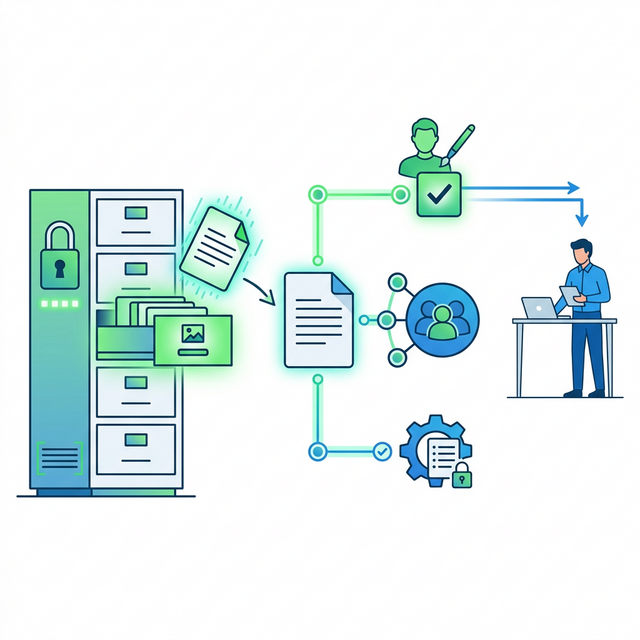
In everyday language, we say someone "owns" a file. In operating systems, ownership is not about possession — it is about authority attribution.
A file's metadata records:
- Which user created it
- Which group it is associated with
- What actions are allowed
None of this changes automatically when:
- A user leaves an organisation
- A role changes
- A process terminates
Mental model: files remember past trust decisions long after people forget them. Ownership is attribution, not possession — the system records who created it, not who should have access now.
2) Data Persistence Beyond Identity (Explicit Concept)
We now name the phenomenon directly.
Data persistence beyond identity describes the fact that:
- Files outlive processes
- Files outlive sessions
- Files often outlive users and roles
The filesystem does not ask whether the original trust context still makes sense. It simply enforces recorded rules.
Many real-world breaches involve no new access being created — only old access never being reconsidered.
Key insight: the filesystem doesn't ask "should this still be true?" It only enforces what was recorded. Security requires humans to review and revoke — the system won't do it automatically.
3) Authority vs Access
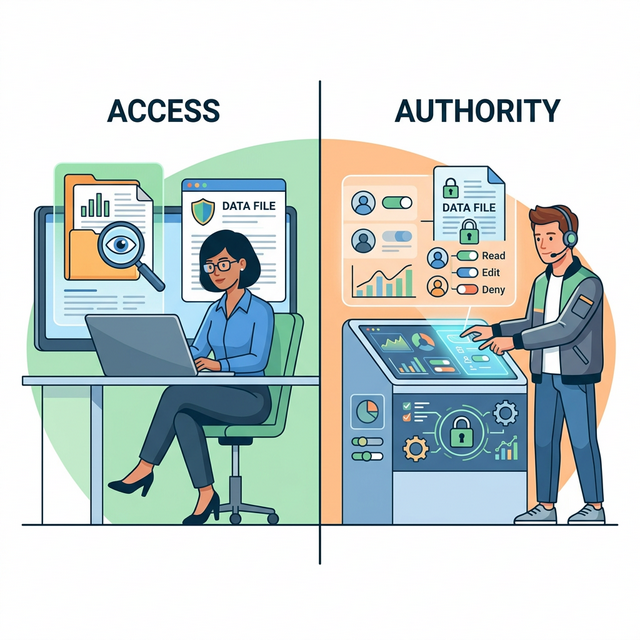
It is tempting to equate "having access" with "having authority". Filesystems make this distinction very clear.
Authority answers:
- Who may grant or revoke access?
- Who may change permissions?
Access answers:
- Who can read?
- Who can write?
- Who can execute?
Security failures often occur when access is audited, but authority is ignored.
Key insight: access control asks "who can read this?" Authority asks "who can change who can read this?" Both matter, but authority is often forgotten.
Real-World Context: Data Persistence as Attack Surface
Data persistence creates security risks that outlast the circumstances that created them:
The Uber Breach (2016): Attackers found AWS credentials stored in a private GitHub repository. Those credentials were created months earlier and never rotated. The data persisted; the need for those specific credentials did not. 57 million user records were exposed because secrets outlived their safe context.
Exposed S3 Buckets: Hundreds of organizations have been breached through misconfigured S3 storage buckets. The pattern is consistent: someone creates a bucket, sets permissions for a specific purpose, and those permissions persist long after the original purpose changes. Data persistence beyond identity — the bucket doesn't know the person who configured it has left the company.
Log File Exposure: Applications write logs containing sensitive data — API keys, session tokens, personal information. Those logs persist on disk, in backups, in log aggregation systems. The application that wrote them may be gone; the data remains. MITRE ATT&CK documents credential harvesting from files as technique T1552.001.
Common thread: files remember what processes forget. Credentials, configurations, and sensitive data persist until explicitly removed — and explicit removal rarely happens.
Guided Lab: Observing Persistent Authority
This lab focuses on seeing how authority and access are recorded in the filesystem, and how those records persist independently of users and processes.
Lab Objective
Observe how file ownership, permissions, and timestamps encode historical trust decisions.
Step 1: Inspect file metadata
Choose a file you know you created earlier (even in a previous session).
ls -l <filename>Observe owner, group, and permissions. Ask: when were these decisions made?
Step 2: Compare files from different origins
Compare a user-created file with a system-owned file.
ls -l /etcAsk: why does the system treat these files differently? What authority assumptions are encoded?
Step 3: Reflection (mandatory)
- Which trust decisions are no longer visible to the user?
- Which decisions persist without review?
- How could outdated permissions become a security problem?
- What would a "permission audit" look like for this file or directory?
Week 4 Outcome Check
By the end of this week, you should be able to explain:
- why files outlive identity
- how authority is encoded separately from access
- why data exposure often happens without attackers
- how timestamps encode historical trust decisions
Next week: Memory, isolation, and why boundaries are enforced illusions. Week 5 completes the foundation before we move to services, scheduling, and networking.
Weekly Reflection
Reflection Prompt (200-300 words):
This week introduced a principle that challenges how most people think about security: data persists beyond the identity and context that created it. A file doesn't know who created it, why, or whether that reason still applies.
Reflect on the implications:
- What files on your own system might contain permissions or data that no longer make sense given current circumstances?
- How might a file's ownership or permissions become a security liability over time?
- What is the difference between "access" and "authority" in filesystem terms? Why does this distinction matter?
- How would you audit whether file permissions still match their intended purpose?
Connect your observations from the lab to this week's core idea: data persistence beyond identity. Files remember trust decisions that humans forget.
A strong response will identify specific examples of persistent data risk, explain how permissions can become stale, and demonstrate understanding of why filesystem security requires ongoing review rather than one-time configuration.
🎯 Hands-On Labs (Free & Essential)
Practice filesystem inspection and data persistence concepts before moving to reading resources.
🎮 TryHackMe: Linux Fundamentals Part 3
What you'll do: Work with file permissions, ownership, and common admin tasks.
Why it matters: Filesystem metadata encodes long-lived trust decisions.
Time estimate: 1.5-2 hours
🎯 OverTheWire: Bandit (Levels 16-20)
What you'll do: Use file access rules, hidden data, and permissions to retrieve secrets.
Why it matters: Persistent files and permissions are real attack surfaces.
Time estimate: 1.5-2.5 hours
🏁 PicoCTF Practice: General Skills (File Handling)
What you'll do: Solve beginner challenges that require reading files, permissions, and metadata.
Why it matters: Real investigations start with careful file handling.
Time estimate: 1-2 hours
💡 Lab Tip: If a file outlives its owner, its permissions become a security debt.
🛡️ Secure Configuration & Filesystem Controls
Files persist long after sessions end. Secure configuration makes ownership and permissions explicit, with defaults that limit exposure.
Filesystem hardening checklist:
- Use least-privilege permissions
- Set strict default umask
- Separate user data from system data
- Protect sensitive files (.ssh, config, logs)
- Enable file integrity monitoring (FIM)
Security models: DAC is flexible but easy to misconfigure. MAC (SELinux/AppArmor) adds enforcement that prevents unsafe sharing by default.
📚 Building on CSY101 Week-13: Threat model data stores and trust boundaries. CSY204: Forensics depends on file ownership, timestamps, and integrity signals.
Resources
- OSTEP — Files and Directories · Resource ID: csy102_w4_r1 (Required)
- Linux man-pages — ls(1) · Resource ID: csy102_w4_r3 (Optional)
Lab: Filesystems, Ownership, and Persistence Beyond Identity
Goal: observe how ownership and storage structure create long-term effects (persistence), even when user accounts change.
Choose ONE path (Linux or Windows). Both are valid.
Linux Path (safe commands)
- Create a folder called
csy102-week4-labin your home directory and create two empty files inside it. - Run
ls -land record the owner and group for each file. - Run
staton one file and note: timestamps (created/modified/accessed) and permissions. - Locate system-wide persistence concepts (observation only): identify the existence of
/etc,/var, and/usrand write what you think each is "for." - Concept question: Why is "where something is stored" often more important than "who stored it"?
Windows Path (built-in tools)
- Pick a file in your Documents folder. Right-click → Properties → Security. Identify the owner and which principals have access.
- Observe persistence-related locations conceptually (do not change anything): open the Startup folder location for your user (view only).
- Open Task Manager → Startup tab and note which items are enabled (no changes required).
- Concept question: Why would removing a user account not necessarily remove startup/persistence behavior?
Deliverable (submit):
- 1–2 pages: observations + explanations.
- Include one paragraph: "Describe persistence beyond identity using a filesystem example."
- Identify one file or permission on your system that might be outdated or overly permissive.
Checkpoint Questions
- Explain the difference between "ownership" and "permission." Why do systems separate these ideas?
- Why are timestamps security-relevant? Give one defensive use and one attacker use of timestamps.
- What does it mean to say "persistence lives in locations and mechanisms, not in people"?
- Give one example of a system-wide location/mechanism that could create persistence.
- Why do defenders care about system directories (e.g., configuration, logs, installed software) more than user folders?
- How does "data persistence beyond identity" connect to Week 3's concept of permissions as contracts?
Verified Resources & Videos
- Linux (file metadata & timestamps): man7 — stat(1) manual page
- Linux (permissions model reference): man7 — chmod(2) (system call) reference (conceptual depth: what the OS actually enforces)
- Windows (startup/persistence surface): Microsoft Learn — Run and RunOnce Registry Keys (authoritative persistence mechanism reference)
- Windows (startup apps overview): Microsoft Support — Configure startup applications
- Security perspective (MITRE ATT&CK): MITRE ATT&CK — Credentials In Files (T1552.001)
Week 4's key insight: defenders track persistence by mechanisms and locations (startup paths, scheduled tasks, services), not by assuming "the user is the source." MITRE ATT&CK shows how attackers harvest credentials from files that persist beyond their safe context.