Opening Framing: "Who Are You?" Is Not a Simple Question
Last week, you learned that execution is delegated trust — when code runs, the system authorizes a chain of actions. But authorized for whom? Under what identity? With what permissions?
In the physical world, identity feels intuitive. You are you. You show an ID. Someone checks it. Access is granted or denied.
In operating systems, identity is nothing like this.
The system never truly knows who you are. It only knows what claims are attached to a running process — and those claims can change, be inherited, or be misinterpreted.
This week is about understanding a deeply uncomfortable truth:
In computing systems, identity is an assertion — not a fact.
1) Identity Exists Only in Context
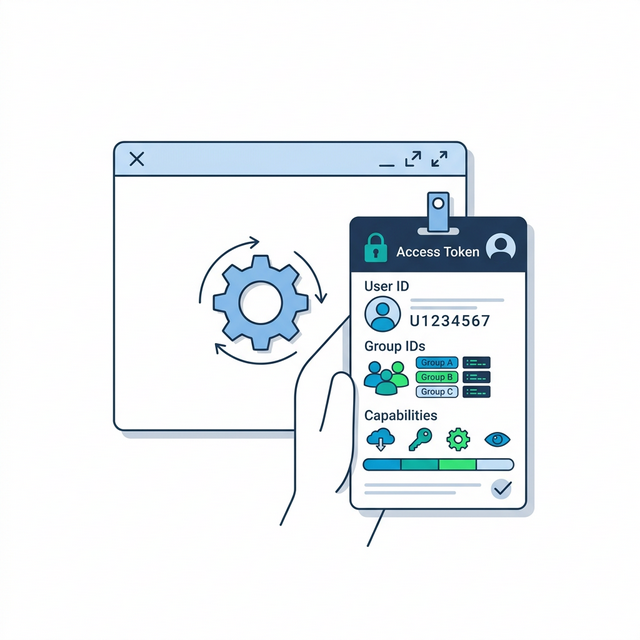
When you log into a system, you believe you have established your identity. In reality, the system has created a context associated with your session.
That context includes:
- A user identifier
- One or more group identifiers
- Default permissions
- Limits and capabilities
Crucially, these attributes do not belong to you. They belong to the processes that are running.
Mental model: the system does not secure users — it secures execution contexts. Your identity is what the system believes about your processes right now.
2) Permissions Are Contracts, Not Guarantees
Permissions are often taught as simple rules: "read", "write", "execute". In practice, they are closer to contracts between the system and a process.
The contract says:
"As long as you run under this identity, I will allow these actions."
What the contract does not say is:
- Why those permissions exist
- Whether they are still appropriate
- What happens if context changes
Most security failures around permissions occur not because rules are missing, but because rules outlive their justification.
Key insight: permissions are frozen decisions. They don't automatically update when circumstances change — someone must actively review and revoke them.
3) Inheritance: How Trust Spreads Quietly
Processes do not appear from nowhere. They are created by other processes. When that happens, identity information is often inherited.
This is convenient — but dangerous.
If a trusted process creates a child process, that child often receives:
- The same user identity
- The same group memberships
- Equal or similar permissions
This inheritance is not malicious. It is how systems function. But it creates a pathway where trust can move further than originally intended.
Key insight: identity inheritance is automatic and silent. A child process doesn't ask for permissions — it receives them. This is why compromising a high-privilege parent gives attackers high-privilege children.
4) Privilege Escalation: A Design Outcome
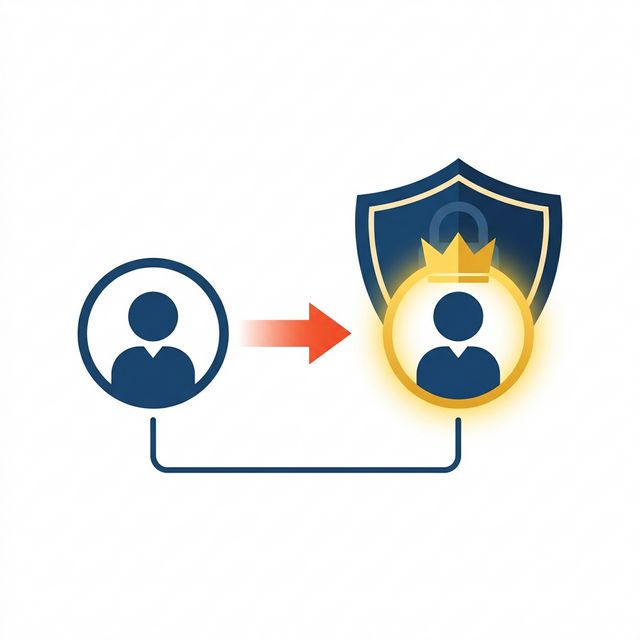
At this point, we can name a phenomenon you have already been reasoning about:
Privilege escalation.
Privilege escalation does not begin with exploits or tricks. It begins with systems that allow:
- Identity to be inherited
- Permissions to be reused
- Context to shift without re-evaluation
When a process gains more authority than was originally intended, privilege escalation has occurred — even if no attacker was involved.
Key insight: privilege escalation is a design outcome, not just an attack technique. Systems that allow identity inheritance, permission reuse, and context shifts without re-evaluation are systems where privilege escalation is possible by design.
Real-World Context: Identity and Privilege in Practice
Identity and privilege escalation are at the heart of most security incidents:
The Capital One Breach (2019): An attacker exploited a misconfigured web application firewall to obtain temporary AWS credentials. Those credentials had more permissions than necessary — they could access S3 buckets containing 100 million customer records. The identity (the credentials) was legitimate; the permissions attached to that identity were excessive. This is privilege escalation through misconfiguration.
Sudo Vulnerabilities (CVE-2021-3156 "Baron Samedit"): A heap overflow in sudo — the tool that controls privilege escalation on Linux — allowed any local user to become root without authentication. The vulnerability existed for nearly 10 years. Sudo is the gatekeeper for identity transitions; when the gatekeeper is broken, all identity boundaries collapse.
Kerberoasting Attacks: In Active Directory environments, attackers request service tickets for accounts with weak passwords, then crack those tickets offline. The attack doesn't "break" authentication — it exploits how identity claims (tickets) are generated and validated. Understanding identity as a system concept reveals why this works.
Common thread: attackers don't break identity systems — they exploit how identity is represented, inherited, and trusted. Defenders must understand these mechanisms to recognize abuse.
Guided Lab: Observing Identity Claims
This lab focuses on seeing identity the way the operating system sees it: as attributes attached to running processes.
Lab Objective
Observe how identity and permissions are assigned, inherited, and interpreted by the system — without attempting to bypass anything.
Step 1: Observe your identity context
Ask the system what identity attributes are associated with your session.
idYou are not memorising output. You are identifying which claims the system is making about you.
Step 2: Compare processes with different owners
List processes and observe differences in ownership and authority.
ps -o user,group,cmd -p <PID>Step 3: Reflection (mandatory)
- What does the system believe about this process? (user, groups, capabilities)
- Where did that belief come from? (login, inheritance, configuration)
- What would change if the identity context were different?
- How would you detect if a process had more privileges than it should?
Week 3 Outcome Check
By the end of this week, you should be able to explain:
- why identity is contextual, not intrinsic
- how permissions function as contracts
- how privilege escalation emerges from normal system behavior
- why identity inheritance creates security risks
Next week: Filesystems, data ownership, and why information often outlives trust.
Weekly Reflection
Reflection Prompt (200-300 words):
This week introduced a fundamental truth: in computing systems, identity is an assertion, not a fact. The system doesn't know who you "really" are — it only knows what claims are attached to your processes.
Reflect on the implications:
- What does it mean that identity "belongs to processes, not people"?
- How does identity inheritance create pathways for privilege to spread?
- Why do permissions often outlive their original justification?
- How might you audit whether current permissions still make sense?
Connect your observations from the lab to this week's core idea: privilege escalation is a design outcome. It happens when identity can be inherited, permissions can be reused, and context can shift without re-evaluation.
A strong response will distinguish between identity as a human concept and identity as a system concept, explain how permissions become stale, and demonstrate understanding of privilege escalation as a system behavior rather than an attack technique.
🎯 Hands-On Labs (Free & Essential)
Practice identity and permissions in real systems before moving to reading resources.
🎮 TryHackMe: Linux Fundamentals Part 3
What you'll do: Explore permissions, users, groups, and common admin workflows.
Why it matters: Identity is enforced through permissions and group membership.
Time estimate: 1.5-2 hours
🎯 OverTheWire: Bandit (Levels 10-15)
What you'll do: Use permissions and file access rules to retrieve hidden data.
Why it matters: Bandit forces you to reason about identity and access boundaries.
Time estimate: 1.5-2.5 hours
🏁 PicoCTF Practice: General Skills (Permissions)
What you'll do: Solve beginner challenges that involve file permissions and user contexts.
Why it matters: Permissions are the OS's core access control mechanism.
Time estimate: 1-2 hours
🛡️ CIS Benchmark Mini-Audit (Linux)
What you'll do: Run a CIS-CAT Lite check or follow a CIS Benchmark checklist, then remediate three findings.
Why it matters: Secure identity and permission baselines prevent privilege abuse.
Time estimate: 2-3 hours
💡 Lab Tip: If a process inherits identity, document who or what created it. That origin matters.
🛡️ Secure Configuration & Identity Controls
Identity becomes security only when it is enforced. Secure configuration focuses on limiting privilege, removing default access, and auditing identity changes.
Identity hardening checklist:
- Disable or lock unused accounts
- Enforce strong password policies (PAM)
- Minimize sudoers entries
- Require MFA for privileged access (where supported)
- Audit group membership regularly
Baseline guidance: CIS Benchmarks and DISA STIGs provide tested identity and permission baselines for Linux and Windows systems.
📚 Building on CSY101 Week-13: Threat model privilege escalation paths before hardening. CSY201: Advanced OS hardening expands these identity controls at scale.
Resources
- OSTEP — Security & Protection (relevant sections) · Resource ID: csy102_w3_r1 (Required)
- Linux man-pages — id(1) · Resource ID: csy102_w3_r3 (Optional)
Lab: Identity Is a Security Object (Not a Name)
Goal: observe how systems represent identity (users, groups, privileges) and how those representations drive permission decisions.
Choose ONE path (Linux or Windows). Both are valid.
Linux Path (safe commands)
- Run
idand write down: your user ID, group IDs, and group names. - Create a small "lab" folder in your home directory and put one empty file inside it.
- Run
ls -land interpret the permission string (owner/group/others). - Change the file permissions with
chmod(e.g., remove write from "others"). Re-runls -land explain what changed. - Concept question: If you gained admin/root privileges, which of these permission boundaries would stop you — and which would stop ordinary users?
Windows Path (built-in tools)
- Open a terminal and run
whoamiandwhoami /groups. Note which groups you belong to. - Pick a folder you own (e.g., Documents). Right-click → Properties → Security. Identify which groups/users have access and what type (read/write/full control).
- Concept question: Why does Windows talk about "groups" so much, rather than assigning permissions user-by-user?
- Concept question: What do you think changes about your "security context" when you run something as Administrator?
Deliverable (submit):
- 1–2 pages: observations + explanations (screenshots optional).
- Include one paragraph answering: "What is the real difference between identity and authority?"
Checkpoint Questions
- Explain why identity in an OS is represented by stable identifiers (not just a username string).
- Why do groups exist as a first-class security concept? What problem do they solve?
- Describe "privilege escalation" as a change in security context, not as a magic trick.
- Why is "running as admin/root" qualitatively different from "being a normal user"?
- Give one example of a system component that must run with high privileges and explain why that creates risk.
- How does identity inheritance (parent to child process) create security implications?
Verified Resources & Videos
- Windows (identity is not a name): Microsoft Learn — Security Identifiers (SIDs)
- Windows (what actually acts on your behalf): Microsoft Learn — Access Tokens
- Windows (high-level conceptual anchor): Microsoft Learn — Security Principals
- Linux (permissions mechanics): man7 — chmod(1) manual page
- Linux (controlled privilege escalation boundary): man7 — sudoers(5) manual page (how elevated privileges are granted under policy)
- Security perspective (MITRE ATT&CK): MITRE ATT&CK — Privilege Escalation (TA0004)
Read for understanding, not memorisation: the key idea is that identity becomes a security context (token), and privileges are governed by policy, not hope. MITRE ATT&CK shows how attackers exploit privilege boundaries in real incidents.