Opening Framing: Data Is Everything
In Week 1, you wrote your first script—but it just printed static text. Real security scripts work with data: IP addresses, usernames, timestamps, hash values, log entries, threat scores. To manipulate this data, we need to store it somewhere. That's what variables do.
But not all data is the same. An IP address is text, a port number is a number, and "is this IP malicious?" is a yes/no question. Python handles these differently, and understanding data types prevents bugs that could make your security tools fail when you need them most.
This week, you'll learn to store, retrieve, and manipulate the fundamental building blocks of all security data.
Key insight: Every piece of security data—from a single password character to a massive log file—is ultimately stored in variables with specific types. Master this, and you master the foundation of all data processing.
1) Variables: Naming and Assignment
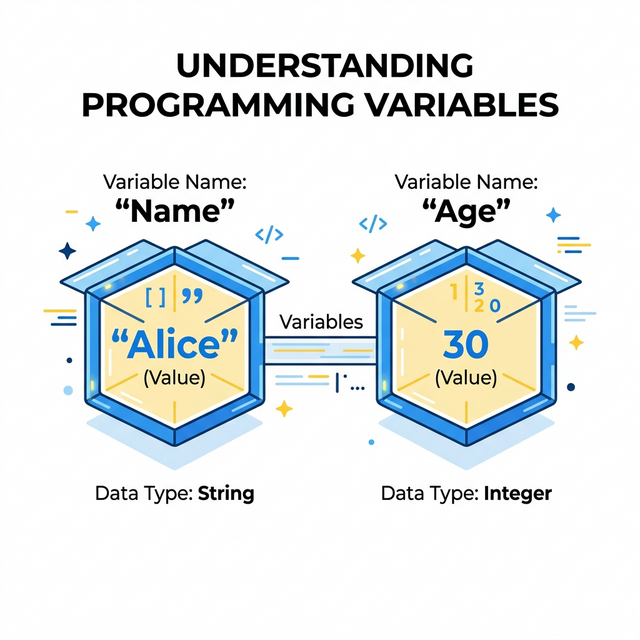
A variable is a name that refers to a value stored in memory. Think of it as a labeled box: the label is the variable name, and the contents are the value.
# Creating variables (assignment)
ip_address = "192.168.1.100"
port_number = 443
is_malicious = False

# Using variables
print(ip_address)
print(port_number)
print(is_malicious)
Naming Rules:
- Must start with a letter or underscore
- Can contain letters, numbers, and underscores
- Case-sensitive:
IPandipare different variables - Cannot use Python keywords like
if,for,print
Naming Conventions (best practices):
- Use descriptive names:
source_ipnotx - Use snake_case:
failed_login_countnotfailedLoginCount - Be consistent throughout your script
Key insight: Good variable names make code self-documenting. When you read
blocked_ip_list, you immediately know what it contains. When you
read data2, you have no idea.
2) Strings: Text Data
Strings are sequences of characters—text. In security, strings hold: IP addresses, usernames, file paths, hash values, log messages, URLs, email addresses, and much more.
# Creating strings (use quotes)
username = "admin"
file_path = '/var/log/auth.log'
hash_value = "5d41402abc4b2a76b9719d911017c592"

# String operations
print(len(username))          # Length: 5
print(username.upper())       # ADMIN
print(username.lower())       # admin
print(hash_value[0:8])        # First 8 chars: 5d41402a
Essential String Methods for Security:
log_line = "Failed password for admin from 192.168.1.50"

# Check if string contains something
print("admin" in log_line)              # True
print(log_line.startswith("Failed"))    # True
print(log_line.endswith("50"))          # True

# Split string into parts
parts = log_line.split(" ")
print(parts)  # ['Failed', 'password', 'for', 'admin', 'from', '192.168.1.50']

# Strip whitespace (critical for parsing!)
messy = "  192.168.1.1  \n"
clean = messy.strip()
print(clean)  # "192.168.1.1"
Key insight: Most security data arrives as strings—log files, network packets, user input. String manipulation is the most common operation in security scripts.
3) Numbers: Integers and Floats
Python has two main number types: integers (whole numbers) and floats (decimal numbers). In security, numbers represent: port numbers, byte counts, timestamps, risk scores, thresholds, and counts.
# Integers (whole numbers)
port = 443
failed_attempts = 5
byte_count = 1048576

# Floats (decimal numbers)
risk_score = 7.5
percentage = 0.85
response_time = 0.023

# Arithmetic operations
total = failed_attempts + 10      # Addition: 15
remaining = 100 - failed_attempts # Subtraction: 95
doubled = failed_attempts * 2     # Multiplication: 10
average = 100 / 4                 # Division: 25.0 (always float!)
integer_div = 100 // 4            # Integer division: 25
remainder = 100 % 3               # Modulo: 1
Security-Relevant Calculations:
# Threshold checking
max_attempts = 5
current_attempts = 3
attempts_remaining = max_attempts - current_attempts
print(f"Attempts remaining: {attempts_remaining}")

# Percentage calculation
total_requests = 1000
blocked_requests = 150
block_rate = (blocked_requests / total_requests) * 100
print(f"Block rate: {block_rate}%")  # 15.0%
Key insight: Integer vs. float matters! Port numbers must be integers (you can't connect to port 443.5). Risk scores might be floats for precision. Know which type your data requires.
4) Booleans: True/False
Booleans represent truth values: True or False.
In security, booleans answer yes/no questions: Is this IP blocked? Is the
user authenticated? Did the scan find vulnerabilities?
# Boolean values
is_authenticated = True
is_blocked = False
has_vulnerabilities = True

# Booleans from comparisons
port = 22
is_ssh = (port == 22)           # True
is_high_port = (port > 1024)    # False
is_privileged = (port < 1024)   # True

# String comparisons
username = "admin"
is_admin = (username == "admin")  # True
is_root = (username == "root")    # False
Boolean Operators:
# and - both must be True
is_admin = True
is_active = True
can_access = is_admin and is_active  # True

# or - at least one must be True
is_blocked = False
is_suspicious = True
needs_review = is_blocked or is_suspicious  # True

# not - inverts the value
is_safe = True
is_dangerous = not is_safe  # False
Key insight: Security decisions are fundamentally boolean—allow/deny, safe/unsafe, detected/missed. Booleans are how we encode these decisions in code.
5) Type Conversion and Type Errors
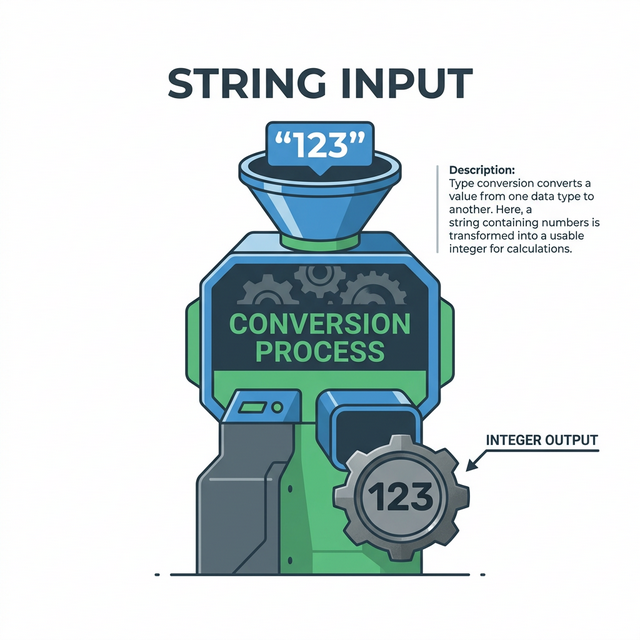
Sometimes you need to convert between types. Data from files and user input always arrives as strings, even if it represents numbers. You must convert explicitly.
# String to integer
port_string = "443"
port_number = int(port_string)
print(port_number + 1)  # 444

# String to float
score_string = "7.5"
score_number = float(score_string)

# Number to string
port = 443
port_text = str(port)
message = "Connected to port " + port_text

# Check type
print(type(port_string))  # <class 'str'>
print(type(port_number))  # <class 'int'>
Common Type Errors:
# ERROR: Can't add string and integer
port = "443"
# next_port = port + 1  # TypeError!
next_port = int(port) + 1  # Correct: 444

# ERROR: Can't concatenate string and integer
port = 443
# message = "Port: " + port  # TypeError!
message = "Port: " + str(port)  # Correct: "Port: 443"
message = f"Port: {port}"       # Better: f-strings handle conversion
Key insight: Type errors are among the most common bugs. When your script crashes with "TypeError," you're mixing incompatible types. Always know what type your data is.
Real-World Context: Types and Security Vulnerabilities
Type handling isn't just about avoiding bugs—it's about security:
Type Confusion Vulnerabilities: Many exploits abuse how programs handle unexpected types. When a program expects an integer but receives a specially crafted string, the results can be catastrophic. Buffer overflows, format string attacks, and injection attacks all exploit type handling.
SQL Injection Example: If a login form takes a username
as a string without validation, an attacker can input
' OR '1'='1 to bypass authentication. The database interprets
the string as SQL code—a type confusion at the application layer.
Integer Overflow: In 2014, a bug in OpenSSL (Heartbleed) involved improper handling of length values. An attacker could specify a length larger than the actual data, causing the server to return extra memory—potentially containing passwords and private keys.
MITRE ATT&CK Reference: T1027 (Obfuscated Files or Information) often involves encoding data as different types to evade detection—base64 encoding binary as text, hex encoding strings, etc.
Key insight: Understanding types isn't academic—it's security-critical. Attackers exploit type confusion; defenders must understand types to write secure code and recognize attacks.
Guided Lab: Password Strength Analyzer
Let's build a script that analyzes password characteristics using variables and types.
Step 1: Create the Script
Create password_analyzer.py:
# Password Strength Analyzer
# Demonstrates variables, types, and string operations

password = "SecureP@ss123"

# Analyze characteristics
length = len(password)
has_upper = any(c.isupper() for c in password)
has_lower = any(c.islower() for c in password)
has_digit = any(c.isdigit() for c in password)
has_special = any(c in "!@#$%^&*" for c in password)

# Calculate score
score = 0
if length >= 8:
    score += 1
if length >= 12:
    score += 1
if has_upper:
    score += 1
if has_lower:
    score += 1
if has_digit:
    score += 1
if has_special:
    score += 1

# Output results
print(f"Password: {password}")
print(f"Length: {length}")
print(f"Has uppercase: {has_upper}")
print(f"Has lowercase: {has_lower}")
print(f"Has digits: {has_digit}")
print(f"Has special chars: {has_special}")
print(f"Strength score: {score}/6")
Step 2: Run and Test
Run with different passwords to see how scores change.
Step 3: Reflection (mandatory)
- What type is the
passwordvariable? - What type is the
lengthvariable? - What type are
has_upper,has_lower, etc.? - Why do we use
f"..."strings for output?
Week 2 Outcome Check
By the end of this week, you should be able to:
- Create and name variables following Python conventions
- Work with strings: concatenation, slicing, methods
- Perform arithmetic with integers and floats
- Use booleans for true/false logic
- Convert between types safely
- Recognize and fix common type errors
Next week: Control Flow—where we make our scripts smart enough to make decisions based on the data we've stored.
🎯 Hands-On Labs (Free & Essential)
Practice data types and parsing before moving to reading resources.
🎮 TryHackMe: Python Basics
What you'll do: Work through variables, strings, and numeric operations.
Why it matters: Every security script is built on reliable data handling.
Time estimate: 1-1.5 hours
📝 Lab Exercise: Log Field Converter
Task: Parse a log string and convert port/attempts to integers.
Deliverable: Script that prints each field and its Python type.
Why it matters: Type safety prevents false positives and parsing errors.
Time estimate: 45-60 minutes
🏁 PicoCTF Practice: General Skills (Python Strings)
What you'll do: Solve beginner challenges that require string manipulation.
Why it matters: Most security data arrives as strings that need parsing.
Time estimate: 1-2 hours
🛡️ Lab: Build an Input Validator
What you'll do: Write a whitelist-based validator for usernames, ports, and IPs.
Why it matters: Input validation blocks entire classes of vulnerabilities early.
Time estimate: 1-2 hours
💡 Lab Tip: Always print a value and its type when debugging parsing logic.
🛡️ Secure Coding: Validation and Error Handling
Data types are where bugs start. Secure code treats all input as untrusted and validates it before use.
Validation checklist:
- Use allowlists for expected formats
- Convert types explicitly and handle failures
- Fail safe with clear, minimal errors
- Log validation failures for visibility
📚 Building on CSY101 Week-13: Model input abuse cases before writing parsing logic.
Resources
Complete the required resources to build your foundation.
- Python Tutorial - Numbers, Strings, Lists · 30-45 min · 50 XP · Resource ID: csy103_w2_r1 (Required)
- Real Python - Basic Data Types · 45-60 min · 50 XP · Resource ID: csy103_w2_r2 (Required)
- Automate the Boring Stuff - Chapter 1 · 30-45 min · 25 XP · Resource ID: csy103_w2_r3 (Optional)
Lab: Security Data Parser
Goal: Practice extracting and converting data types from a simulated log entry.
Linux/Windows Path (same for both)
- Create
log_parser.py - Start with this log line as a string variable:
"2024-01-15 14:23:45 FAILED LOGIN user=admin src_ip=192.168.1.50 port=22 attempts=3" - Extract the username into a variable
- Extract the IP address into a variable
- Extract the port number and convert to integer
- Extract attempts and convert to integer
- Calculate if attempts exceed threshold (threshold = 2)
- Print all extracted values with their types
Deliverable (submit):
- Your
log_parser.pyscript - Screenshot of output showing extracted values and types
- One paragraph: Explain why type conversion was necessary
Checkpoint Questions
- What is the difference between
"443"and443? - How do you check the type of a variable in Python?
- What string method removes whitespace from both ends?
- What is the result of
10 / 3vs10 // 3? - How do booleans relate to security access decisions?
- What is type confusion, and why is it a security concern?
Weekly Reflection
Reflection Prompt (200-300 words):
This week introduced variables and data types—the building blocks of all data processing. You learned that strings, numbers, and booleans behave differently and must be handled appropriately.
Reflect on these questions:
- Why is it important to use descriptive variable names in security scripts?
- Think of a security scenario where confusing string "443" with integer 443 could cause a real problem.
- How might an attacker exploit poor type handling in a web application?
- What types of security data would you represent as strings vs. numbers vs. booleans?
A strong reflection will connect data types to real security implications, not just programming mechanics.
Verified Resources & Videos
- Python String Methods: Python Docs - String Methods
- Security perspective (MITRE ATT&CK): MITRE ATT&CK — Obfuscated Files or Information (T1027)
- Type Confusion Vulnerabilities: OWASP - Buffer Overflow
Variables and types are fundamental. Every script you write from now on will use these concepts. Next week, we add decision-making with control flow.