Opening Framing: Scripts That Think
So far, your scripts execute every line from top to bottom. But security work requires decisions: Is this IP on the blocklist? Is this login attempt suspicious? Does this file match a malware signature? Should we alert?
Control flow lets scripts make decisions. Instead of blindly executing every instruction, your script can evaluate conditions and choose different paths. This is where code becomes intelligent.
Every firewall rule, every SIEM alert, every access control decision is ultimately an if-statement: IF condition is true, THEN take action. This week, you learn to write these decisions in Python.
Key insight: Control flow transforms scripts from simple automation into decision-making systems. A script that can decide is a script that can enforce policy, detect threats, and respond to incidents.
1) The If Statement: Basic Decisions
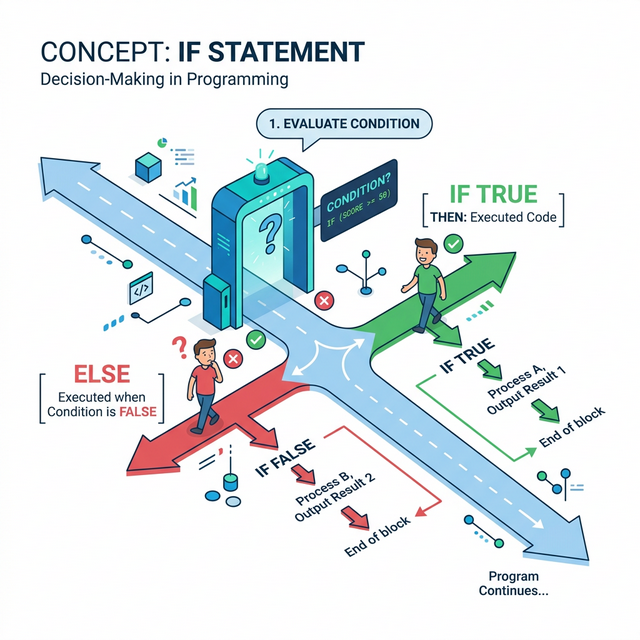
The if-statement evaluates a condition and executes code only if the condition is True:
# Basic if statement
failed_attempts = 5

if failed_attempts > 3:
    print("WARNING: Multiple failed login attempts detected!")
    print("Consider blocking this IP address.")
Critical Syntax Rules:
- The condition must evaluate to True or False
- End the if line with a colon
: - Indent the code block (4 spaces is standard)
- All indented lines are part of the if block
# Security example: Port classification
port = 22

if port == 22:
    print("SSH detected - check for brute force attempts")

if port == 80:
    print("HTTP detected - check for web attacks")

if port == 443:
    print("HTTPS detected - encrypted traffic")
Key insight: Indentation isn't just style in Python—it's syntax. Wrong indentation breaks your code. This enforced structure makes Python code readable, which matters when reviewing security scripts.
2) Comparison Operators
Conditions use comparison operators to evaluate relationships between values:
# Equality and inequality
port = 443
print(port == 443)   # True (equal to)
print(port != 80)    # True (not equal to)

# Numeric comparisons
attempts = 5
print(attempts > 3)   # True (greater than)
print(attempts < 10)  # True (less than)
print(attempts >= 5)  # True (greater than or equal)
print(attempts <= 5)  # True (less than or equal)

# String comparisons
username = "admin"
print(username == "admin")  # True
print(username == "Admin")  # False (case-sensitive!)
Security-Critical: String Comparison Pitfalls
# Case sensitivity can be a security issue
input_user = "Admin"
if input_user == "admin":
    print("Access granted")  # This won't execute!

# Solution: Normalize before comparing
if input_user.lower() == "admin":
    print("Access granted")  # This works
Key insight: The difference between = (assignment) and
== (comparison) causes countless bugs. Assignment puts a
value in a variable; comparison checks if two values are equal.
3) If-Else: Two-Way Decisions
Often you need to do one thing if a condition is true, and something else if it's false. That's what else provides:
# Basic if-else
is_authenticated = True

if is_authenticated:
    print("Welcome! Access granted.")
else:
    print("Access denied. Please log in.")
Security Example: Threshold-Based Alerting
risk_score = 7.5
threshold = 7.0

if risk_score >= threshold:
    print(f"HIGH RISK: Score {risk_score} exceeds threshold")
    print("Escalating to security team...")
else:
    print(f"Normal: Score {risk_score} within acceptable range")
    print("Logging for audit trail...")
This pattern—check against threshold, then branch—is fundamental to:
- SIEM alert rules
- Intrusion detection systems
- Rate limiting
- Anomaly detection
Key insight: If-else represents binary security decisions: allow/deny, alert/ignore, block/permit. Most security controls are fundamentally if-else logic applied at scale.
4) If-Elif-Else: Multi-Way Decisions
When you have more than two options, use elif (else-if) for additional conditions:
# Multi-level severity classification
severity_score = 8

if severity_score >= 9:
    level = "CRITICAL"
    action = "Immediate response required"
elif severity_score >= 7:
    level = "HIGH"
    action = "Respond within 1 hour"
elif severity_score >= 4:
    level = "MEDIUM"
    action = "Respond within 24 hours"
else:
    level = "LOW"
    action = "Address in next maintenance window"

print(f"Severity: {level}")
print(f"Action: {action}")
Security Example: Port-Based Service Detection
port = 3389

if port == 22:
    service = "SSH"
    risk = "Check for brute force"
elif port == 23:
    service = "Telnet"
    risk = "CRITICAL: Unencrypted protocol!"
elif port == 80:
    service = "HTTP"
    risk = "Check for web vulnerabilities"
elif port == 443:
    service = "HTTPS"
    risk = "Verify certificate validity"
elif port == 3389:
    service = "RDP"
    risk = "High-value target for attackers"
else:
    service = "Unknown"
    risk = "Investigate this port"

print(f"Port {port}: {service}")
print(f"Security note: {risk}")
Key insight: Elif chains are evaluated top-to-bottom; the first true condition wins. Order matters! Put more specific or critical conditions first.
5) Combining Conditions: and, or, not
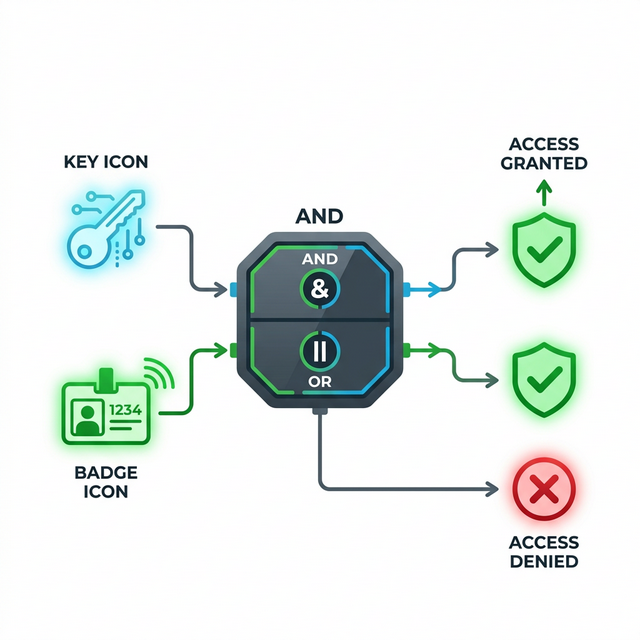
Real security decisions often involve multiple conditions. Use logical operators to combine them:
# and - ALL conditions must be True
is_admin = True
is_active = True
mfa_verified = True

if is_admin and is_active and mfa_verified:
    print("Full administrative access granted")

# or - ANY condition being True is enough
is_blocked = False
is_suspicious = True
failed_mfa = False

if is_blocked or is_suspicious or failed_mfa:
    print("Access requires additional verification")

# not - Inverts the condition
maintenance_mode = False

if not maintenance_mode:
    print("System operational - accepting connections")
Complex Security Decision:
# Simulating a firewall rule
src_ip = "192.168.1.100"
dst_port = 22
is_internal = src_ip.startswith("192.168.")
is_ssh = (dst_port == 22)

# Allow SSH only from internal network
if is_internal and is_ssh:
    print("ALLOW: Internal SSH connection")
elif is_ssh and not is_internal:
    print("DENY: External SSH blocked by policy")
else:
    print("ALLOW: Non-SSH traffic permitted")
Key insight: Complex conditions should be broken into named booleans
(like is_internal) for readability. Security code must be
auditable—someone reviewing your firewall logic should understand it
instantly.
Real-World Context: Control Flow in Security Tools
Control flow is the backbone of security automation:
SIEM Alert Rules: Every SIEM rule is an if-statement. "IF source_ip NOT IN whitelist AND destination_port == 22 AND login_attempts > 5 THEN generate_alert()" — this is exactly what you're learning to write.
Web Application Firewalls: WAF rules evaluate requests
against conditions. ModSecurity rules like
SecRule ARGS "@contains <script>" "deny" are if-statements
checking for XSS patterns.
Incident Response Playbooks: Automated IR uses branching logic: IF alert_type == "malware" THEN isolate_host() ELIF alert_type == "phishing" THEN block_sender() — decision trees encoded as control flow.
MITRE ATT&CK Reference: Technique T1562.001 (Impair Defenses: Disable or Modify Tools) often involves modifying the control flow of security tools—changing IF conditions so threats pass through undetected.
Key insight: When you write if-statements, you're writing security policy. The logic must be correct because attackers will probe every condition for weaknesses.
Guided Lab: Login Attempt Analyzer
Let's build a script that classifies login attempts based on multiple criteria—simulating what a SIEM might do.
Step 1: Create the Script
Create login_analyzer.py:
# Login Attempt Analyzer
# Demonstrates control flow for security decisions

# Simulated login attempt data
username = "admin"
source_ip = "203.0.113.50"
failed_attempts = 4
time_hour = 3  # 3 AM
geo_location = "foreign"

# Classification logic
print(f"Analyzing login: {username} from {source_ip}")
print("-" * 40)

# Check 1: Is this a privileged account?
if username in ["admin", "root", "administrator"]:
    print("[!] Privileged account targeted")
    is_privileged = True
else:
    print("[+] Standard user account")
    is_privileged = False

# Check 2: Failed attempt threshold
if failed_attempts >= 5:
    print("[!] ALERT: Brute force threshold exceeded")
    is_brute_force = True
elif failed_attempts >= 3:
    print("[!] WARNING: Multiple failures detected")
    is_brute_force = False
else:
    print("[+] Normal failure count")
    is_brute_force = False

# Check 3: Unusual time
if time_hour < 6 or time_hour > 22:
    print("[!] Outside business hours")
    unusual_time = True
else:
    print("[+] Within business hours")
    unusual_time = False

# Check 4: Geographic anomaly
if geo_location == "foreign":
    print("[!] Foreign source location")
    geo_anomaly = True
else:
    print("[+] Domestic source")
    geo_anomaly = False

# Final risk assessment
print("-" * 40)
risk_factors = sum([is_privileged, is_brute_force, unusual_time, geo_anomaly])

if risk_factors >= 3:
    print(f"VERDICT: HIGH RISK ({risk_factors}/4 factors)")
    print("ACTION: Block IP, alert SOC, require MFA reset")
elif risk_factors >= 2:
    print(f"VERDICT: MEDIUM RISK ({risk_factors}/4 factors)")
    print("ACTION: Flag for review, increase monitoring")
else:
    print(f"VERDICT: LOW RISK ({risk_factors}/4 factors)")
    print("ACTION: Log and continue monitoring")
Step 2: Test Different Scenarios
Modify the input values and observe how the verdict changes.
Step 3: Reflection (mandatory)
- How many if/elif/else structures are in this script?
- What makes this a "multi-factor" risk assessment?
- How would you add a fifth risk factor?
- Why is order important in the elif chain for risk assessment?
Week 3 Outcome Check
By the end of this week, you should be able to:
- Write if statements with proper syntax and indentation
- Use all comparison operators correctly
- Implement if-else for two-way decisions
- Build if-elif-else chains for multi-way decisions
- Combine conditions with and, or, not
- Design multi-factor security decision logic
Next week: Loops—where we process not just one login attempt, but thousands of them automatically.
🎯 Hands-On Labs (Free & Essential)
Practice control flow and decision logic before moving to reading resources.
🎮 TryHackMe: Python Basics (Control Flow)
What you'll do: Apply if/elif/else logic and comparisons in short exercises.
Why it matters: Security logic is expressed as conditional rules.
Time estimate: 1-1.5 hours
📝 Lab Exercise: Access Decision Script
Task: Build a small script that accepts role, risk score, and time of day to allow/deny access.
Deliverable: Script with at least three conditional branches and clear output.
Why it matters: Real security checks depend on multiple conditions.
Time estimate: 45-60 minutes
🏁 PicoCTF Practice: General Skills (Conditionals)
What you'll do: Solve beginner challenges requiring conditional logic.
Why it matters: Knowing when to branch is the core of writing secure logic.
Time estimate: 1-2 hours
💡 Lab Tip: Always normalize input (case, whitespace) before comparing values.
🛡️ Secure Coding: Decision Logic Hardening
Security bugs often come from logic mistakes, not missing features. Defensive code makes decisions explicit, predictable, and fail-safe.
Decision logic checklist:
- Default deny, then explicitly allow
- Keep conditions simple and testable
- Use allowlists over denylists
- Avoid "negative logic" where possible
- Log the decision path for auditability
📚 Building on CSY101 Week-13: Threat model decision points to catch bypass paths.
Resources
Complete the required resources to build your foundation.
- Python Tutorial - Control Flow · 30-45 min · 50 XP · Resource ID: csy103_w3_r1 (Required)
- Real Python - Conditional Statements · 45-60 min · 50 XP · Resource ID: csy103_w3_r2 (Required)
- Automate the Boring Stuff - Chapter 2 · 30-45 min · 25 XP · Resource ID: csy103_w3_r3 (Optional)
Lab: Firewall Rule Simulator
Goal: Build a script that simulates firewall rule evaluation using control flow.
Linux/Windows Path (same for both)
- Create
firewall_sim.py - Define these input variables:
src_ip- source IP address (string)dst_ip- destination IP address (string)dst_port- destination port (integer)protocol- "TCP" or "UDP" (string)
- Implement these rules in order:
- DENY all traffic to port 23 (Telnet) - log "Telnet blocked"
- ALLOW TCP to port 22 only from 192.168.x.x - log decision
- ALLOW TCP to ports 80, 443 from any source
- DENY all other traffic - log "Default deny"
- Test with at least 5 different input combinations
Deliverable (submit):
- Your
firewall_sim.pyscript - Output from 5 test cases showing different rule matches
- One paragraph: Why does rule order matter in firewalls?
Checkpoint Questions
- What is the difference between
=and==? - Why must if-statement blocks be indented?
- In an if-elif-else chain, how many blocks execute?
- What does
andrequire for the overall condition to be True? - How would you check if a port is between 1 and 1024 (inclusive)?
- Why might an attacker want to modify control flow in security tools?
Weekly Reflection
Reflection Prompt (200-300 words):
This week you learned to make your scripts intelligent through control flow. If-statements are the foundation of all automated security decisions.
Reflect on these questions:
- Think of a security tool you've used (firewall, antivirus, SIEM). What if-statements might be running behind the scenes?
- Why is it important that security control flow logic be readable and auditable?
- How could a bug in an if-statement create a security vulnerability?
- What's the relationship between control flow in code and access control in systems?
A strong reflection will connect programming control flow to real security systems you've learned about in CSY101/CSY102.
Verified Resources & Videos
- Python Boolean Operations: Python Docs - Boolean Operations
- Security perspective (MITRE ATT&CK): MITRE ATT&CK — Disable or Modify Tools (T1562.001)
- Firewall Rule Logic: Cisco - ACL Configuration Guide
Control flow is where code becomes decision-making. Every security tool from firewalls to SIEMs runs on this logic. Next week, we scale up with loops.