Opening Framing: Scale Changes Everything
In Week 3, you wrote scripts that analyze one login attempt, one IP address, one packet. But real security work involves millions. A SOC analyst doesn't review one log entry—they review millions. A vulnerability scanner doesn't check one port—it checks thousands.
Loops are what make this scale possible. Instead of writing the same code a thousand times, you write it once and let the loop repeat it. This is the fundamental difference between manual and automated security: automation means loops.
This week, you'll learn to process entire log files, scan port ranges, and iterate through lists of indicators—all with code that's barely longer than what you wrote for a single item.
Key insight: Without loops, scripts are calculators. With loops, they become security tools. Every scanner, every parser, every automated detector uses loops to achieve scale.
1) The For Loop: Iterating Over Collections

The for loop processes each item in a collection one at a time:
# Iterate over a list of IPs
suspicious_ips = ["192.168.1.50", "10.0.0.25", "172.16.0.100"]

for ip in suspicious_ips:
    print(f"Checking IP: {ip}")

# Output:
# Checking IP: 192.168.1.50
# Checking IP: 10.0.0.25
# Checking IP: 172.16.0.100
How It Works:
for- keyword that starts the loopip- variable that holds the current item (you choose the name)in- keyword connecting variable to collectionsuspicious_ips- the collection to iterate over- The indented block runs once for each item
# Iterate over characters in a string
password = "abc123"

for char in password:
    print(f"Character: {char}")

# Useful for checking password composition
Key insight: The loop variable (ip, char) automatically
takes on each value in sequence. You don't manage this—Python handles it.
2) Range: Generating Number Sequences
The range() function generates sequences of numbers—perfect
for port scanning, counting, and indexed access:
# range(stop) - 0 to stop-1
for i in range(5):
    print(i)  # 0, 1, 2, 3, 4

# range(start, stop) - start to stop-1
for port in range(20, 26):
    print(f"Scanning port {port}")  # 20, 21, 22, 23, 24, 25

# range(start, stop, step) - with increment
for port in range(20, 30, 2):
    print(f"Port {port}")  # 20, 22, 24, 26, 28
Security Application: Port Range Scanning
# Simulate scanning well-known ports
print("Scanning well-known ports (1-1024)...")
open_ports = []

for port in range(1, 1025):
    # In real scanner, this would check if port is open
    # Here we simulate some ports being "open"
    if port in [22, 80, 443, 8080]:
        open_ports.append(port)
        print(f"[OPEN] Port {port}")

print(f"\nScan complete. {len(open_ports)} open ports found.")
Key insight: range() is memory-efficient—it doesn't create all
numbers at once, just generates them as needed. You can range(1, 1000000)
without running out of memory.
3) The While Loop: Condition-Based Repetition
While loops repeat as long as a condition is True—useful when you don't know in advance how many iterations you need:
# Basic while loop
attempts = 0
max_attempts = 3

while attempts < max_attempts:
    print(f"Login attempt {attempts + 1}")
    attempts += 1

print("Max attempts reached - account locked")
Security Application: Retry with Backoff
# Simulating connection retry logic
import time

max_retries = 5
retry_count = 0
connected = False

while not connected and retry_count < max_retries:
    retry_count += 1
    print(f"Connection attempt {retry_count}...")

    # Simulate: connection succeeds on attempt 3
    if retry_count == 3:
        connected = True
        print("Connected successfully!")
    else:
        wait_time = retry_count * 2  # Exponential backoff
        print(f"Failed. Waiting {wait_time} seconds...")
        # time.sleep(wait_time)  # Uncomment for real delay

if not connected:
    print("All retries exhausted. Connection failed.")
WARNING: Infinite Loops
# DANGER: This runs forever!
# while True:
#     print("This never stops")

# Always ensure your condition will eventually become False
# or use 'break' to exit
Key insight: Use for when you know how many times to loop
(or are iterating a collection). Use while when you loop
until a condition changes.
4) Loop Control: break and continue
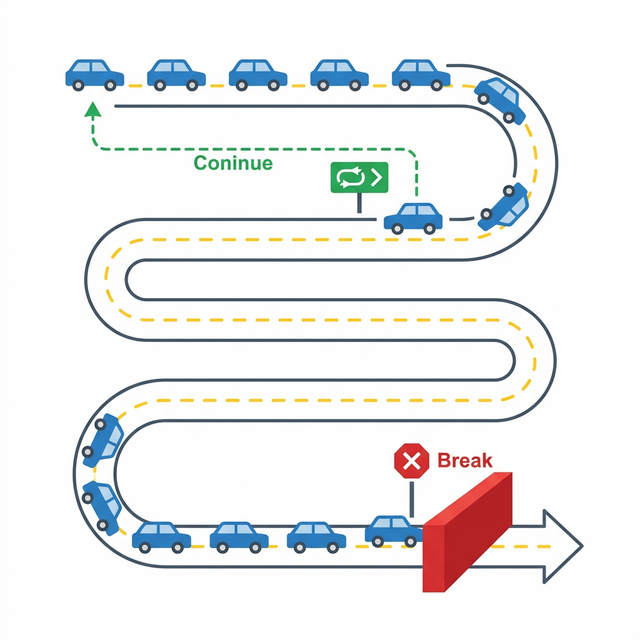
Sometimes you need to exit a loop early or skip certain iterations:
# break - exit loop immediately
blocklist = ["192.168.1.100", "10.0.0.50", "BLOCKED", "172.16.0.1"]

for ip in blocklist:
    if ip == "BLOCKED":
        print("Encountered invalid entry - stopping")
        break
    print(f"Processing: {ip}")

# Output:
# Processing: 192.168.1.100
# Processing: 10.0.0.50
# Encountered invalid entry - stopping
# continue - skip to next iteration
log_entries = ["INFO: Started", "ERROR: Failed", "INFO: Running", "ERROR: Crash"]
print("Showing only ERROR entries:")
for entry in log_entries:
if not entry.startswith("ERROR"):
continue # Skip non-error entries
print(entry)
# Output:
# Showing only ERROR entries:
# ERROR: Failed
# ERROR: CrashSecurity Application: Finding First Match
# Search for malicious indicator - stop at first match
indicators = ["clean.exe", "safe.dll", "malware.exe", "normal.doc"]
known_malware = ["malware.exe", "trojan.exe", "virus.dll"]

found_threat = None
for file in indicators:
    if file in known_malware:
        found_threat = file
        break  # No need to continue searching

if found_threat:
    print(f"ALERT: Malware detected - {found_threat}")
else:
    print("Scan complete - no threats found")
Key insight: break is essential for efficiency. Why check
10,000 more files once you've found malware? Exit early, respond fast.
5) Nested Loops and Loop Patterns
Loops can contain other loops—useful for multi-dimensional data like scanning multiple hosts across multiple ports:
# Nested loop: scan multiple hosts, multiple ports
hosts = ["192.168.1.1", "192.168.1.2", "192.168.1.3"]
ports = [22, 80, 443]

for host in hosts:
    print(f"\nScanning {host}...")
    for port in ports:
        print(f"  Checking {host}:{port}")

# This produces 9 checks (3 hosts × 3 ports)
Accumulator Pattern: Building Results
# Count occurrences in log
log_lines = [
    "Failed login from 192.168.1.50",
    "Successful login from 192.168.1.10",
    "Failed login from 192.168.1.50",
    "Failed login from 10.0.0.25",
    "Failed login from 192.168.1.50"
]

failed_count = 0
for line in log_lines:
    if "Failed" in line:
        failed_count += 1

print(f"Total failed logins: {failed_count}")
Filter Pattern: Collecting Matches
# Extract all IPs with failed logins
failed_ips = []
for line in log_lines:
    if "Failed" in line:
        # Extract IP (simplified - assumes consistent format)
        ip = line.split("from ")[1]
        if ip not in failed_ips:
            failed_ips.append(ip)

print(f"IPs with failed logins: {failed_ips}")
Key insight: Most security scripts follow these patterns—iterate through data, accumulate counts, filter matches. Recognize the pattern, apply it to any problem.
Real-World Context: Loops in Security Operations
Loops power every security tool you'll encounter:
Nmap Port Scanner: At its core, Nmap loops through IP
ranges and port ranges. A command like nmap -p 1-1000 192.168.1.0/24
creates nested loops: for each of 256 hosts, check each of 1000 ports.
That's 256,000 checks from one command.
Log Analysis: Tools like Splunk and ELK process billions
of log entries using loops. Every search query loops through indexed data.
The SPL query index=firewall action=blocked | stats count by src_ip
loops through entries, filtering and counting.
Brute Force Attacks: From the attacker's perspective, credential stuffing is a loop: for each username/password pair in a list, attempt login. A 10,000-entry credential list is just a for loop with 10,000 iterations.
MITRE ATT&CK Reference: Technique T1110 (Brute Force) describes attacks that are essentially loops. Understanding loops helps you understand how attacks scale and how to detect them through iteration patterns (many attempts from one source).
Key insight: Loops are morally neutral—they amplify both attack and defense. Attackers loop to brute force; defenders loop to detect. The tool is the same.
Guided Lab: Log File Analyzer
Let's build a script that processes multiple log entries and produces a security summary—a simplified version of what SIEM tools do.
Step 1: Create the Script
Create log_analyzer.py:
# Log File Analyzer
# Demonstrates loops for security log processing

# Simulated log entries (in reality, read from file)
log_entries = [
    "2024-01-15 09:23:45 INFO Login successful user=jsmith src=192.168.1.10",
    "2024-01-15 09:24:12 WARN Failed login user=admin src=203.0.113.50",
    "2024-01-15 09:24:15 WARN Failed login user=admin src=203.0.113.50",
    "2024-01-15 09:24:18 WARN Failed login user=admin src=203.0.113.50",
    "2024-01-15 09:25:00 INFO Login successful user=mjones src=192.168.1.25",
    "2024-01-15 09:25:30 WARN Failed login user=root src=203.0.113.50",
    "2024-01-15 09:26:00 ERROR Connection timeout src=10.0.0.5",
    "2024-01-15 09:27:00 WARN Failed login user=admin src=203.0.113.50",
    "2024-01-15 09:28:00 INFO Login successful user=admin src=192.168.1.100",
]

# Initialize counters
total_entries = 0
info_count = 0
warn_count = 0
error_count = 0
failed_logins = 0
suspicious_ips = {}

print("=" * 50)
print("LOG ANALYSIS REPORT")
print("=" * 50)

# Process each entry
for entry in log_entries:
    total_entries += 1

    # Count by severity
    if "INFO" in entry:
        info_count += 1
    elif "WARN" in entry:
        warn_count += 1
    elif "ERROR" in entry:
        error_count += 1

    # Track failed logins
    if "Failed login" in entry:
        failed_logins += 1

        # Extract source IP
        if "src=" in entry:
            src_start = entry.find("src=") + 4
            src_ip = entry[src_start:].split()[0]

            # Count by IP
            if src_ip in suspicious_ips:
                suspicious_ips[src_ip] += 1
            else:
                suspicious_ips[src_ip] = 1

# Print summary
print(f"\nTotal entries processed: {total_entries}")
print(f"\nBy Severity:")
print(f"  INFO:  {info_count}")
print(f"  WARN:  {warn_count}")
print(f"  ERROR: {error_count}")

print(f"\nSecurity Findings:")
print(f"  Failed login attempts: {failed_logins}")

print(f"\nFailed logins by source IP:")
for ip, count in suspicious_ips.items():
    status = "ALERT: Possible brute force!" if count >= 3 else ""
    print(f"  {ip}: {count} attempts {status}")

print("\n" + "=" * 50)
print("END OF REPORT")
print("=" * 50)
Step 2: Run and Analyze
Observe how the loop processes each entry and builds the summary.
Step 3: Reflection (mandatory)
- How many times does the main for loop execute?
- What pattern is used to count entries by severity?
- How does the script track counts per IP address?
- How would you modify this to read from an actual file?
Week 4 Outcome Check
By the end of this week, you should be able to:
- Write for loops to iterate over lists and strings
- Use range() to generate number sequences
- Implement while loops for condition-based repetition
- Use break and continue for loop control
- Apply accumulator and filter patterns
- Build nested loops for multi-dimensional processing
Next week: Functions—where we package our loop-powered logic into reusable, callable tools.
🎯 Hands-On Labs (Free & Essential)
Practice loops and iteration before moving to reading resources.
🎮 TryHackMe: Python Basics (Loops)
What you'll do: Use for/while loops to process lists and ranges.
Why it matters: Every parser and scanner relies on iteration.
Time estimate: 1-1.5 hours
📝 Lab Exercise: Log Loop Parser
Task: Iterate through a list of log entries and count failed logins per IP.
Deliverable: Dictionary output of IP → fail count.
Why it matters: Loop-based aggregation is a core detection pattern.
Time estimate: 45-60 minutes
🏁 PicoCTF Practice: General Skills (Iteration)
What you'll do: Solve beginner challenges that involve loops and repetition.
Why it matters: Many security tasks require repeating checks at scale.
Time estimate: 1-2 hours
🛡️ Lab: Eliminate Hardcoded Secrets
What you'll do: Refactor a config loop to pull secrets from environment variables.
Deliverable: Script that loads API key and token from env and prints masked values.
Why it matters: Hardcoded secrets leak in repos, logs, and screenshots.
Time estimate: 45-60 minutes
💡 Lab Tip: Always test loops on small data first to avoid runaway scripts.
🛡️ Secure Coding: Secrets Hygiene
Scripts that process configuration often touch sensitive values. Defensive code keeps secrets out of source control and out of logs.
Secrets handling checklist:
- Never hardcode API keys or passwords
- Load secrets from environment or a vault
- Mask secrets in logs (show last 4 chars)
- Rotate and revoke exposed keys quickly
📚 Building on CSY101 Week-14: Align secrets handling with CIS Controls and ISO 27001 guidance.
Resources
Complete the required resources to build your foundation.
- Python Tutorial - For Statements · 20-30 min · 50 XP · Resource ID: csy103_w4_r1 (Required)
- Real Python - Python For Loops · 45-60 min · 50 XP · Resource ID: csy103_w4_r2 (Required)
- Automate the Boring Stuff - While Loops · 20-30 min · 25 XP · Resource ID: csy103_w4_r3 (Optional)
Lab: Brute Force Detector
Goal: Build a script that detects potential brute force attacks by analyzing login attempt patterns.
Linux/Windows Path (same for both)
- Create
brute_force_detector.py - Create a list of 20+ simulated login attempts with format:
"timestamp,username,source_ip,result" - Include a mix of successful and failed logins
- Include at least one IP with 5+ failed attempts
- Loop through all entries and:
- Count failed attempts per IP
- Count failed attempts per username
- Track timestamps of failures
- Alert if any IP has 5+ failures (threshold)
- Alert if any username has 3+ failures
Deliverable (submit):
- Your
brute_force_detector.pyscript - Screenshot showing detection of brute force pattern
- One paragraph: How would you improve this detector?
Checkpoint Questions
- What is the output of
range(5, 10)? - When would you use a while loop instead of a for loop?
- What does
breakdo inside a loop? - What does
continuedo inside a loop? - How many iterations does a nested loop with outer=3 and inner=4 produce?
- How do brute force attacks relate to loops conceptually?
Weekly Reflection
Reflection Prompt (200-300 words):
This week you learned loops—the mechanism that transforms single-item processing into scalable automation. Loops are what make security tools capable of handling enterprise-scale data.
Reflect on these questions:
- Think of a manual security task that would benefit from automation. How would loops help?
- Both attackers and defenders use loops. Give an example of each.
- Why is the accumulator pattern (counting/collecting as you loop) so common in security scripts?
- How does detecting a brute force attack involve recognizing loop-like behavior from an attacker?
A strong reflection will connect loops to the concept of scale in security operations—both offensive and defensive.
Verified Resources & Videos
- Python Range Function: Python Docs - Range
- Security perspective (MITRE ATT&CK): MITRE ATT&CK — Brute Force (T1110)
- Log Analysis Concepts: Splunk - SIEM Explained
Loops unlock scale. With this week's knowledge, you can process thousands of log entries, scan port ranges, and build real security automation. Next week: packaging this power into reusable functions.