Opening Framing: The Network is the Battlefield
Every cyberattack traverses a network. Whether an attacker is phishing credentials, exfiltrating data, or commanding malware—packets flow across wires, through routers, and past firewalls. Understanding networks isn't optional for security professionals; it's foundational.
This course teaches networking through a security lens. You won't just learn how packets move from A to B—you'll learn where attackers intercept them, how protocols can be abused, and what defenders monitor to catch intrusions.
This week, we establish the foundation: what networks are, why they matter for security, and how to start thinking about network traffic as evidence of activity—both legitimate and malicious.
Key insight: Networks are transparent to those who know how to look. Every connection, every transfer, every communication leaves traces that skilled analysts can read.
1) What is a Network?
At its simplest, a network connects devices so they can communicate. But that simple definition hides enormous complexity:
- Nodes: Devices on the network (computers, servers, phones, IoT devices)
- Links: Connections between nodes (cables, wireless, fiber)
- Protocols: Rules for communication (TCP/IP, HTTP, DNS)
- Services: Applications that use the network (web, email, file sharing)
Network Types by Scale:
- PAN (Personal Area Network): Bluetooth devices, ~10 meters
- LAN (Local Area Network): Office, home, building
- WAN (Wide Area Network): Cities, countries, the Internet
- WLAN: Wireless LAN (Wi-Fi networks)
Security Perspective: Each network type has different attack surfaces. A LAN attacker might be an insider or someone who gained physical access. A WAN attacker could be anywhere in the world. Wireless networks can be attacked from the parking lot.
Key insight: The network boundary defines your threat model. Know where your network ends and the untrusted world begins.
2) The Security Mindset for Networking
Security professionals view networks differently than network engineers:
Network Engineer Thinks: "How do I make this connection reliable and fast?"
Security Professional Thinks: "Who else could use this connection? What could they see? What could they modify?"
The CIA Triad Applied to Networks:
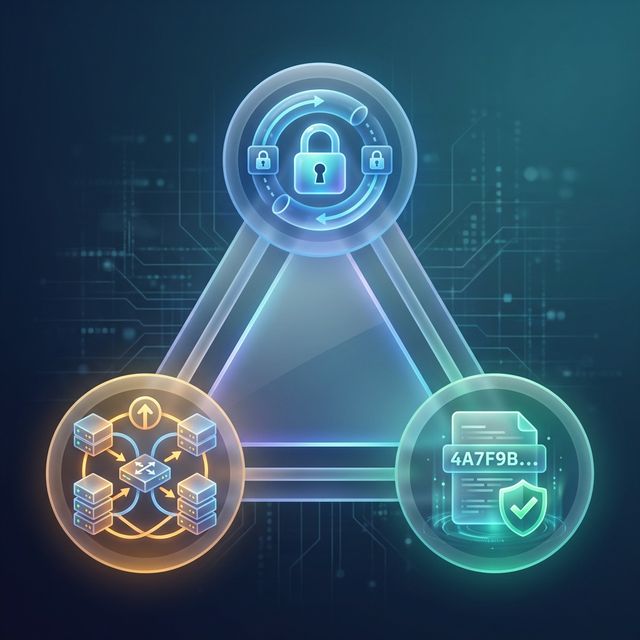
- Confidentiality: Can unauthorized parties read our traffic? (Encryption, VPNs, network segmentation)
- Integrity: Can attackers modify data in transit? (TLS, checksums, digital signatures)
- Availability: Can attackers disrupt our communications? (DDoS protection, redundancy, failover)
Key Security Questions for Any Network:
- What traffic is normal? What would be anomalous?
- Who can access this network segment?
- What data crosses this link? Is it protected?
- If compromised, what else could an attacker reach?
- How would we detect malicious activity?
Key insight: Every network design decision is also a security decision. Convenience often trades off against security.
3) Network Traffic: Packets and Flows
Network communication happens through packets—small chunks of data with headers describing where they're going and what they contain:
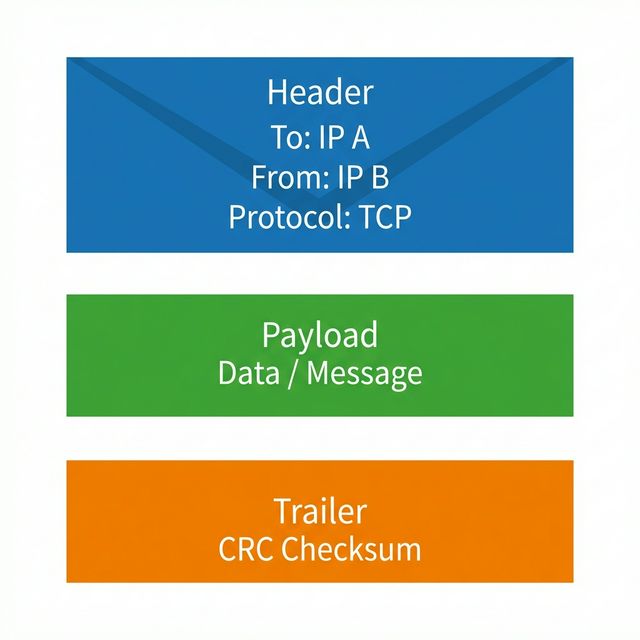
Packet Structure (simplified):
┌─────────────────────────────────────────┐
│ Headers                                 │
│ ┌─────────────────────────────────────┐ │
│ │ Layer 2: MAC addresses (Ethernet)   │ │
│ ├─────────────────────────────────────┤ │
│ │ Layer 3: IP addresses (Internet)    │ │
│ ├─────────────────────────────────────┤ │
│ │ Layer 4: Ports (TCP/UDP)            │ │
│ └─────────────────────────────────────┘ │
├─────────────────────────────────────────┤
│ Payload (actual data)                   │
└─────────────────────────────────────────┘
What Headers Reveal:
- Source/Destination IPs: Who's talking to whom
- Ports: What service is being used (80=HTTP, 443=HTTPS, 22=SSH)
- Protocol flags: Connection state (SYN, ACK, FIN)
- Timestamps: When communication occurred
Flows vs. Packets:
A single web page load might involve hundreds of packets. Security tools often aggregate these into "flows"—summaries of connections:
Flow Record Example:
Source IP:    192.168.1.100
Dest IP:      93.184.216.34
Source Port:  52431
Dest Port:    443
Protocol:     TCP
Bytes:        15,234
Packets:      42
Duration:     2.3 seconds
Start Time:   2024-01-15 09:23:45
Key insight: Packet captures show everything; flow records show patterns. Both are essential for security analysis.
4) Network Security Tools: First Look
Throughout this course, you'll use these essential tools:
Wireshark - Packet Analysis:
The gold standard for packet capture and analysis. Wireshark lets you see every byte of network traffic, decode protocols, and follow conversations.
# Capture packets on interface eth0
wireshark -i eth0

# Or use command-line capture
tshark -i eth0 -w capture.pcap
tcpdump - Command-Line Capture:
Lightweight, available on any Linux system, perfect for servers and headless systems:
# Capture all traffic on eth0
sudo tcpdump -i eth0

# Capture only port 80 traffic, save to file
sudo tcpdump -i eth0 port 80 -w http_traffic.pcap

# Show packet contents in ASCII
sudo tcpdump -i eth0 -A port 80
Nmap - Network Scanner:
Discovers hosts and services. Used by both attackers (reconnaissance) and defenders (asset discovery, vulnerability scanning):
# Ping scan - discover live hosts
nmap -sn 192.168.1.0/24

# Port scan - find open services
nmap -sV 192.168.1.100

# Aggressive scan (OS detection, version, scripts)
nmap -A 192.168.1.100
netstat/ss - Connection Status:
# Show all listening ports
ss -tlnp

# Show established connections
ss -tnp state established

# Legacy command (still works)
netstat -tulnp
Key insight: These tools are dual-use—attackers and defenders use the same techniques. Knowing them helps you both attack and defend.
5) Common Network Attacks: Overview
This course will cover these attacks in depth. For now, understand the categories:
Reconnaissance Attacks:
- Port scanning: Discovering open services
- Network mapping: Understanding topology
- Banner grabbing: Identifying software versions
- DNS enumeration: Finding hosts and subdomains
Interception Attacks:
- Sniffing: Capturing traffic on shared networks
- Man-in-the-Middle: Intercepting and modifying traffic
- ARP spoofing: Redirecting local traffic
- DNS spoofing: Redirecting name lookups
Denial of Service:
- Flooding: Overwhelming with traffic volume
- Protocol abuse: Exploiting protocol weaknesses
- Application layer: Targeting specific services
- Amplification: Using third parties to multiply attack
Exploitation:
- Service vulnerabilities: Attacking exposed software
- Protocol weaknesses: Exploiting design flaws
- Credential attacks: Brute force, credential stuffing
Key insight: Most attacks have network signatures. Understanding attacks helps you recognize their traffic patterns.
Real-World Context: Network Security in Practice
Network security skills are essential across security roles:
SOC Analyst: You'll monitor network traffic for anomalies, investigate alerts from IDS/IPS systems, and trace attack paths through packet captures. The 2020 SolarWinds attack was detected by analyzing unusual DNS traffic patterns.
Incident Responder: Network forensics reveals what attackers accessed, what data they exfiltrated, and how they maintained persistence. Packet captures are evidence in investigations.
Penetration Tester: Network reconnaissance is phase one of any engagement. Understanding protocols helps you find misconfigurations and vulnerabilities that automated tools miss.
MITRE ATT&CK Reference:
- T1046 - Network Service Discovery: Attackers scan for services
- T1040 - Network Sniffing: Capturing credentials and data
- T1557 - Adversary-in-the-Middle: Intercepting communications
- T1498 - Network Denial of Service: Disrupting availability
Key insight: Network skills are foundational—they underpin almost every other security domain.
Guided Lab: Your First Packet Capture
Let's capture and analyze real network traffic to see packets in action.
Step 1: Install Tools (if needed)
# Linux (Debian/Ubuntu)
sudo apt update
sudo apt install tcpdump wireshark nmap

# Allow non-root capture (then log out and back in)
sudo usermod -aG wireshark $USER
Step 2: Capture Traffic with tcpdump
# Find your network interface
ip link show

# Start capture (replace eth0 with your interface)
sudo tcpdump -i eth0 -c 50 -w first_capture.pcap

# While capturing, generate traffic in another terminal:
ping -c 5 google.com
curl -I https://example.com
Step 3: Analyze with tcpdump
# Read the capture file
tcpdump -r first_capture.pcap

# Show more detail
tcpdump -r first_capture.pcap -v

# Filter for ICMP (ping) traffic
tcpdump -r first_capture.pcap icmp

# Filter for specific host
tcpdump -r first_capture.pcap host google.com
Step 4: Open in Wireshark
# Open capture in Wireshark
wireshark first_capture.pcap

# Or from GUI: File > Open > first_capture.pcap
In Wireshark, explore:
- Click a packet to see decoded headers
- Expand each layer (Ethernet, IP, TCP/ICMP)
- Note source/destination addresses and ports
- Try the filter bar:
icmportcp.port == 443
Step 5: Reflection (mandatory)
- How many packets did your ping generate? Why that number?
- What IP address did google.com resolve to?
- Can you identify the DNS query in your capture?
- What information could an attacker learn from this traffic?
Week 1 Outcome Check
By the end of this week, you should be able to:
- Explain what networks are and their security significance
- Apply the security mindset to network analysis
- Describe packet structure and flow records
- Use basic tcpdump commands for packet capture
- Open and navigate captures in Wireshark
- Identify major categories of network attacks
Next week: The OSI Model—understanding the seven layers and their security implications.
📚 Building on Prior Knowledge
Networking security starts with core security framing:
- CSY101 Week 01 (CIA Triad): Network controls protect confidentiality, integrity, and availability.
- CSY101 Week 01 (Risk Thinking): Packet data shows where risk materializes in transit.
🎯 Hands-On Labs (Free & Essential)
Practice core networking fundamentals and packet analysis before moving to reading resources.
🎮 TryHackMe: Intro to Networking
What you'll do: Learn IP addressing, ports, protocols, and how data moves across
networks.
Why it matters: Networking basics are the foundation for every defensive and
offensive security skill.
Time estimate: 1.5-2 hours
🎮 TryHackMe: Wireshark 101
What you'll do: Capture packets, filter traffic, and inspect protocol fields in real
packet traces.
Why it matters: Packet analysis is the fastest way to understand what actually
happened on a network.
Time estimate: 1.5-2 hours
🏁 PicoCTF Practice: Forensics (Packet Challenges)
What you'll do: Solve beginner packet challenges using pcap files and simple analysis.
Why it matters: Network forensics helps you understand attacker behavior from
evidence.
Time estimate: 1-2 hours
💡 Lab Tip: Save your first packet capture and revisit it later. You'll be surprised how much more you can read after a few weeks.
Resources
Complete the required resources to build your foundation.
- Wireshark User's Guide · 60-90 min · 50 XP · Resource ID: csy104_w1_r1 (Required)
- tcpdump Manual Page · 30-45 min · 50 XP · Resource ID: csy104_w1_r2 (Required)
- Nmap Reference Guide · 45-60 min · 25 XP · Resource ID: csy104_w1_r3 (Optional)
Lab: Network Reconnaissance
Goal: Perform basic network reconnaissance on your local network and document findings.
Linux Path
- Discover your network configuration:
ip addr show ip route show cat /etc/resolv.conf - Scan your local subnet for live hosts:
nmap -sn 192.168.1.0/24 - Pick 2-3 discovered hosts and scan for open ports:
nmap -sV [target_ip] - Capture 100 packets while browsing a website:
sudo tcpdump -i eth0 -c 100 -w lab1.pcap - Analyze the capture and identify:
- DNS queries
- TCP handshakes
- HTTP/HTTPS traffic
Windows Path
- Discover your network configuration:
ipconfig /all route print nslookup - Install Nmap for Windows from nmap.org
- Follow the same scanning steps using Command Prompt or PowerShell
- Use Wireshark for packet capture (GUI-based)
Deliverable (submit):
- Screenshot of your network configuration
- List of discovered hosts on your network
- Open ports found on 2-3 hosts
- Summary of traffic types in your packet capture
- One paragraph: What security concerns did you identify?
Checkpoint Questions
- What is the difference between a LAN and a WAN?
- Name three pieces of information found in packet headers.
- What is the difference between a packet and a flow?
- Which tool would you use to capture packets on a Linux server without a GUI?
- What is reconnaissance in the context of network attacks?
- How does the CIA triad apply to network security?
📝 Week 01 Quiz
Test your understanding of networking fundamentals, the OSI model, and TCP/IP basics.
Format: 10 multiple-choice questions · Passing score: 70% · Time: Untimed
Take QuizWeekly Reflection
Reflection Prompt (200-300 words):
This week introduced you to network security fundamentals and the tools security professionals use to analyze traffic. You captured your first packets and began seeing networks through a security lens.
Reflect on these questions:
- Before this week, how did you think about network traffic? How has that changed?
- What surprised you when you looked at actual packet captures?
- How might an attacker use the same tools you learned (tcpdump, nmap, Wireshark)?
- What questions do you have about networks that you hope this course will answer?
A strong reflection will show genuine engagement with seeing networks as both infrastructure and attack surface.
Verified Resources & Videos
- Wireshark Tutorial: Wireshark Introduction
- Packet Analysis: Malware Traffic Analysis (Practice PCAPs)
- MITRE ATT&CK: Reconnaissance Tactic
This week laid the foundation. You now understand what network traffic is and have tools to observe it. Next week dives into the OSI model—the framework for understanding how networks are structured and where security controls apply.