Week Introduction
The operating system is the security referee of the computer. It decides which programs run, who can access what data, and how resources are shared. When the OS is compromised, every layer above it becomes untrusted.
This week focuses on the OS as a security boundary: how it enforces isolation between processes, manages privileges, controls file access, and why these mechanisms are prime targets for attackers.
Learning Outcomes (Week 3 Focus)
By the end of this week, you should be able to:
- LO2 - Technical Foundations: Explain how operating systems manage resources and enforce security boundaries
- LO3 - Threat Landscape: Understand why OS-level compromise is catastrophic (privilege escalation attacks)
- LO5 - Identity & Access: Connect OS user/permission models to access control principles
Lesson 3.1 · The OS as Security Referee
Core function: The operating system sits between hardware (physical resources) and applications (programs), mediating every interaction. Without an OS, programs would fight for resources and could directly manipulate hardware — chaos.
What the OS manages:
- CPU scheduling: Which program gets to execute when (prevents one app from hogging processor)
- Memory allocation: Assigns RAM to programs, prevents them from reading each other's data
- File system: Controls who can read/write/execute files
- Device drivers: Manages access to hardware (disk, network, USB)
- Process isolation: Keeps programs in separate containers so crashes don't spread
Security role: The OS is a policy enforcement point. It doesn't decide what's allowed (that's policy), but it enforces those decisions. If the OS is bypassed or compromised, all security controls above it become irrelevant.
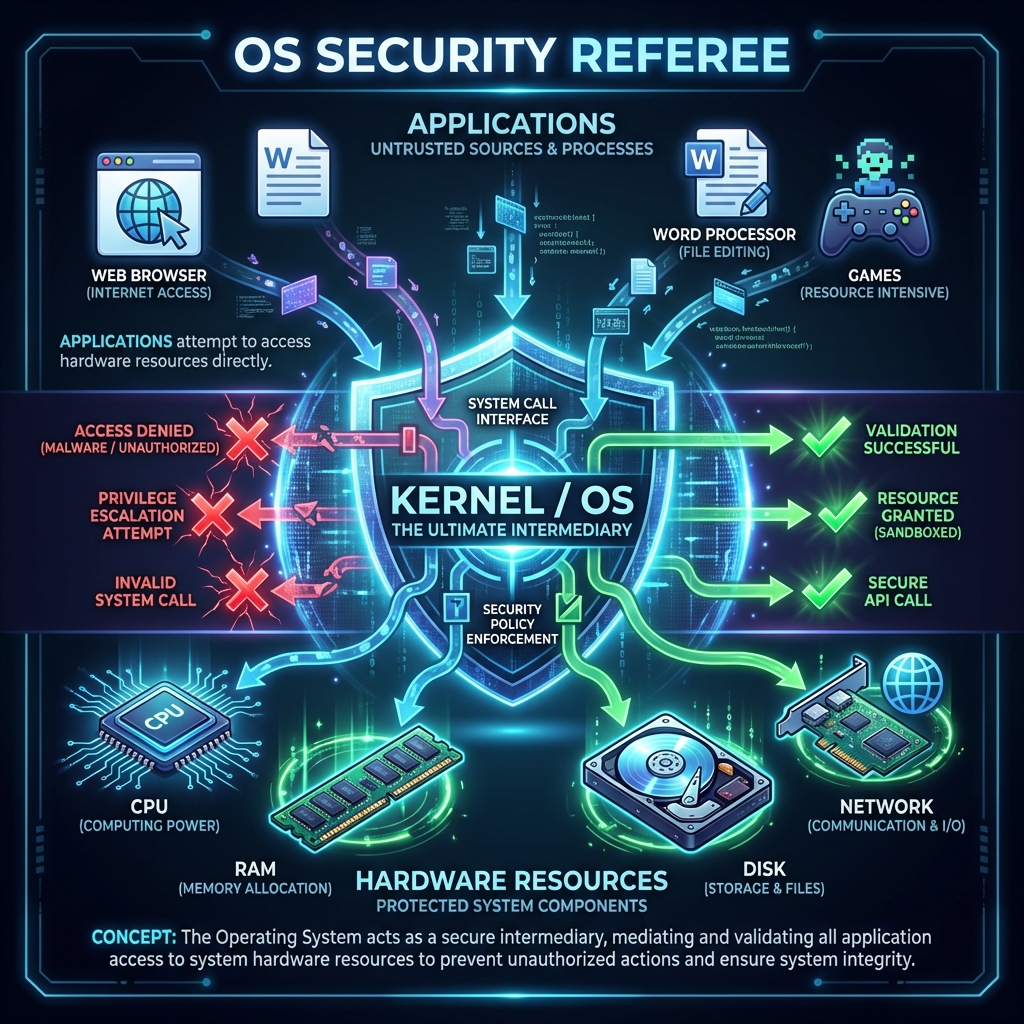
Real-world analogy: Think of the OS like airport security. Applications are passengers trying to board planes (access hardware). The OS checks tickets (permissions), scans bags (validates requests), and prevents unauthorized access to restricted areas (kernel space, other processes' memory).
Lesson 3.2 · Processes and Isolation (Security Containers)
Key concept: A process is a running instance of a program. When you double-click an application, the OS creates a process with its own isolated environment.
What each process gets:
- Virtual memory space: Appears to have access to entire RAM (actually isolated from other processes)
- Permission set: Defines what files, network ports, devices it can access
- Process ID (PID): Unique identifier for tracking and control
- Execution context: CPU registers, stack, heap (all isolated per process)
Why isolation matters for security:
- If your browser crashes, it doesn't take down the OS or other apps
- Malware running in one process can't directly read another process's memory (in theory)
- Each process operates in a "sandbox" — limited view of system resources
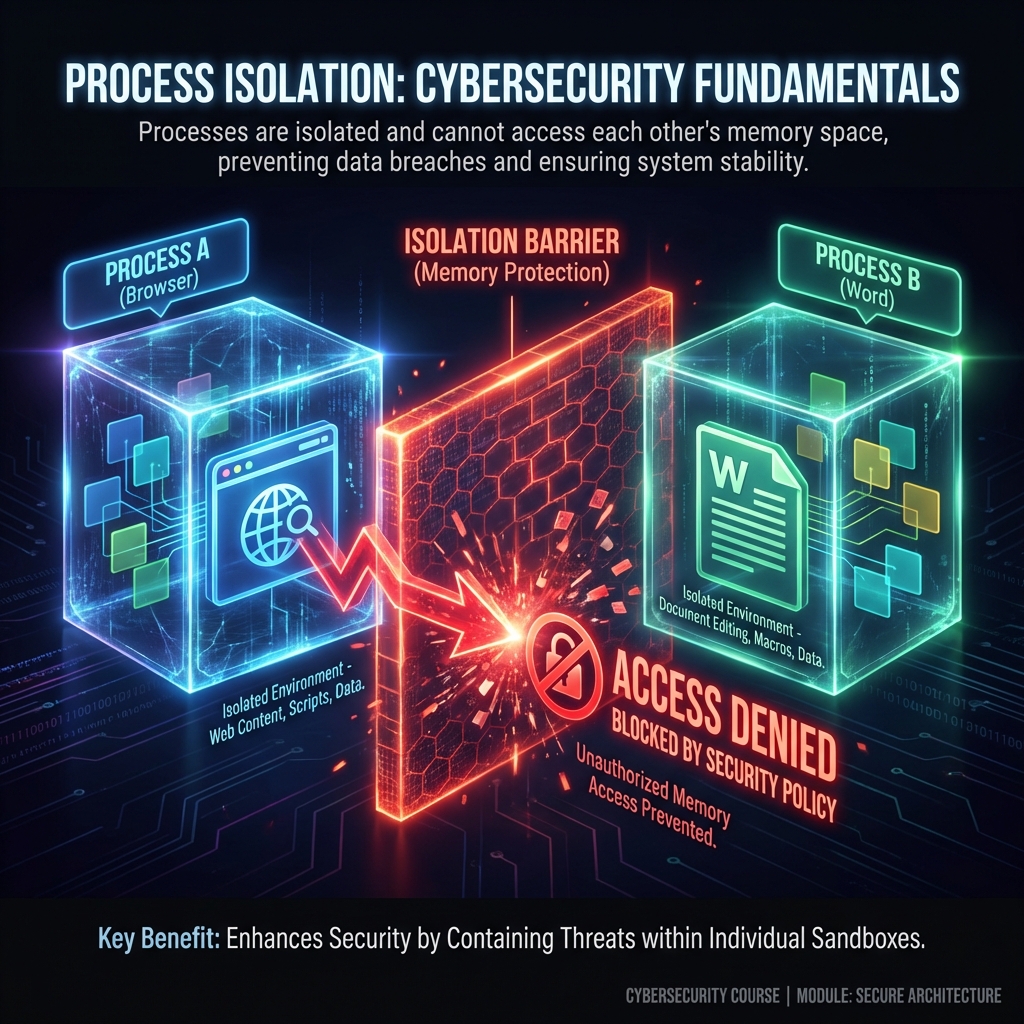
Attack goal: Breaking isolation
Attackers seek to escape process boundaries. Common techniques:
- Memory exploits: Buffer overflows that overwrite process boundaries
- Privilege escalation: Tricking the OS into granting higher permissions
- Inter-process communication (IPC) abuse: Exploiting message-passing mechanisms
Defender takeaway: Isolation is only as strong as the OS kernel enforces it. Kernel vulnerabilities are catastrophic because they undermine all process isolation.
Lesson 3.3 · Users, Privileges, and the Principle of Least Privilege
Core security principle: Users and processes should have only the minimum privileges needed to accomplish their tasks — no more. Every additional privilege is potential attack surface.
Privilege hierarchy (typical OS model):
- Root / Administrator / SYSTEM: God mode — can do anything (read all files, modify OS, install drivers, create users). Compromise at this level = total system control.
- Standard user: Can run programs, access own files, but cannot install software or modify system settings. Most users should operate here.
- Service accounts: Non-human accounts for background processes (web server, database). Often over-privileged in practice (security risk).
- Guest / Limited accounts: Minimal access for temporary or untrusted users.
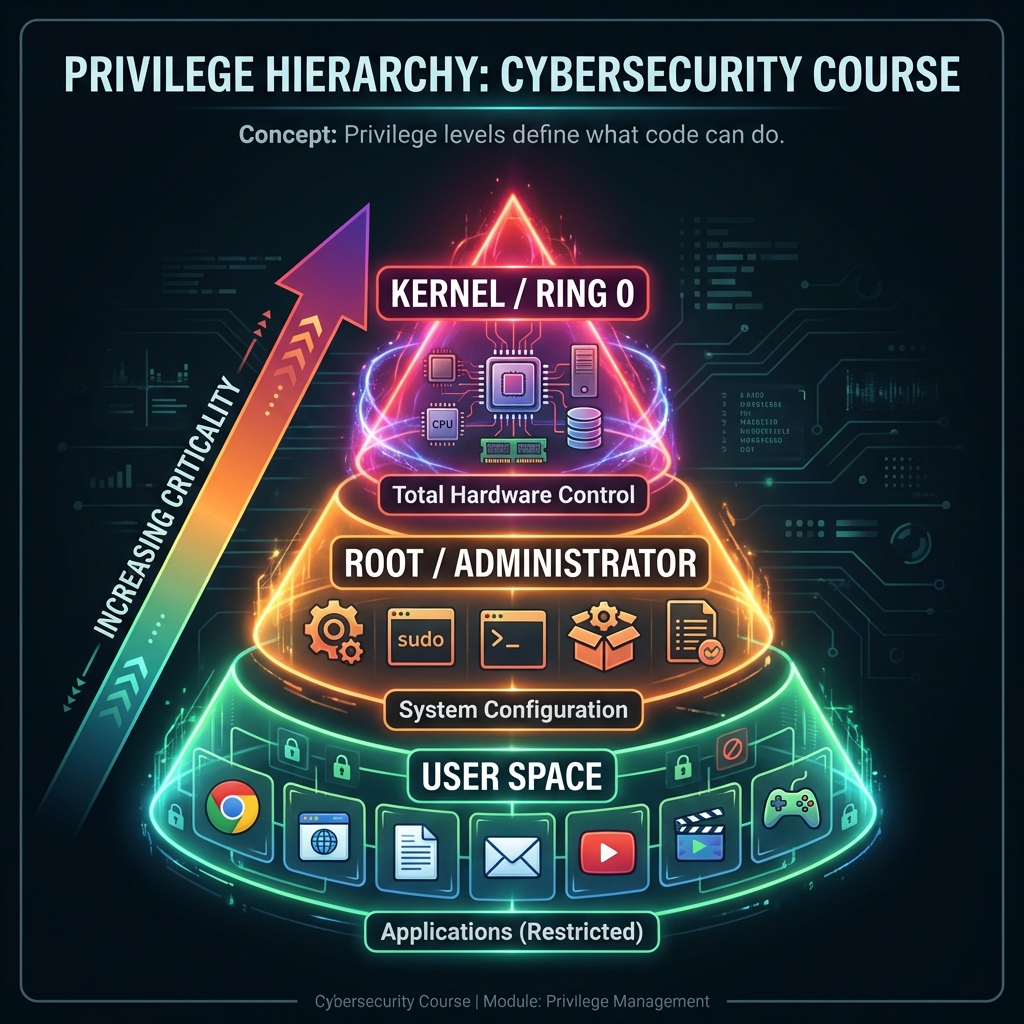
Why privilege matters:
Imagine an attacker exploits a vulnerability in your web browser. If you're logged in as:
- Standard user: Attacker gets your files, but can't install persistent malware or access other users
- Administrator: Attacker gets everything — OS control, all user data, ability to hide malware in system
Privilege escalation attacks:
Most attacks start with limited access (standard user or compromised service). The attacker then exploits OS vulnerabilities to "escalate" to administrator/root. Common techniques:
- Exploiting vulnerable system services running as root
- Abusing misconfigured file permissions (SUID binaries on Linux)
- Kernel exploits that bypass privilege checks
- Social engineering (tricking user into running installer with admin rights)
Defender principle: Run everything with minimum necessary privilege. Don't browse the web as admin. Don't run services as root unless absolutely required. Assume compromise and limit blast radius.
Lesson 3.4 · File Permissions: Access Control in Practice
Every file has a "permission label" that defines who can do what. The OS enforces these labels before allowing any file operation.
The permission triad (Read, Write, Execute):
-
Read (r): View file contents
Security impact: Confidentiality — who can see sensitive data? -
Write (w): Modify or delete file
Security impact: Integrity — who can tamper with configuration, logs, executables? -
Execute (x): Run file as program (or enter directory)
Security impact: Who can run code? Executable files with wrong permissions = backdoor risk
Permission groups (Unix/Linux model):
- Owner: User who created the file (or was assigned ownership)
- Group: Collection of users who share access
- Others: Everyone else on the system
Example: File permissions -rw-r--r-- mean:
- Owner: read + write
- Group: read only
- Others: read only
Common misconfigurations (dangerous patterns):
- World-writable files:
-rw-rw-rw-— anyone can modify (integrity violation) - Secrets readable by all: Password files, API keys visible to any user (confidentiality failure)
- Executable config files:
-rwxrwxrwxon non-programs (unnecessary attack surface) - SUID binaries: Programs that run with owner's privileges regardless of who executes (privilege escalation risk)
Real-world example: In 2019, Capital One breach involved misconfigured AWS permissions — a firewall configuration flaw allowed access to files that should have been restricted. 100 million customer records exposed.
Defender principle: Default to restrictive permissions. Grant access explicitly only when needed. Audit permissions regularly, especially on sensitive files (passwords, keys, configs).
Lesson 3.5 · Why the OS Is Prime Attack Target
Strategic reality: Compromising the operating system gives attackers control over everything above it. This is why kernel exploits are among the most valuable vulnerabilities.
Attack value hierarchy:
- Kernel exploit: Complete system control, bypasses all security controls (highest value)
- Root/admin access: Can install rootkits, access all data, persist across reboots
- Standard user access: Limited to that user's data and capabilities
- Sandboxed process: Least valuable — restricted by OS isolation
Why OS compromise is catastrophic:
- Attacker can disable security tools (antivirus, logging, monitoring)
- Can hide presence (modify system calls, hide processes/files)
- Can persist indefinitely (survives reboots, reinstalls applications)
- Can pivot to other systems (steal credentials, map networks)
Defense strategy: OS hardening
- Patching: Keep OS updated — kernel vulnerabilities are frequently discovered
- Minimize attack surface: Disable unnecessary services, remove unused software
- Principle of least privilege: Run services as non-root, users as non-admin
- Security modules: SELinux, AppArmor (mandatory access control)
- Monitoring: Log privileged operations, detect anomalies
Self-Check Questions (Test Your Understanding)
Answer these in your own words (2-3 sentences each):
- Why is the OS called a "security referee"? What would happen if applications could access hardware directly?
- Explain process isolation. Why can't one process normally read another process's memory?
- What is privilege escalation? Why do attackers seek it?
- Give one example of a dangerous file permission configuration and explain the risk.
- Why is kernel-level compromise more dangerous than user-level compromise?
Lab 3 · OS Security Boundaries and Privilege Analysis
Time estimate: 30-45 minutes
Objective: Map privilege boundaries in an operating system and analyze what happens when those boundaries fail. You will trace how privilege escalation attacks work and propose defenses.
Step 1: Choose Your OS Context (5 minutes)
Select one scenario (or propose your own):
- Personal laptop: Windows 10/11 or macOS with standard user account
- Linux server: Web server running Apache/Nginx
- University lab computer: Shared machine with multiple student accounts
- Corporate workstation: Windows machine managed by IT department
- Cloud VM: Ubuntu instance running in AWS/Azure
Why it matters: Privilege models differ by context — understand the environment before analyzing risk.
Step 2: Map Privilege Levels (10 minutes)
Identify at least 3 privilege levels in your chosen system:
- What accounts exist? (admin, standard user, service accounts, guest)
- What can each level do? (install software, modify system files, access other users' data)
- What is each level prohibited from doing?
Example for Linux web server:
-
root: Can do anything — install packages, modify kernel, access all files
Prohibited: Nothing (god mode) -
www-data (web server account): Can read web files, write logs, bind to port
80/443
Prohibited: Cannot install software, modify system configs, read other users' files -
Standard user (alice): Can run programs, read own files, write to home
directory
Prohibited: Cannot install software, modify /etc configs, read other users' files
Step 3: Identify a Critical File (10 minutes)
Choose one security-critical file in your system and analyze its permissions:
- File path: (e.g., /etc/passwd, C:\Windows\System32\config\SAM, ~/.ssh/id_rsa)
- What it contains: (passwords, keys, system configuration)
- Current permissions: Who can read/write/execute?
- Why it matters: What happens if wrong person accesses it?
Example for /etc/shadow (Linux):
- Contains: Hashed passwords for all user accounts
- Permissions: Owner=root, Group=shadow, Mode=640 (owner read/write, group read only)
- Risk if exposed: Attacker can crack passwords offline, compromise all accounts
Step 4: Trace a Privilege Escalation Attack (10 minutes)
Describe a realistic attack scenario where an attacker escalates from low privilege to high:
- Starting point: What access does attacker initially have? (standard user, compromised web service)
- Vulnerability exploited: What weakness allows escalation? (SUID binary, kernel bug, misconfigured permission)
- Escalation method: What specific action grants higher privilege?
- Final state: What can attacker do after escalation?
Example attack:
- Start: Attacker exploits web application vulnerability, gains shell as www-data user
- Discovery: Finds /usr/bin/backup binary with SUID bit set (runs as root)
- Exploit: backup binary doesn't sanitize input — attacker injects command:
backup "file; /bin/bash" - Result: Gets root shell, can now read /etc/shadow, install backdoor, access all data
Step 5: Propose Defenses (5 minutes)
Identify at least two controls that would prevent or detect the attack:
- Preventive control: What would stop the attack before it succeeds?
- Detective control: What would alert defenders that attack is happening?
- Principle applied: Connect to concepts from this week (least privilege, isolation, permissions)
Example defenses:
- Preventive: Remove SUID bit from backup binary (runs as calling user, not root) — applies least privilege
- Preventive: Input sanitization in backup script (reject commands with shell metacharacters)
- Detective: Monitor for unexpected processes running as root (auditd logs privilege escalation)
- Detective: File integrity monitoring on /etc/shadow (alerts if modified unexpectedly)
Step 6: Synthesis (5 minutes)
Write a short paragraph (3-5 sentences) answering:
"Why is the operating system called a security boundary? What makes OS-level compromise more dangerous than application-level compromise?"
Example answer:
The operating system is a security boundary because it sits between all applications and hardware, enforcing isolation and access controls. When the OS is compromised, attackers can bypass all higher-level security measures because the OS is the ultimate authority on what's allowed. Application-level compromise affects only that app's data and capabilities, but OS-level compromise grants control over all processes, all users, and the ability to hide malicious activity from detection tools.
Success Criteria (What "Good" Looks Like)
Your lab is successful if you:
- ✅ Mapped privilege hierarchy with clear boundaries between levels
- ✅ Analyzed file permissions on a security-critical file
- ✅ Described realistic privilege escalation attack (not just "attacker gets root somehow")
- ✅ Proposed defenses aligned to OS security principles (least privilege, isolation, monitoring)
- ✅ Explained why OS compromise is catastrophic compared to app compromise
Extension (For Advanced Students)
If you finish early, explore these questions:
- Research one real CVE (Common Vulnerabilities and Exposures) for Linux or Windows privilege escalation. What was the root cause?
- How do modern OSes defend against privilege escalation? (ASLR, DEP, kernel hardening, mandatory access control)
- What's the difference between discretionary access control (DAC) and mandatory access control (MAC)?
🎯 Hands-On Labs (Free & Essential)
Build OS fundamentals and Linux confidence before moving to reading resources.
🎮 TryHackMe: Linux Fundamentals Part 1
What you'll do: Navigate the Linux filesystem, understand users/groups, and practice
essential commands.
Why it matters: Most security tooling runs on Linux. OS-level security begins with
command-line literacy and permission awareness.
Time estimate: 1.5-2 hours
🎯 OverTheWire: Bandit (Levels 0-6)
What you'll do: Practice Linux navigation, file permissions, and basic command usage
while solving progressively harder tasks.
Why it matters: Bandit forces you to understand OS permissions and file access —
core concepts behind privilege escalation.
Time estimate: 1.5-2.5 hours
🔐 HackTheBox Academy: Linux Fundamentals
What you'll do: Work through structured lessons on Linux architecture, permissions,
processes, and security basics.
Why it matters: HTB Academy reinforces OS concepts with real-world security context
and practical exercises.
Time estimate: 2-3 hours
💡 Lab Tip: Keep a small Linux command journal. Write the command, what it did, and why you used it. This builds long-term muscle memory.
Resources (Free + Authoritative)
Work through these in order. Focus on security-relevant concepts.
📘 OSTEP - Operating Systems: Three Easy Pieces
What to read: Chapters on "Processes" and "Address Spaces" (skim for concepts,
not implementation details).
Why it matters: Free textbook from University of Wisconsin. Best
explanation of how OS provides isolation.
Time estimate: 30 minutes (focus on conceptual understanding)
🎥 Computerphile - Processes & Privilege (Video)
What to watch: Full video on how operating systems manage user privileges.
Why it matters: Visual explanation of privilege levels and why escalation
is dangerous.
Time estimate: 15 minutes
📘 Linux File Permissions Explained (Red Hat)
What to read: Entire article on Unix/Linux permission model.
Why it matters: Even if you use Windows, understanding Unix permissions
teaches access control principles.
Time estimate: 20 minutes
📘 NIST SP 800-123 - Guide to General Server Security
What to read: Section 2 on "Server Security Principles" (pages 4-10).
Why it matters: Shows how OS hardening applies in real enterprise
environments.
Time estimate: 20 minutes
Tip: Completion and XP persist via localStorage. If progress doesn't update immediately, refresh once.
Weekly Reflection Prompt
Aligned to LO2 (Technical Foundations) and LO5 (Identity & Access)
Write 200-300 words answering this prompt:
Explain why privilege escalation is considered one of the most critical attack classes. Use a specific example from this week's content (processes, file permissions, or user accounts).
In your answer, include:
- What the attacker starts with (initial access level)
- What vulnerability or misconfiguration enables escalation
- What the attacker gains after escalation (new capabilities)
- Why OS-level compromise is more dangerous than application-level compromise
- One principle-based defense (least privilege, isolation, monitoring, etc.)
What good looks like: You explain the cascade effect of privilege escalation — how gaining one level unlocks access to many more resources. You show understanding that the OS is the ultimate authority, so controlling it means controlling everything above.