Week Introduction
Networks are highways for data — and attackers. Every connection expands attack surface. Every packet is an opportunity to intercept, modify, or inject malicious content.
This week explains how networks work at a security-relevant level: why data flows in packets, what trust boundaries exist, and why "network security" is fundamentally about controlling where data can flow and who can observe it.
Learning Outcomes (Week 4 Focus)
By the end of this week, you should be able to:
- LO2 - Technical Foundations: Explain how networks transmit data and why packet-based communication creates security challenges
- LO3 - Threat Landscape: Identify network-based attack patterns (interception, modification, spoofing)
- LO4 - Risk Reasoning: Analyze trust boundaries in network architectures and their security implications
Lesson 4.1 · Networks as Attack Surface Multipliers
Core principle: Networks enable collaboration and resource sharing — but every connection is a potential attack vector. The moment a system joins a network, it becomes accessible to anyone else on that network (and potentially the entire internet).
What networks provide:
- Communication: Email, messaging, video calls
- Resource sharing: File servers, printers, databases
- Remote access: Cloud services, remote desktop, SSH
- Distributed computing: Load balancing, distributed databases
Security trade-off: Standalone (air-gapped) systems are highly secure but useless for modern work. Networked systems are productive but exposed. Organizations must balance connectivity with protection.
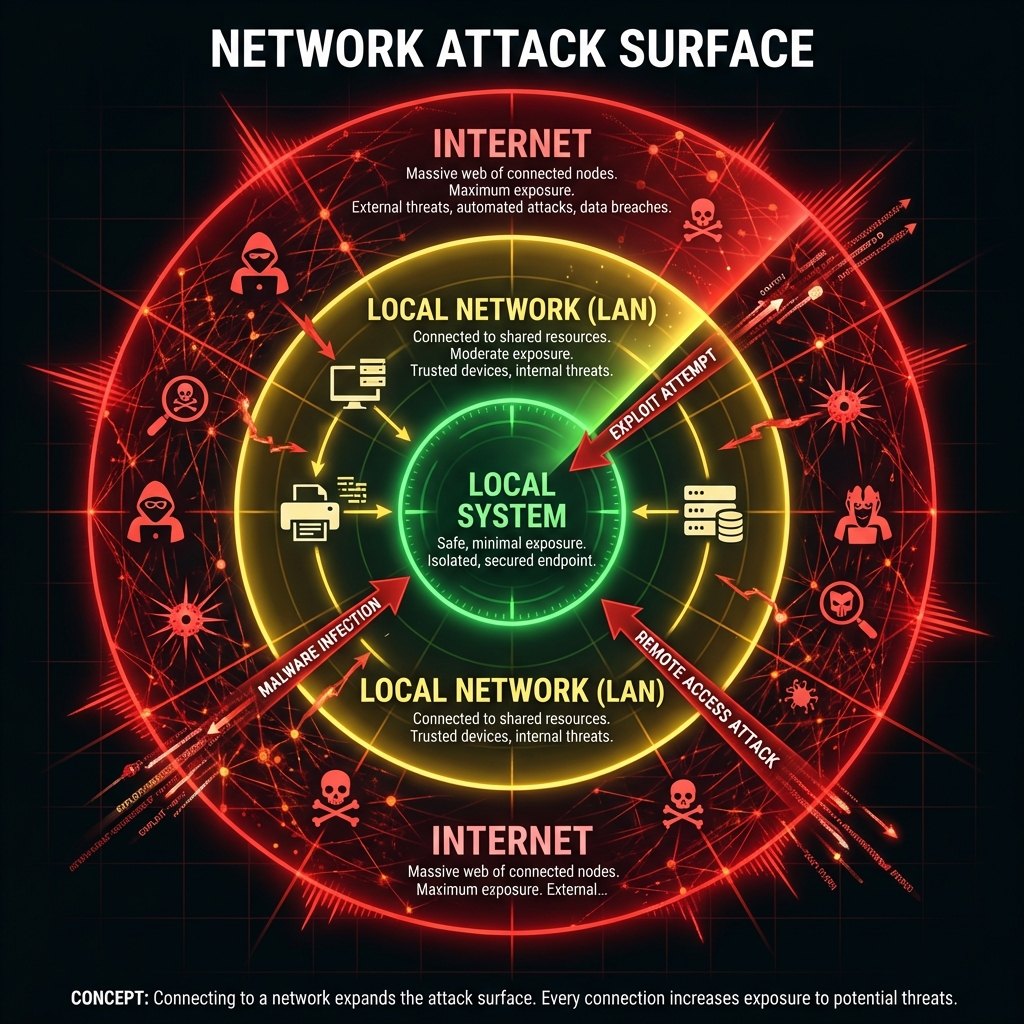
Attack surface expansion:
- Local system: Attacker needs physical access (very limited threat)
- Internal network: Anyone on LAN can attack (insiders, lateral movement)
- Internet-facing: Entire world can probe for vulnerabilities (maximum exposure)
Defender assumption: Treat all network traffic as potentially hostile. Never trust data simply because it arrived over a network connection.
Lesson 4.2 · Packets: The Fundamental Unit of Network Communication
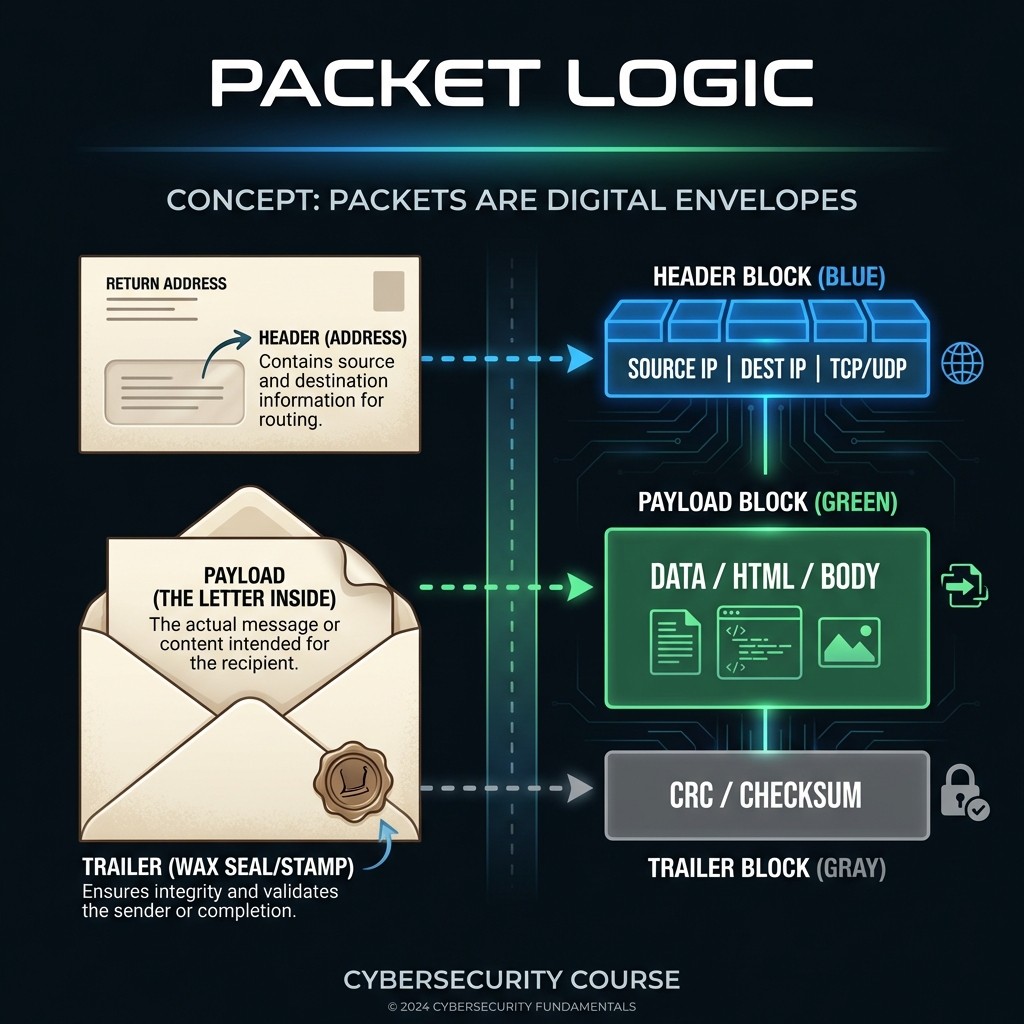
Imagine sending a book by tearing out pages, putting each in an envelope with addressing info, and mailing them separately. That's how networks send data — in small chunks called packets.
Why packets?
- Efficiency: Multiple devices can share the same network link (multiplexing)
- Resilience: If one packet is lost, only that piece needs retransmission (not entire file)
- Routing flexibility: Packets can take different paths to destination (avoids congestion)
Packet structure (simplified):
- Header: Source IP, destination IP, protocol type, sequence number
- Payload: Actual data being transmitted (email content, web page, file chunk)
- Trailer: Error-checking information (checksum)
Security implications:
- Interception: Anyone on the network path can copy packets as they pass by (passive eavesdropping) — packets aren't encrypted by default
- Modification: Man-in-the-middle attacks can alter packet contents before forwarding them (active tampering)
- Replay: Attacker captures legitimate packets and retransmits them later (e.g., replaying a "transfer $1000" command)
- Spoofing: Forging source address in packet header (pretending to be someone else)
Defender principle: Assume network is hostile. Use encryption (TLS/HTTPS) to protect confidentiality and integrity. Use authentication to prevent spoofing.
Lesson 4.3 · TCP/IP Model: Security at Every Layer
Why layering matters: Networks are complex. Layering breaks the problem into manageable pieces — each layer provides services to the layer above and uses services from the layer below. Each layer is also a potential attack target.
The four layers (bottom to top):
-
1. Link Layer (Physical/Data Link): How bits travel over wires/wireless
Protocols: Ethernet, Wi-Fi (802.11)
Security concerns: Physical access (tap wires), Wi-Fi eavesdropping (unencrypted networks)
Controls: WPA3 encryption, physical security, MAC address filtering -
2. Internet Layer (Network): Addressing and routing packets between networks
Protocols: IP (Internet Protocol), ICMP
Security concerns: IP spoofing (forged source addresses), routing attacks
Controls: Ingress/egress filtering, IPsec (encrypted IP) -
3. Transport Layer: Reliable end-to-end communication
Protocols: TCP (reliable, connection-oriented), UDP (fast, connectionless)
Security concerns: Port scanning (reconnaissance), SYN floods (denial of service)
Controls: Firewalls (block ports), rate limiting, connection tracking -
4. Application Layer: User-facing protocols
Protocols: HTTP/HTTPS (web), SMTP (email), DNS (name resolution), SSH (remote access)
Security concerns: Application vulnerabilities (XSS, SQLi), credential theft, malware delivery
Controls: TLS encryption, input validation, authentication, web application firewalls
Security insight: Attacks can target any layer. A firewall (layer 3/4) won't stop XSS attacks (layer 7). TLS encryption (layer 4/7) won't stop ARP spoofing (layer 2). Defense-in-depth means controls at multiple layers.
Example multi-layer attack: Attacker ARP spoofs (layer 2) to intercept traffic, downgrades HTTPS to HTTP (layer 7), then steals credentials (application vulnerability).
Lesson 4.4 · Network Segmentation and Trust Boundaries
Core principle: Not all parts of a network should trust each other equally. Segmentation creates zones with different security policies, limiting blast radius when compromise occurs.
Common network zones:
-
Internet (Untrusted Zone): Hostile, fully exposed
Assumption: All traffic is potentially malicious
Controls: Firewalls, IDS/IPS, strict filtering -
DMZ (Demilitarized Zone): Semi-trusted — hosts public-facing services (web
servers, email gateways)
Assumption: Will likely be attacked, limit damage if compromised
Controls: Hardened systems, no direct access to internal network, heavy monitoring -
Internal Network: Trusted — employee workstations, internal apps
Assumption: Users authenticated, but insider threats exist
Controls: Network access control (NAC), endpoint protection, segmentation by department -
Sensitive/Restricted Network: High-trust — databases, financial systems, HR
data
Assumption: Only specific people/systems need access
Controls: Strict access control, encryption, audit logging, air-gapping (physical separation)
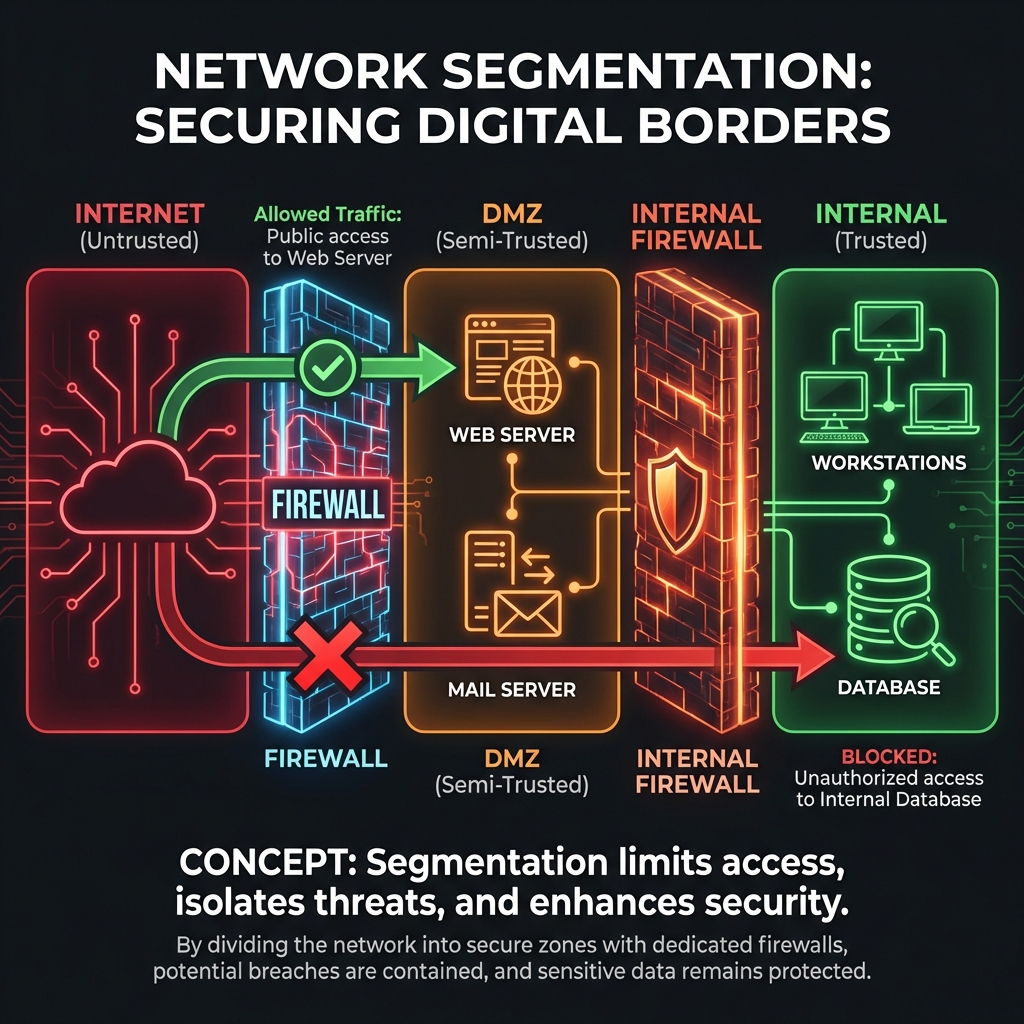
Trust boundary violations (how breaches spread):
- Attacker compromises DMZ web server (initial foothold)
- Web server has excessive permissions to internal database (misconfiguration)
- Attacker pivots from DMZ → Internal Network → Sensitive Data (lateral movement)
- Entire breach enabled by lack of proper segmentation
Defender principle: Zero Trust Architecture
Modern approach: "Never trust, always verify." Even internal network traffic should be authenticated and authorized. Don't assume "inside the firewall = safe."
Lesson 4.5 · Why Networks Are Prime Attack Targets
Strategic reality: Networks are attractive because they enable remote access — attackers don't need physical presence. Most modern attacks begin with network reconnaissance and exploitation.
Why attackers love networks:
- Remote access: Attack from anywhere in the world (low risk, high reward)
- Visibility: Network traffic reveals what services are running, what data flows where
- Scale: Automated tools can scan millions of IP addresses for vulnerabilities
- Anonymity: VPNs, Tor, compromised hosts hide attacker identity
Common network attack patterns:
- Reconnaissance: Port scanning (nmap), DNS enumeration, service fingerprinting
- Interception: Packet sniffing, man-in-the-middle, session hijacking
- Denial of Service: Overwhelming target with traffic (DDoS)
- Exploitation: Exploiting vulnerable network services (unpatched servers)
- Lateral movement: Using compromised system to attack others on internal network
Defense-in-depth for networks:
- Perimeter: Firewalls, IDS/IPS (intrusion detection/prevention)
- Segmentation: VLANs, DMZs, micro-segmentation
- Encryption: TLS for web, VPN for remote access, IPsec for site-to-site
- Monitoring: Network traffic analysis, anomaly detection, SIEM
- Access control: Network access control (NAC), 802.1X authentication
Self-Check Questions (Test Your Understanding)
Answer these in your own words (2-3 sentences each):
- Why does connecting a system to a network increase attack surface? What changes from a security perspective?
- Explain how packet-based communication enables interception attacks. Why aren't packets encrypted by default?
- What is a DMZ in network architecture? Why would you put a web server there instead of on the internal network?
- Give one example of an attack that targets each TCP/IP layer (link, network, transport, application).
- What is the difference between "trust by network location" and "zero trust" architecture?
Lab 4 · Network Trust Boundaries and Attack Paths
Time estimate: 30-45 minutes
Objective: Map network zones, identify trust boundaries, and trace how an attacker could move laterally through a network. You will analyze data flows and propose segmentation controls.
Step 1: Choose Your Network Context (5 minutes)
Select one scenario (or propose your own):
- Small business: Office with 20 employees, file server, public website
- University campus network: Student WiFi, academic systems, administrative databases
- E-commerce company: Web storefront, payment processing, customer database, internal email
- Home network: Smart home devices, laptops, gaming consoles, NAS storage
- Cloud application: Web app in AWS/Azure with frontend, backend API, database
Why it matters: Different contexts have different trust requirements and attack patterns.
Step 2: Map Network Zones (10 minutes)
Identify at least 3 network zones in your chosen environment:
- Zone name: (e.g., "Internet," "DMZ," "Internal," "Database Tier")
- Trust level: Untrusted, semi-trusted, trusted, highly-restricted
- What lives here: Systems, services, users
- Security assumption: What threats exist in this zone?
Example for e-commerce:
-
Zone 1 - Internet (Untrusted):
Contains: Customer browsers, potential attackers
Assumption: Fully hostile, all traffic suspect -
Zone 2 - DMZ (Semi-trusted):
Contains: Web servers, load balancers
Assumption: Exposed to attacks, will likely be targeted -
Zone 3 - Internal Network (Trusted):
Contains: Application servers, employee workstations
Assumption: Authenticated users, but insider threats exist -
Zone 4 - Database Tier (Highly-restricted):
Contains: Customer data, payment information
Assumption: Only specific systems need access, heavily monitored
Step 3: Map Data Flows Between Zones (10 minutes)
For each zone boundary, identify what traffic flows across it:
- Source → Destination: Which zones communicate?
- Protocol/Port: What type of traffic? (HTTP/443, SSH/22, SQL/3306)
- Purpose: Why does this traffic need to flow?
- Is it necessary? Could it be eliminated or restricted?
Example flows:
- Internet → DMZ: HTTPS/443 (customers browsing website) — necessary
- DMZ → Internal: API calls/8080 (web servers fetching product data) — necessary
- Internal → Database: SQL/3306 (app servers querying customer records) — necessary
- DMZ → Database: Direct SQL/3306 — DANGEROUS (unnecessary, should go through Internal)
Step 4: Identify Attack Path (Lateral Movement) (10 minutes)
Trace a realistic attack scenario showing how an attacker moves between zones:
- Initial compromise: Which zone does attacker breach first? How?
- Pivot point: What misconfiguration or vulnerability allows movement to next zone?
- Lateral movement: What path does attacker take? (Zone A → Zone B → Zone C)
- Final objective: What sensitive data/system does attacker reach?
Example attack:
- Step 1: Attacker exploits web app vulnerability (SQL injection) on DMZ web server
- Step 2: Web server has stored credentials to internal app server (bad practice)
- Step 3: Attacker uses credentials to SSH from DMZ → Internal Network
- Step 4: Internal network allows any system to connect to database (no segmentation)
- Step 5: Attacker reaches Database Tier, exfiltrates customer payment data
Step 5: Propose Segmentation Controls (5 minutes)
Identify at least two controls that would block or detect the attack path:
- Preventive control: What would stop lateral movement?
- Detective control: What would alert defenders?
- Principle applied: Least privilege, segmentation, monitoring, etc.
Example defenses:
- Preventive: Firewall rule - DMZ systems cannot initiate connections to Database Tier (must go through Internal application tier only)
- Preventive: Remove stored credentials from web server (use short-lived tokens, service accounts with minimal privilege)
- Detective: Monitor for SSH connections originating from DMZ (unusual, should trigger alert)
- Detective: Database access logging - flag queries from unexpected source IPs
Step 6: Synthesis (5 minutes)
Write a short paragraph (3-5 sentences) answering:
"Why is network segmentation a critical security control? How does it limit blast radius when a breach occurs?"
Example answer:
Network segmentation is critical because it assumes breach is inevitable and limits how far attackers can move. By dividing the network into zones with enforced boundaries (firewalls, access controls), compromise of one zone doesn't automatically grant access to all others. In our e-commerce example, proper segmentation means even if the DMZ web server is compromised, the attacker cannot directly reach the database — they must first breach the internal application tier, which has additional defenses and monitoring. This defense-in-depth approach multiplies the attacker's effort while giving defenders multiple opportunities to detect and respond.
Success Criteria (What "Good" Looks Like)
Your lab is successful if you:
- ✅ Mapped network zones with clear trust boundaries
- ✅ Identified data flows between zones (necessary vs unnecessary)
- ✅ Traced realistic lateral movement attack path (not just "attacker gets in")
- ✅ Proposed segmentation controls that would break the attack chain
- ✅ Explained why segmentation reduces blast radius in breach scenarios
Extension (For Advanced Students)
If you finish early, explore these questions:
- Research "micro-segmentation" vs traditional network segmentation. What's the difference?
- How does Zero Trust Network Access (ZTNA) differ from VPN-based remote access?
- What role does network traffic analysis (NTA) play in detecting lateral movement?
🎯 Hands-On Labs (Free & Essential)
Practice how network traffic flows, how packets are inspected, and where trust breaks down. Complete these labs before moving to reading resources.
🎮 TryHackMe: Intro to Networking
What you'll do: Learn IP addressing, routing basics, ports, and protocols through
guided exercises.
Why it matters: Security teams reason about trust boundaries at the network layer.
You need to understand how data actually moves.
Time estimate: 1.5-2 hours
🎮 TryHackMe: Wireshark 101
What you'll do: Capture and analyze packets, filter traffic, and identify key protocol
fields in real network traces.
Why it matters: Packet inspection reveals how attackers intercept or modify data in
transit.
Time estimate: 1.5-2 hours
🏁 PicoCTF Practice: Forensics (Packet Challenges)
What you'll do: Solve beginner packet challenges using pcap files and basic filtering.
Why it matters: Network forensics teaches you to spot suspicious traffic and
understand attacker behaviors.
Time estimate: 1-2 hours
💡 Lab Tip: When analyzing packets, always identify the protocol first (DNS, HTTP, TLS). The protocol tells you what "normal" should look like.
Resources (Free + Authoritative)
Work through these in order. Focus on security implications of network design.
📘 Cloudflare Learning - How the Internet Works
What to read: Full article on internet architecture, IP addressing, and
routing.
Why it matters: Clear explanation of how packets move across networks —
foundational for understanding network attacks.
Time estimate: 20 minutes
🎥 Computerphile - TCP/IP Explained (Video)
What to watch: Full video on TCP/IP model and how layers interact.
Why it matters: Visual explanation of why layered architecture matters for
security.
Time estimate: 15 minutes
📘 NIST SP 800-41 - Guidelines on Firewalls and Firewall Policy
What to read: Section 2 on "Firewall Technologies" (pages 2-1 to 2-15).
Why it matters: Explains how network segmentation is enforced in practice.
Time estimate: 25 minutes
📘 Cloudflare Learning - What is a DMZ?
What to read: Entire article on DMZ architecture and purpose.
Why it matters: Practical example of trust boundary implementation.
Time estimate: 10 minutes
Tip: Completion and XP persist via localStorage. If progress doesn't update immediately, refresh once.
Weekly Reflection Prompt
Aligned to LO3 (Threat Landscape) and LO4 (Risk Reasoning)
Write 200-300 words answering this prompt:
Explain how network segmentation reduces risk when a breach occurs. Use the lateral movement attack scenario from your Lab 4 work as an example.
In your answer, include:
- What the attacker's initial foothold was (which zone was compromised first)
- What trust boundary the attacker needed to cross to reach sensitive data
- How proper segmentation would have blocked or slowed the attack
- Why "defense-in-depth" requires controls at multiple network layers (not just perimeter firewall)
- One detective control that would alert defenders to lateral movement
What good looks like: You explain the attack chain and how breaking one link stops the entire attack. You show understanding that networks aren't "trusted inside, untrusted outside" — they're collections of zones with enforced boundaries. You connect segmentation to the principle of limiting blast radius.