Opening Framing: From Theory to Reality
Last week covered the OSI model—a theoretical framework. This week we dive into TCP/IP—the practical protocol stack that actually runs the Internet. While OSI has seven layers, TCP/IP has four, mapping roughly to OSI but designed for real-world implementation.
Understanding TCP/IP at the packet level is essential for security work. When you analyze traffic, write firewall rules, or investigate incidents, you're working with TCP/IP. Every header field matters; attackers manipulate them, and defenders must recognize abnormalities.
This week goes deep: IP headers, TCP headers, the three-way handshake, connection states, and how these protocols can be abused.
Key insight: TCP/IP wasn't designed with security in mind. Many attacks exploit fundamental protocol behaviors that were designed for reliability, not defense against malicious actors.
1) TCP/IP Model vs. OSI
The TCP/IP model has four layers that map to OSI:
TCP/IP Model          OSI Model
─────────────         ─────────────────────
Application    ←───→  Application (7)
                      Presentation (6)
                      Session (5)

Transport      ←───→  Transport (4)

Internet       ←───→  Network (3)

Network Access ←───→  Data Link (2)
                      Physical (1)
TCP/IP Layer Functions:
- Application: HTTP, DNS, SMTP, SSH, FTP—user-facing protocols
- Transport: TCP and UDP—end-to-end delivery
- Internet: IP, ICMP—routing across networks
- Network Access: Ethernet, Wi-Fi—local delivery
Why TCP/IP Won:
TCP/IP was practical and implemented first. While OSI remained a reference model, TCP/IP powered ARPANET and became the Internet. Security professionals must know both: OSI for conceptual analysis, TCP/IP for practical work.
Key insight: When working with real traffic, think TCP/IP. When categorizing attacks or explaining concepts, OSI often helps.
2) IP Protocol: Headers and Addressing
IP (Internet Protocol) handles addressing and routing. Every packet crossing the Internet has an IP header:
IPv4 Header (20 bytes minimum):
 0                   1                   2                   3
 0 1 2 3 4 5 6 7 8 9 0 1 2 3 4 5 6 7 8 9 0 1 2 3 4 5 6 7 8 9 0 1
├─┼─┼─┼─┼─┼─┼─┼─┼─┼─┼─┼─┼─┼─┼─┼─┼─┼─┼─┼─┼─┼─┼─┼─┼─┼─┼─┼─┼─┼─┼─┼─┤
│Version│  IHL  │    ToS    │          Total Length             │
├─┼─┼─┼─┼─┼─┼─┼─┼─┼─┼─┼─┼─┼─┼─┼─┼─┼─┼─┼─┼─┼─┼─┼─┼─┼─┼─┼─┼─┼─┼─┼─┤
│         Identification        │Flags│    Fragment Offset      │
├─┼─┼─┼─┼─┼─┼─┼─┼─┼─┼─┼─┼─┼─┼─┼─┼─┼─┼─┼─┼─┼─┼─┼─┼─┼─┼─┼─┼─┼─┼─┼─┤
│    TTL    │    Protocol   │        Header Checksum            │
├─┼─┼─┼─┼─┼─┼─┼─┼─┼─┼─┼─┼─┼─┼─┼─┼─┼─┼─┼─┼─┼─┼─┼─┼─┼─┼─┼─┼─┼─┼─┼─┤
│                       Source IP Address                       │
├─┼─┼─┼─┼─┼─┼─┼─┼─┼─┼─┼─┼─┼─┼─┼─┼─┼─┼─┼─┼─┼─┼─┼─┼─┼─┼─┼─┼─┼─┼─┼─┤
│                    Destination IP Address                     │
└─┴─┴─┴─┴─┴─┴─┴─┴─┴─┴─┴─┴─┴─┴─┴─┴─┴─┴─┴─┴─┴─┴─┴─┴─┴─┴─┴─┴─┴─┴─┴─┘
Security-Relevant Fields:
- Source IP: Can be spoofed! No built-in authentication
- TTL (Time To Live): Decrements at each hop; prevents infinite loops. Also used for OS fingerprinting (Windows=128, Linux=64)
- Protocol: Identifies upper layer (6=TCP, 17=UDP, 1=ICMP)
- Flags/Fragment Offset: Used in fragmentation attacks
IP Fragmentation:
# Large packet gets fragmented:
Original: [IP Header][1500 bytes data]

Fragmented:
Fragment 1: [IP Header][500 bytes] Offset=0, MF=1
Fragment 2: [IP Header][500 bytes] Offset=500, MF=1
Fragment 3: [IP Header][500 bytes] Offset=1000, MF=0

# Attackers abuse fragmentation:
- Tiny fragments hide TCP port info
- Overlapping fragments confuse reassembly
- Fragmentation used to bypass firewalls
Key insight: IP has no security. Source addresses aren't verified, and fragmentation creates complexity attackers exploit.
3) TCP Protocol: Reliable Delivery
TCP provides reliable, ordered delivery over unreliable IP. The TCP header adds connection management:
TCP Header (20 bytes minimum):
 0                   1                   2                   3
 0 1 2 3 4 5 6 7 8 9 0 1 2 3 4 5 6 7 8 9 0 1 2 3 4 5 6 7 8 9 0 1
├─┼─┼─┼─┼─┼─┼─┼─┼─┼─┼─┼─┼─┼─┼─┼─┼─┼─┼─┼─┼─┼─┼─┼─┼─┼─┼─┼─┼─┼─┼─┼─┤
│          Source Port          │       Destination Port        │
├─┼─┼─┼─┼─┼─┼─┼─┼─┼─┼─┼─┼─┼─┼─┼─┼─┼─┼─┼─┼─┼─┼─┼─┼─┼─┼─┼─┼─┼─┼─┼─┤
│                        Sequence Number                        │
├─┼─┼─┼─┼─┼─┼─┼─┼─┼─┼─┼─┼─┼─┼─┼─┼─┼─┼─┼─┼─┼─┼─┼─┼─┼─┼─┼─┼─┼─┼─┼─┤
│                     Acknowledgment Number                     │
├─┼─┼─┼─┼─┼─┼─┼─┼─┼─┼─┼─┼─┼─┼─┼─┼─┼─┼─┼─┼─┼─┼─┼─┼─┼─┼─┼─┼─┼─┼─┼─┤
│ Offset│ Res │U│A│P│R│S│F│          Window Size              │
├─┼─┼─┼─┼─┼─┼─┼─┼─┼─┼─┼─┼─┼─┼─┼─┼─┼─┼─┼─┼─┼─┼─┼─┼─┼─┼─┼─┼─┼─┼─┼─┤
│           Checksum            │        Urgent Pointer         │
└─┴─┴─┴─┴─┴─┴─┴─┴─┴─┴─┴─┴─┴─┴─┴─┴─┴─┴─┴─┴─┴─┴─┴─┴─┴─┴─┴─┴─┴─┴─┴─┘
TCP Flags (Critical for Security):
- SYN: Synchronize—initiates connection
- ACK: Acknowledge—confirms receipt
- FIN: Finish—graceful close
- RST: Reset—abrupt termination
- PSH: Push—deliver immediately
- URG: Urgent—priority data
Sequence and Acknowledgment:
# TCP tracks every byte:
Client sends:  SEQ=1000, 100 bytes of data
Server acks:   ACK=1100 (expecting byte 1100 next)

Client sends:  SEQ=1100, 200 bytes
Server acks:   ACK=1300

# This enables:
- Ordered delivery (reassemble by sequence)
- Reliable delivery (retransmit if no ACK)
- Flow control (window size limits in-flight data)
Key insight: Sequence numbers were originally designed for reliability, not security. Predictable sequences enabled session hijacking until randomization was implemented.
4) TCP Connection Lifecycle
Understanding TCP states is essential for analyzing traffic and attacks:
Three-Way Handshake (Connection Establishment):
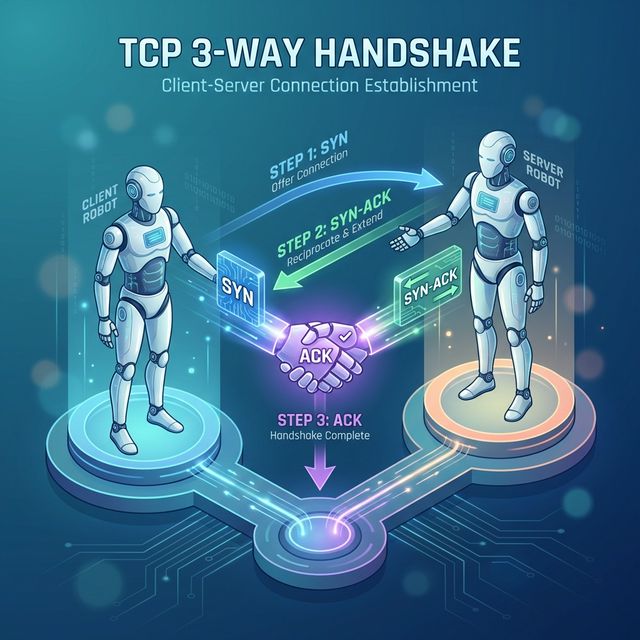
Client                          Server
   │                               │
   │──────── SYN (SEQ=100) ───────>│  Client: SYN_SENT
   │                               │  Server: SYN_RECEIVED
   │<─── SYN-ACK (SEQ=300,ACK=101)─│
   │                               │
   │──────── ACK (ACK=301) ───────>│  Both: ESTABLISHED
   │                               │
   │<═══════ DATA TRANSFER ═══════>│
Four-Way Termination (Connection Close):
Client                          Server
   │                               │
   │──────── FIN ─────────────────>│  Client: FIN_WAIT_1
   │                               │  Server: CLOSE_WAIT
   │<─────── ACK ─────────────────│  Client: FIN_WAIT_2
   │                               │
   │<─────── FIN ─────────────────│  Server: LAST_ACK
   │                               │
   │──────── ACK ─────────────────>│  Client: TIME_WAIT
   │                               │  Server: CLOSED
TCP States (from netstat/ss):
LISTEN      - Server waiting for connections
SYN_SENT    - Client sent SYN, waiting for SYN-ACK
SYN_RECV    - Server received SYN, sent SYN-ACK
ESTABLISHED - Connection active
FIN_WAIT_1  - Sent FIN, waiting for ACK
FIN_WAIT_2  - Received ACK for FIN, waiting for FIN
TIME_WAIT   - Waiting to ensure remote received final ACK
CLOSE_WAIT  - Received FIN, waiting for application to close
LAST_ACK    - Sent FIN, waiting for final ACK
CLOSED      - Connection terminated
Key insight: Many attacks target specific states. SYN floods exhaust SYN_RECV slots. TIME_WAIT accumulation can cause resource exhaustion.
5) TCP/IP Attacks and Defenses
SYN Flood Attack:
# Attacker sends many SYNs with spoofed source IPs
Attacker ──SYN──> Server (allocates resources, sends SYN-ACK)
         ──SYN──> Server (allocates more resources)
         ──SYN──> Server (connection table filling up)
         ...

# Server's SYN queue fills, can't accept legitimate connections
# Defense: SYN cookies (stateless SYN handling)
TCP Reset Attack:
# Attacker injects RST packet with correct sequence number
Client <══════> Server (established connection)

Attacker ──RST (spoofed)──> Server
# Connection terminated if sequence number is in window

# Defense: TCP sequence number randomization, encrypted connections
Session Hijacking:
# Attacker predicts or captures sequence numbers
1. Sniff traffic to learn sequence numbers
2. Inject packets with valid SEQ/ACK
3. Take over session

# Modern defense: Randomized initial sequence numbers (ISN)
Port Scanning Techniques:
# TCP Connect Scan (full handshake)
nmap -sT target
# Completes 3-way handshake - logged by target

# SYN Scan (half-open)
nmap -sS target
# Only sends SYN, analyzes response - stealthier

# Response analysis:
SYN-ACK = Port open
RST     = Port closed
Nothing = Filtered (firewall)
Defense Summary:
- SYN cookies for SYN flood protection
- Randomized ISNs prevent prediction
- Stateful firewalls track connections
- Rate limiting prevents scanning
- Encryption (TLS) prevents injection/hijacking
Key insight: Most TCP attacks require being on the network path (MitM) or require spoofing. Encryption defeats most injection attacks.
Real-World Context: TCP/IP in Security Operations
TCP/IP knowledge powers security operations:
Firewall Rules: Firewall rules specify source/destination IPs and ports. Understanding TCP flags lets you write rules like "allow established connections" (packets with ACK set) while blocking new inbound connections (SYN only).
Traffic Analysis: Unusual TCP flags indicate attacks or reconnaissance. A packet with SYN+FIN is invalid and indicates scanning or evasion. NULL packets (no flags) are used in stealth scans.
Incident Investigation: Packet captures reveal attack timelines. You can trace connection attempts, identify data exfiltration by volume, and spot C2 beacons by connection patterns.
MITRE ATT&CK Reference:
- T1046 - Network Service Discovery: TCP port scanning
- T1095 - Non-Application Layer Protocol: Raw TCP/IP manipulation
- T1571 - Non-Standard Port: Services on unusual ports
Key insight: Deep TCP/IP knowledge separates senior analysts from juniors. When you can read packets like text, investigations go much faster.
Guided Lab: TCP Handshake Analysis
Let's capture and dissect a TCP three-way handshake in detail.
Step 1: Capture a Clean Handshake
# Start capture filtering for a specific host
sudo tcpdump -i eth0 host example.com -w tcp_handshake.pcap &

# Generate a TCP connection
curl http://example.com

# Stop capture
sudo killall tcpdump
Step 2: Analyze in Wireshark
# Open capture
wireshark tcp_handshake.pcap

# Filter for TCP handshake
tcp.flags.syn == 1
Step 3: Examine Each Handshake Packet
Packet 1 - SYN:
Find and document:
- Source Port (ephemeral, high number)
- Destination Port (80)
- Sequence Number (initial, random)
- Flags: SYN=1, ACK=0
- Window Size
- TCP Options (MSS, Window Scale, SACK)
Packet 2 - SYN-ACK:
Find and document:
- Sequence Number (server's ISN)
- Acknowledgment Number (client's ISN + 1)
- Flags: SYN=1, ACK=1
- Server's Window Size
Packet 3 - ACK:
Find and document:
- Sequence Number (client's ISN + 1)
- Acknowledgment Number (server's ISN + 1)
- Flags: SYN=0, ACK=1
- Connection now ESTABLISHED
Step 4: Follow the Stream
# In Wireshark: Right-click packet > Follow > TCP Stream
# See the actual HTTP request/response
Step 5: Examine Connection Termination
# Filter for FIN packets
tcp.flags.fin == 1

# Document the four-way close sequence
Step 6: Reflection (mandatory)
- What is the purpose of random Initial Sequence Numbers?
- Why does the ACK number equal the other side's SEQ + 1?
- What would happen if a SYN-ACK never arrived?
- How could an attacker use knowledge of sequence numbers?
Week 3 Outcome Check
By the end of this week, you should be able to:
- Compare TCP/IP and OSI models
- Identify and explain IP header fields
- Identify and explain TCP header fields
- Describe the TCP three-way handshake
- Explain TCP connection states
- Recognize TCP/IP-based attacks and defenses
Next week: Network Addressing and Subnetting—dividing networks for organization and security.
🎯 Hands-On Labs (Free & Essential)
Inspect real TCP/IP traffic and services before moving to reading resources.
🎮 TryHackMe: Network Services
What you'll do: Explore common network services (DNS, FTP, SMB) and see how TCP/UDP are
used in practice.
Why it matters: Understanding TCP/IP means understanding the services built on top
of it.
Time estimate: 2-3 hours
📝 Lab Exercise: TCP Handshake Capture
Task: Capture a TCP three-way handshake with tcpdump or Wireshark and label SYN,
SYN/ACK, ACK.
Deliverable: Screenshot of the handshake + one paragraph explaining sequence
numbers.
Why it matters: Many attacks (SYN floods, spoofing) target TCP state.
Time estimate: 45-60 minutes
🏁 PicoCTF Practice: Forensics (Packet Challenges)
What you'll do: Analyze pcap files to identify TCP streams and extract basic evidence.
Why it matters: Packet analysis reinforces header fields and connection states.
Time estimate: 1-2 hours
💡 Lab Tip: Always note source/destination IPs and ports first. They tell you the story quickly.
Resources
Complete the required resources to build your foundation.
- RFC 793 - Transmission Control Protocol · 60-90 min · 50 XP · Resource ID: csy104_w3_r1 (Required)
- Cloudflare - SYN Flood Attack · 15-20 min · 50 XP · Resource ID: csy104_w3_r2 (Required)
- Nmap - Port Scanning Techniques · 30-45 min · 25 XP · Resource ID: csy104_w3_r3 (Optional)
Lab: TCP Flag Analysis and Scanning
Goal: Analyze different TCP scan types and understand their signatures in packet captures.
Linux Path
- Set up a target (use a VM or authorized test system):
# Start some services to scan sudo python3 -m http.server 80 & sudo python3 -m http.server 8080 & - Capture traffic while performing different scans:
# Terminal 1: Start capture sudo tcpdump -i lo -w scan_analysis.pcap # Terminal 2: TCP Connect scan nmap -sT localhost -p 80,8080,443 # TCP SYN scan (requires root) sudo nmap -sS localhost -p 80,8080,443 # NULL scan sudo nmap -sN localhost -p 80,8080,443 # FIN scan sudo nmap -sF localhost -p 80,8080,443 # XMAS scan sudo nmap -sX localhost -p 80,8080,443 - Analyze each scan type in Wireshark:
- What TCP flags are set?
- How does the target respond to open vs closed ports?
- Which scans complete the handshake?
- Create a comparison table of scan types
Windows Path
- Install Nmap for Windows
- Use Wireshark for capture (select appropriate interface)
- Run scans from Command Prompt (as Administrator for SYN scans)
- Follow same analysis steps
Deliverable (submit):
- PCAP file with all scan types
- Table comparing: Scan type, Flags sent, Open port response, Closed port response
- Screenshots of Wireshark showing each scan type
- One paragraph: Which scan is stealthiest and why?
Checkpoint Questions
- How many layers does the TCP/IP model have? Name them.
- What IP header field prevents packets from looping forever?
- What TCP flags are set in the second packet of a handshake?
- What is the purpose of TCP sequence numbers?
- How does a SYN flood attack work?
- What response indicates an open port during a SYN scan?
Weekly Reflection
Reflection Prompt (200-300 words):
This week you dove deep into TCP/IP—the protocols that power the Internet. You analyzed headers field by field and examined how attackers exploit protocol behaviors.
Reflect on these questions:
- TCP was designed for reliability, not security. What design decisions make sense for reliability but create security problems?
- How does understanding TCP states help you analyze firewall logs or connection issues?
- Consider the different port scanning techniques. What does each reveal about the trade-off between stealth and reliability?
- How has this deep dive changed how you think about network traffic?
A strong reflection will connect protocol design decisions to security implications and practical analysis skills.
Verified Resources & Videos
- TCP/IP Guide: TCP/IP Guide - Overview
- Packet Analysis: Wireshark - Working with Captured Packets
- MITRE ATT&CK: Network Service Discovery
TCP/IP mastery takes time—you'll revisit these concepts throughout your career. Every packet capture, every firewall rule, every network investigation builds on what you learned this week. Next week: IP addressing and subnetting for network segmentation.