Opening Framing: Why Addressing Matters for Security
IP addresses aren't just technical identifiers—they're the foundation of network security architecture. Subnetting divides networks into segments, creating boundaries where you place firewalls, monitor traffic, and contain breaches.
When an attacker compromises one system, proper segmentation limits what they can reach. A flat network (everything on one subnet) lets attackers move freely. A well-segmented network forces them through chokepoints where defenses can detect and block them.
This week covers IP addressing, subnetting math, and how to design network segments for security. These skills are essential for firewall configuration, network architecture, and incident containment.
Key insight: Network segmentation is one of the most effective security controls. Understanding addressing is prerequisite to implementing it properly.
1) IPv4 Addressing Fundamentals
IPv4 addresses are 32 bits, written as four octets in decimal:
IP Address: 192.168.1.100

Binary breakdown:
192      .168      .1        .100
11000000.10101000.00000001.01100100

32 bits total = 4 bytes = 4 octets
Each octet: 0-255 (8 bits)
Address Classes (Historical):
Class A: 1.0.0.0   - 126.255.255.255  (Large networks)
         First bit: 0
         Default mask: 255.0.0.0 (/8)

Class B: 128.0.0.0 - 191.255.255.255  (Medium networks)
         First bits: 10
         Default mask: 255.255.0.0 (/16)

Class C: 192.0.0.0 - 223.255.255.255  (Small networks)
         First bits: 110
         Default mask: 255.255.255.0 (/24)

Class D: 224.0.0.0 - 239.255.255.255  (Multicast)
Class E: 240.0.0.0 - 255.255.255.255  (Reserved)
Private Address Ranges (RFC 1918):
10.0.0.0    - 10.255.255.255   (10.0.0.0/8)     - Class A private
172.16.0.0  - 172.31.255.255   (172.16.0.0/12)  - Class B private
192.168.0.0 - 192.168.255.255  (192.168.0.0/16) - Class C private

These addresses:
- Not routable on the Internet
- Used inside organizations
- Require NAT to reach Internet
- Security benefit: Not directly attackable from outside
Key insight: Private addresses provide a layer of isolation. Attackers can't directly reach 192.168.1.100 from the Internet—they must first compromise something on the network boundary.
2) Subnet Masks and CIDR Notation
Subnet masks divide IP addresses into network and host portions:
IP Address:    192.168.1.100
Subnet Mask:   255.255.255.0

Binary:
IP:    11000000.10101000.00000001.01100100
Mask:  11111111.11111111.11111111.00000000
       |_______ Network _________|__Host__|

Network portion: 192.168.1.0
Host portion:    .100

CIDR Notation: 192.168.1.100/24
The /24 means 24 bits for network (255.255.255.0)
Common Subnet Masks:
CIDR    Subnet Mask       Hosts    Common Use
/8      255.0.0.0         16.7M    Large enterprise
/16     255.255.0.0       65,534   Campus network
/24     255.255.255.0     254      Department/floor
/25     255.255.255.128   126      Server farm
/26     255.255.255.192   62       Small team
/27     255.255.255.224   30       Point-to-point
/28     255.255.255.240   14       DMZ
/29     255.255.255.248   6        Router links
/30     255.255.255.252   2        Point-to-point
/32     255.255.255.255   1        Single host
Calculating Hosts per Subnet:
Formula: 2^(host bits) - 2 = usable hosts

Why -2?
- Network address (all host bits = 0): 192.168.1.0
- Broadcast address (all host bits = 1): 192.168.1.255

Example /24:
Host bits = 32 - 24 = 8
Usable hosts = 2^8 - 2 = 256 - 2 = 254
Key insight: Smaller subnets mean fewer hosts that can communicate directly. A /28 with 14 hosts limits lateral movement far more than a /16 with 65,534 hosts.
3) Subnetting: Dividing Networks
Subnetting takes a network and divides it into smaller segments:
Example: Divide 192.168.1.0/24 into 4 subnets
Original: 192.168.1.0/24 (254 hosts)

Need 4 subnets: 2^2 = 4, so borrow 2 bits
New mask: /24 + 2 = /26 (255.255.255.192)

Resulting subnets:
Subnet 1: 192.168.1.0/26   (hosts: .1-.62,    broadcast: .63)
Subnet 2: 192.168.1.64/26  (hosts: .65-.126,  broadcast: .127)
Subnet 3: 192.168.1.128/26 (hosts: .129-.190, broadcast: .191)
Subnet 4: 192.168.1.192/26 (hosts: .193-.254, broadcast: .255)

Each subnet: 2^6 - 2 = 62 usable hosts
IPv4 Address Structure:
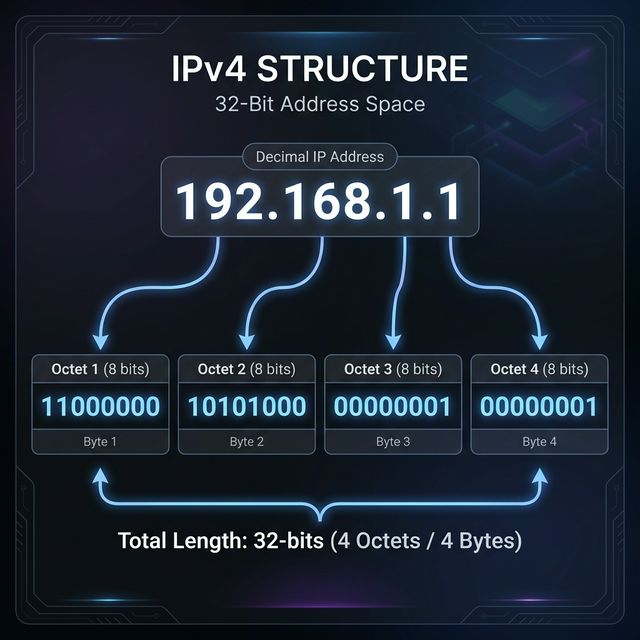
IP Address: 32 bits, expressed as 4 dotted decimal octets.

Binary breakdown: many subnets needed?
        - How many hosts per subnet?

Step 2: Calculate bits to borrow
        - Subnets: 2^n ≥ required subnets
        - Hosts: 2^h - 2 ≥ required hosts
Subnetting Process:
Step 1: Determine requirements
        - How many subnets needed?
        - How many hosts per subnet?

Step 2: Calculate bits to borrow
        - Subnets: 2^n ≥ required subnets
        - Hosts: 2^h - 2 ≥ required hosts

Step 3: Create new mask
        - Add borrowed bits to network portion

Step 4: Calculate subnet ranges
        - Block size = 256 - subnet mask octet
        - Each subnet starts at multiple of block size
Security Application:
Network design for a small company:

192.168.1.0/24 divided into:
├── 192.168.1.0/26   - Servers (62 hosts max)
├── 192.168.1.64/26  - Finance dept (62 hosts max)
├── 192.168.1.128/26 - Engineering (62 hosts max)
└── 192.168.1.192/26 - Guest WiFi (62 hosts max)

Firewall rules between subnets:
- Finance cannot reach Engineering
- Guest cannot reach any internal subnet
- Only Servers accessible from all internal
Key insight: Subnetting enables firewall rules. Without separate subnets, you can't easily block Finance from Engineering—they're all on the same network.
4) Special Addresses and Security Implications
Localhost and Loopback:
127.0.0.0/8 - Loopback range
127.0.0.1   - Localhost (most common)

Security implications:
- Traffic never leaves the host
- Binding to 127.0.0.1 = only local access
- Binding to 0.0.0.0 = all interfaces (exposed!)

# Dangerous: Database on all interfaces
mysql listening on 0.0.0.0:3306

# Safer: Database on localhost only
mysql listening on 127.0.0.1:3306
Broadcast Addresses:
Limited broadcast: 255.255.255.255
- Reaches all hosts on local network
- Not forwarded by routers

Directed broadcast: 192.168.1.255 (for 192.168.1.0/24)
- Targets specific subnet
- Can be forwarded (dangerous!)

Security risk: Smurf attack
- Send ICMP to broadcast with spoofed source
- All hosts reply to victim
- Amplification attack

Defense: Disable directed broadcast forwarding
Link-Local Addresses:
169.254.0.0/16 - APIPA (Automatic Private IP)

When DHCP fails:
- Windows/Mac auto-assign 169.254.x.x
- Indicates network configuration problem

Security implication:
- System may be misconfigured/isolated
- Can still communicate with other APIPA hosts
- May indicate DHCP attack or failure
Multicast:
224.0.0.0/4 - Multicast range

Common multicast addresses:
224.0.0.1   - All hosts on segment
224.0.0.2   - All routers
224.0.0.5   - OSPF routers
224.0.0.251 - mDNS

Security: Multicast can leak information
- Service discovery protocols broadcast presence
- Attackers can listen for device announcements
Key insight: Special addresses have special risks. 0.0.0.0 bindings expose services; broadcast enables amplification; link-local indicates problems.
5) Network Segmentation for Security
Segmentation is a core security architecture principle:
Segmentation Zones:
Typical enterprise zones:

┌─────────────────────────────────────────────────────┐
│                    INTERNET                          │
└───────────────────────┬─────────────────────────────┘
                        │
                   [Firewall]
                        │
┌───────────────────────┴─────────────────────────────┐
│                      DMZ                             │
│  Web servers, mail servers, public-facing services  │
│  192.168.1.0/24                                      │
└───────────────────────┬─────────────────────────────┘
                        │
                   [Firewall]
                        │
┌───────────────────────┼─────────────────────────────┐
│               INTERNAL NETWORK                       │
│  ┌─────────────┐ ┌─────────────┐ ┌─────────────┐   │
│  │   Users     │ │   Servers   │ │  Management │   │
│  │ 10.1.0.0/16 │ │ 10.2.0.0/16 │ │ 10.3.0.0/24 │   │
│  └─────────────┘ └─────────────┘ └─────────────┘   │
└─────────────────────────────────────────────────────┘
Zero Trust Principles:
Traditional model:
- Trust everything inside the perimeter
- Firewall at edge only
- Problem: Once inside, attacker moves freely

Zero Trust model:
- Never trust, always verify
- Micro-segmentation (tiny subnets)
- Authenticate every connection
- Assume breach has already happened

Implementation:
- Segment by function AND sensitivity
- Firewall between ALL segments
- Monitor east-west traffic (internal)
- Least privilege network access
The Concept of Borrowing: Subnetting works by "borrowing" bits from the Host portion to create a new Subnet portion.
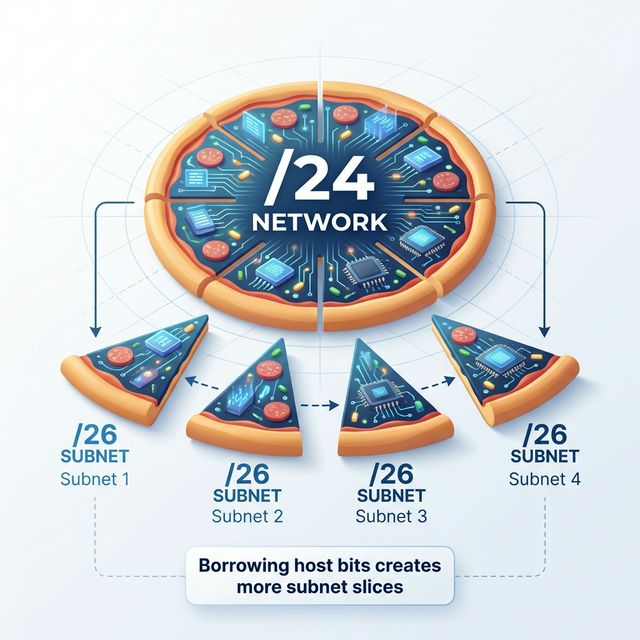
Segmentation Benefits:
- Contain breaches: Compromised host can't reach everything
- Reduce attack surface: Fewer exposed services per segment
- Simplify compliance: PCI data isolated to specific segment
- Enable monitoring: Traffic crossing segments is inspectable
- Support least privilege: Access only what's needed
Key insight: Network segmentation is as important as patching. A well-segmented network with old vulnerabilities may be safer than a flat network with everything patched.
Real-World Context: Addressing in Security Operations
IP addressing knowledge is used daily in security:
Firewall Rules: Every firewall rule specifies source and destination networks. Understanding CIDR lets you write efficient rules like "10.0.0.0/8 → 192.168.1.0/24" instead of listing individual IPs.
Log Analysis: When reviewing logs, you need to quickly identify whether an IP is internal (10.x, 172.16-31.x, 192.168.x) or external, and which segment it belongs to.
Incident Response: During a breach, understanding network segments helps determine blast radius. "They're in the DMZ— what can they reach from there?"
MITRE ATT&CK Reference:
- T1016 - System Network Configuration Discovery: Attackers enumerate IP configs
- T1018 - Remote System Discovery: Scanning subnets for targets
- T1599 - Network Boundary Bridging: Bypassing segmentation
Key insight: Attackers study your network architecture. You should know it better than they do.
Guided Lab: Subnetting Practice
Let's work through subnetting exercises and verify with real tools.
Step 1: Manual Subnetting Exercise
Given network: 172.16.0.0/16
Requirement: Create 8 subnets for different departments
# Calculate:
# Need 8 subnets: 2^3 = 8, borrow 3 bits
# New mask: /16 + 3 = /19
# Block size: 2^(32-19) = 2^13 = 8192 hosts per subnet

Subnet 1: 172.16.0.0/19    (172.16.0.1 - 172.16.31.254)
Subnet 2: 172.16.32.0/19   (172.16.32.1 - 172.16.63.254)
Subnet 3: 172.16.64.0/19   (172.16.64.1 - 172.16.95.254)
Subnet 4: 172.16.96.0/19   (172.16.96.1 - 172.16.127.254)
Subnet 5: 172.16.128.0/19  (172.16.128.1 - 172.16.159.254)
Subnet 6: 172.16.160.0/19  (172.16.160.1 - 172.16.191.254)
Subnet 7: 172.16.192.0/19  (172.16.192.1 - 172.16.223.254)
Subnet 8: 172.16.224.0/19  (172.16.224.1 - 172.16.255.254)
Step 2: Verify with ipcalc
# Install ipcalc
sudo apt install ipcalc

# Verify subnet calculations
ipcalc 172.16.0.0/19

# Output shows:
# Network, HostMin, HostMax, Broadcast, Hosts/Net
Step 3: Examine Your System's Configuration
# Linux
ip addr show
ip route show

# Identify:
# - Your IP address and subnet mask
# - What subnet are you on?
# - What is your broadcast address?
# - How many hosts possible on your subnet?
Step 4: Test Subnet Boundaries
# Ping your broadcast address (if allowed)
ping -b 192.168.1.255

# Scan your subnet
nmap -sn 192.168.1.0/24

# Note which hosts respond - these are your neighbors
Step 5: Reflection (mandatory)
- If 172.16.50.100/19 sends a packet to 172.16.60.100, does it need a router?
- What subnet is 172.16.100.50/19 on?
- Why would you use a /28 instead of a /24 for a DMZ with 10 servers?
- How does subnetting support the principle of least privilege?
Week 4 Outcome Check
By the end of this week, you should be able to:
- Convert between decimal and binary IP addresses
- Identify address classes and private ranges
- Calculate hosts per subnet from CIDR notation
- Subnet a network into required number of segments
- Identify network, broadcast, and usable host addresses
- Design network segmentation for security
Next week: Ethernet, Switching, and VLANs—Layer 2 technologies that implement segmentation at the local network level.
🎯 Hands-On Labs (Free & Essential)
Practice subnetting and segmentation before moving to reading resources.
🎮 TryHackMe: Intro to Networking (Addressing Focus)
What you'll do: Revisit IP addressing and routing fundamentals with hands-on exercises.
Why it matters: Subnetting is built on solid IP addressing knowledge.
Time estimate: 1-1.5 hours
📝 Lab Exercise: Subnetting Drill Sheet
Task: Solve 10 subnetting problems (find network/broadcast/host range).
Deliverable: Completed table with CIDR, mask, usable hosts, first/last IP.
Why it matters: Fast subnetting is essential for firewall rules and segmentation
design.
Time estimate: 45-60 minutes
🏁 PicoCTF Practice: General Skills (Netcat + Sockets)
What you'll do: Complete beginner challenges that require basic networking commands and
socket interaction.
Why it matters: Understanding sockets helps you reason about ports, services, and
segmentation.
Time estimate: 1-2 hours
💡 Lab Tip: When you design a subnet, write down the threat it contains. Segmentation is a security control, not just math.
Resources
Complete the required resources to build your foundation.
- Cisco - IP Addressing and Subnetting · 45-60 min · 50 XP · Resource ID: csy104_w4_r1 (Required)
- SANS - Network Segmentation Best Practices · 30-45 min · 50 XP · Resource ID: csy104_w4_r2 (Required)
- Online IP Subnet Calculator · Interactive tool · 25 XP · Resource ID: csy104_w4_r3 (Optional)
Lab: Network Segmentation Design
Goal: Design a segmented network for a small company and document the security benefits.
Scenario
You've been given 10.50.0.0/16 for a company with:
- 50 employees in Sales
- 30 employees in Engineering
- 10 employees in Finance (handles sensitive data)
- 5 servers (web, database, file, email, backup)
- Guest WiFi network (up to 100 guests)
- Management network for network devices (10 devices)
Requirements
- Design subnets for each group with appropriate sizes
- Leave room for 50% growth in each segment
- Document:
- Subnet address and CIDR notation
- Usable host range
- Broadcast address
- Gateway (first usable IP)
- Create a network diagram showing segments
- Write firewall rules (in plain English) for:
- Guest WiFi isolation
- Finance protection
- Server access control
Linux/Windows Path (same for both)
Use ipcalc or online calculator to verify your subnets.
Deliverable (submit):
- Subnet allocation table
- Network diagram (hand-drawn or digital)
- Firewall rules document
- One paragraph: What breach scenarios does this design mitigate?
Checkpoint Questions
- How many usable hosts are in a /26 network?
- What are the three private IP address ranges?
- What is the broadcast address for 192.168.10.0/25?
- If you need 500 hosts, what is the smallest subnet mask you can use?
- Why is binding a service to 0.0.0.0 a security risk?
- What is the security benefit of network segmentation?
Weekly Reflection
Reflection Prompt (200-300 words):
This week you learned IP addressing and subnetting—skills that directly enable network segmentation, one of the most important security controls available.
Reflect on these questions:
- Before this week, did you think of IP addresses as security-relevant? How has that changed?
- Think of a network you use (home, work, school). How is it segmented? How could segmentation be improved?
- The "flat network" is common in small organizations. What risks does this create, and why do organizations accept them?
- How does understanding subnetting help you read firewall rules and security logs?
A strong reflection will connect addressing concepts to practical security architecture decisions.
Verified Resources & Videos
- Subnetting Practice: Subnetting Practice - Interactive Exercises
- Zero Trust: NIST - Zero Trust Architecture (SP 800-207)
- MITRE ATT&CK: System Network Configuration Discovery
Subnetting math becomes automatic with practice. The real skill is applying it to security architecture—designing networks that contain breaches and enable monitoring. Next week: Layer 2 technologies (Ethernet, switches, VLANs) that implement segmentation.