Opening Framing: The Local Network
Before packets reach routers and traverse the Internet, they travel across local networks. Ethernet and switches operate at Layer 2, delivering frames between devices on the same network segment.
Layer 2 is often overlooked in security discussions, but it's where some of the most dangerous attacks occur. An attacker on your local network can intercept traffic, impersonate devices, and bypass IP-based security controls—all without touching Layer 3.
This week covers Ethernet fundamentals, how switches work, and VLANs— the primary tool for Layer 2 segmentation. You'll learn both the attacks and the defenses that make local networks secure.
Key insight: Layer 2 attacks require local access, but that access is easier to get than you think—compromised hosts, rogue devices, or malicious insiders all operate at Layer 2.
1) Ethernet Fundamentals
Ethernet is the dominant LAN technology. It uses MAC addresses for local delivery:
MAC Address: 00:1A:2B:3C:4D:5E

Structure:
00:1A:2B = OUI (Organizationally Unique Identifier) - manufacturer
3C:4D:5E = NIC-specific identifier

Special addresses:
FF:FF:FF:FF:FF:FF = Broadcast (reaches all devices)
01:xx:xx:xx:xx:xx = Multicast (first bit = 1)
Ethernet Frame Structure:
┌──────────┬──────────┬──────┬─────────────────┬─────┐
│ Preamble │ Dest MAC │ Src  │ Type/ │ Payload │ FCS │
│ (8)      │ (6)      │ MAC  │ Len   │ (46-1500)│ (4) │
│          │          │ (6)  │ (2)   │          │     │
└──────────┴──────────┴──────┴───────┴──────────┴─────┘

Type/Length field values:
0x0800 = IPv4
0x0806 = ARP
0x86DD = IPv6
0x8100 = VLAN tagged
How Ethernet Delivery Works:
1. Host A wants to send to Host B (same LAN)
2. Host A needs Host B's MAC address
3. Host A sends ARP request: "Who has 192.168.1.50?"
4. Host B replies: "192.168.1.50 is at 00:1A:2B:3C:4D:5E"
5. Host A caches this in ARP table
6. Host A sends Ethernet frame to 00:1A:2B:3C:4D:5E
7. Switch forwards frame only to Host B's port
Key insight: ARP has no authentication. Any device can claim any IP address, which enables ARP spoofing attacks.
2) Switches: Intelligent Forwarding
Switches replaced hubs by intelligently forwarding frames only to the destination port:
Hub (old):
- Receives frame, broadcasts to ALL ports
- Every device sees all traffic
- Easy to sniff, no segmentation

Switch (modern):
- Learns MAC addresses per port
- Forwards frames only to destination port
- Creates separate collision domains
- Reduces sniffing opportunity
MAC Address Table (CAM Table):
Switch learns by observing source MACs:

Port 1: 00:1A:2B:3C:4D:5E
Port 2: 00:AA:BB:CC:DD:EE
Port 3: 00:11:22:33:44:55
Port 4: (empty - no traffic yet)

When frame arrives for 00:AA:BB:CC:DD:EE:
→ Switch looks up table
→ Forwards only to Port 2

When frame arrives for unknown MAC:
→ Switch floods to all ports (like a hub)
→ This is exploitable!
Switch Security Features:
# Port Security - limit MACs per port
switchport port-security maximum 2
switchport port-security violation shutdown

# DHCP Snooping - prevent rogue DHCP servers
ip dhcp snooping
ip dhcp snooping vlan 10

# Dynamic ARP Inspection - validate ARP
ip arp inspection vlan 10

# 802.1X - authenticate devices before access
dot1x port-control auto
Key insight: Switches provide some security over hubs, but they're not security devices. Without additional features enabled, they're vulnerable to Layer 2 attacks.
3) Layer 2 Attacks
ARP Spoofing (ARP Poisoning):
Normal ARP:
Victim ARP table: Gateway 192.168.1.1 → AA:AA:AA:AA:AA:AA

Attack:
Attacker sends gratuitous ARP:
"192.168.1.1 is at EV:IL:EV:IL:EV:IL" (attacker's MAC)

Poisoned ARP table:
Gateway 192.168.1.1 → EV:IL:EV:IL:EV:IL

Result:
- Victim sends all gateway traffic to attacker
- Attacker forwards to real gateway (MitM)
- Attacker sees all victim's traffic

Tools: arpspoof, ettercap, bettercap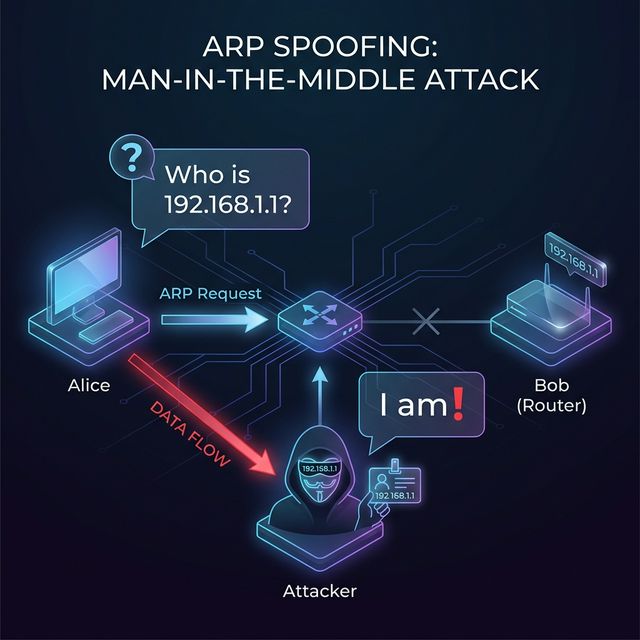
MAC Flooding:
Attack:
- Send thousands of frames with random source MACs
- Switch CAM table fills up
- Switch can't learn new MACs
- Switch falls back to hub mode (floods all traffic)

Result: Attacker can sniff all traffic on segment

Tool: macof (part of dsniff)

Defense: Port security limiting MACs per port
VLAN Hopping:
Switch Spoofing:
- Attacker pretends to be a switch
- Negotiates trunk port (carries all VLANs)
- Gains access to all VLANs

Double Tagging:
- Attacker on VLAN 10 sends frame with two 802.1Q tags
- Outer tag: VLAN 10 (native VLAN)
- Inner tag: VLAN 20 (target VLAN)
- First switch strips outer tag
- Second switch sees inner tag, delivers to VLAN 20

Defense:
- Disable DTP (no auto trunking)
- Set native VLAN to unused VLAN
- Explicitly configure access ports
DHCP Attacks:
DHCP Starvation:
- Request all available IP addresses
- Legitimate clients can't get addresses
- DoS attack

Rogue DHCP:
- Set up fake DHCP server
- Provide attacker-controlled gateway
- MitM all client traffic

Defense: DHCP snooping - only trusted ports can respond
Key insight: Layer 2 attacks are devastating because they often bypass Layer 3 security. A firewall can't stop ARP spoofing on the same subnet.
4) VLANs: Virtual Segmentation
VLANs (Virtual LANs) create logical network segments on a single physical switch:
Physical switch with VLANs:

Port 1-4:   VLAN 10 (Sales)
Port 5-8:   VLAN 20 (Engineering)
Port 9-12:  VLAN 30 (Finance)
Port 13-16: VLAN 40 (Servers)

Behavior:
- VLAN 10 devices can only reach VLAN 10
- Traffic between VLANs requires a router
- Each VLAN is a separate broadcast domain
802.1Q VLAN Tagging:
Standard Ethernet frame:
[Dest MAC][Src MAC][Type][Payload][FCS]

802.1Q tagged frame:
[Dest MAC][Src MAC][0x8100][VLAN Tag][Type][Payload][FCS]
                    └─────────────┘
                    4-byte VLAN header

VLAN Tag contains:
- Priority (3 bits) - QoS
- CFI (1 bit) - format indicator
- VLAN ID (12 bits) - 0-4095 VLANs possible
Access vs Trunk Ports:
Access Port:
- Belongs to single VLAN
- Frames untagged (device doesn't know about VLAN)
- Used for end devices (computers, phones)

Trunk Port:
- Carries multiple VLANs
- Frames tagged with VLAN ID
- Used between switches and to routers
- Native VLAN: untagged traffic on trunk

Configuration example:
# Access port
switchport mode access
switchport access vlan 10

# Trunk port
switchport mode trunk
switchport trunk allowed vlan 10,20,30
Inter-VLAN Routing:
VLANs are isolated - need Layer 3 to communicate:

Option 1: Router-on-a-stick
- Single router interface, multiple subinterfaces
- Each subinterface = one VLAN
- Router handles inter-VLAN traffic

Option 2: Layer 3 switch
- Switch with routing capability
- SVIs (Switched Virtual Interfaces) per VLAN
- Faster than external router

Security benefit:
- All inter-VLAN traffic passes through router/firewall
- Can apply ACLs between VLANs
- Traffic is inspectable
Key insight: VLANs provide segmentation without separate physical switches. But remember—VLANs are a Layer 2 construct; if someone gains trunk access, they reach all VLANs.
5) Layer 2 Security Best Practices
Port Security Configuration:
# Limit to 1 MAC per port, shutdown on violation
interface GigabitEthernet0/1
  switchport mode access
  switchport port-security
  switchport port-security maximum 1
  switchport port-security violation shutdown
  switchport port-security mac-address sticky
DHCP Snooping:
# Enable DHCP snooping
ip dhcp snooping
ip dhcp snooping vlan 10,20,30

# Trust only uplink to DHCP server
interface GigabitEthernet0/24
  ip dhcp snooping trust
Dynamic ARP Inspection:
# Requires DHCP snooping for binding table
ip arp inspection vlan 10,20,30

# Trust uplink
interface GigabitEthernet0/24
  ip arp inspection trust
VLAN Best Practices:
1. Change native VLAN from default (VLAN 1)
   switchport trunk native vlan 999

2. Disable unused ports and put in dead VLAN
   switchport access vlan 666
   shutdown

3. Disable DTP (auto trunking)
   switchport nonegotiate

4. Explicitly configure access vs trunk
   switchport mode access  (not "dynamic")

5. Prune unnecessary VLANs from trunks
   switchport trunk allowed vlan 10,20,30

6. Use private VLANs for isolation within VLAN
802.1X Network Access Control:
# Device must authenticate before getting access
# Works with RADIUS server

interface GigabitEthernet0/1
  dot1x port-control auto
  authentication host-mode single-host

Benefits:
- Only authorized devices connect
- Can assign VLAN based on user/device
- Logging of who connected where/when
Key insight: Layer 2 security requires explicit configuration. Switches ship in convenient-but-insecure defaults. Harden every switch port.
Real-World Context: Layer 2 in Security Operations
Layer 2 knowledge is essential for security work:
Incident Response: When investigating a compromised host, check the switch port. Was port security triggered? Are there unexpected MACs? Did the attacker attempt ARP spoofing? Switch logs tell the Layer 2 story.
Network Forensics: Packet captures at Layer 2 show ARP traffic, VLAN tags, and MAC addresses. Analyzing ARP patterns reveals poisoning attempts. VLAN tags show if traffic is escaping intended segments.
Penetration Testing: Layer 2 attacks are standard pen test techniques. ARP spoofing to MitM, VLAN hopping to reach restricted segments, MAC spoofing to bypass port security—all test Layer 2 controls.
MITRE ATT&CK Reference:
- T1557.002 - ARP Cache Poisoning: MitM via ARP spoofing
- T1200 - Hardware Additions: Rogue devices on network
- T1599.001 - Network Boundary Bridging: VLAN hopping
Key insight: Many organizations focus on perimeter security while ignoring Layer 2. An attacker who gets inside finds an easy path to lateral movement.
Guided Lab: ARP Analysis and VLAN Observation
Let's examine ARP behavior and understand how Layer 2 operates.
Step 1: View Your ARP Table
# Linux
ip neigh show
# or
arp -a

# Windows
arp -a

# Note entries:
# - IP address
# - MAC address
# - State (REACHABLE, STALE, etc.)
Step 2: Capture ARP Traffic
# Start capture filtering for ARP only
sudo tcpdump -i eth0 arp -w arp_capture.pcap &

# Clear ARP cache to force new requests
sudo ip neigh flush all

# Generate traffic to trigger ARP
ping -c 3 [gateway IP]
ping -c 3 [another host on your LAN]

# Stop capture
sudo killall tcpdump
Step 3: Analyze ARP in Wireshark
# Open capture
wireshark arp_capture.pcap

# Examine ARP packets:
# - ARP Request: "Who has X.X.X.X? Tell Y.Y.Y.Y"
# - ARP Reply: "X.X.X.X is at AA:BB:CC:DD:EE:FF"

# Note the fields:
# - Opcode (1=request, 2=reply)
# - Sender MAC/IP
# - Target MAC/IP
Step 4: Observe Gratuitous ARP
# A gratuitous ARP announces IP-to-MAC mapping
# Often seen at system startup or IP changes

# Filter in Wireshark:
arp.isgratuitous == 1

# Security note: Attackers send gratuitous ARPs
# to poison caches without waiting for requests
Step 5: Check for VLAN Tags (if available)
# If you have access to tagged traffic:
# Filter in Wireshark:
vlan

# Or look for EtherType 0x8100

# On Linux, check VLAN interfaces:
ip -d link show
Step 6: Reflection (mandatory)
- How long do ARP entries stay in the cache on your system?
- What could an attacker do with the ability to send ARP replies?
- Why doesn't ARP have authentication?
- How would you detect ARP spoofing on your network?
Week 5 Outcome Check
By the end of this week, you should be able to:
- Explain Ethernet frame structure and MAC addressing
- Describe how switches learn and forward traffic
- Identify and explain Layer 2 attacks (ARP spoofing, MAC flooding, VLAN hopping)
- Configure and explain VLANs for segmentation
- Differentiate access and trunk ports
- Implement Layer 2 security controls
Next week: Routing and WAN Technologies—how packets traverse networks and reach distant destinations.
🎯 Hands-On Labs (Free & Essential)
Practice Layer 2 traffic analysis and switching concepts before moving to reading resources.
🎮 TryHackMe: Wireshark 101 (Ethernet + ARP)
What you'll do: Capture ARP traffic and inspect Ethernet headers and MAC addresses.
Why it matters: Layer 2 attacks rely on ARP and MAC behavior—seeing it live makes
it real.
Time estimate: 1.5-2 hours
📝 Lab Exercise: ARP Table + VLAN Sketch
Task: Inspect your ARP cache and sketch a simple VLAN layout for a small office (users,
servers, guest Wi-Fi).
Deliverable: ARP table screenshot + VLAN diagram with subnet ranges.
Why it matters: VLANs reduce lateral movement and define trust boundaries.
Time estimate: 45-60 minutes
🏁 PicoCTF Practice: Forensics (LAN Artifacts)
What you'll do: Solve beginner forensics challenges that involve basic network
artifacts.
Why it matters: Layer 2 traces often show up in incident investigations.
Time estimate: 1-2 hours
💡 Lab Tip: If ARP traffic spikes unexpectedly, ask why. ARP storms are a common sign of misconfigurations or attacks.
Resources
Complete the required resources to build your foundation.
- Cisco - Port Security Configuration Guide · 30-45 min · 50 XP · Resource ID: csy104_w5_r1 (Required)
- Practical Networking - VLANs Explained · 30-45 min · 50 XP · Resource ID: csy104_w5_r2 (Required)
- Kali - Ettercap (ARP Spoofing Tool) · 20-30 min · 25 XP · Resource ID: csy104_w5_r3 (Optional)
Lab: Layer 2 Attack Detection
Goal: Detect Layer 2 attacks in packet captures and understand their signatures.
Linux Path
- Download or create packet captures with Layer 2 anomalies:
# Option 1: Use sample PCAPs from Wireshark wiki # Option 2: Create your own (in isolated lab only!) # Simulate ARP anomalies (LAB ONLY - isolated network) # Install arpwatch to detect ARP changes sudo apt install arpwatch sudo arpwatch -i eth0 - Analyze ARP patterns for spoofing indicators:
# In Wireshark, look for: # - Multiple IPs claiming same MAC # - MAC address changes for same IP # - Gratuitous ARPs from unexpected sources # - ARP replies without requests # Useful filters: arp.duplicate-address-detected arp.opcode == 2 # All replies - Look for MAC flooding indicators:
# Signs of MAC flooding: # - Many different source MACs from one port # - Switch flooding traffic to all ports # - Unusual number of unknown unicast frames - Check for VLAN hopping attempts:
# Look for double-tagged frames
# Filter: vlan.id and check for nested tags
# Frames shouldn't have multiple VLAN tags in normal traffic
Windows Path
- Use Wireshark for all packet analysis
- Download sample PCAPs with ARP anomalies
- Apply same filters and analysis
Deliverable (submit):
- Screenshots of ARP table from your system
- Wireshark analysis showing ARP request/reply pairs
- Document describing indicators of:
- ARP spoofing
- MAC flooding
- VLAN hopping
- One paragraph: How would you monitor for these attacks in production?
Checkpoint Questions
- What is the broadcast MAC address?
- How does a switch learn which MAC is on which port?
- What happens when a switch's CAM table is full?
- What is the difference between an access port and a trunk port?
- How does ARP spoofing enable a man-in-the-middle attack?
- What is the purpose of 802.1X authentication?
Weekly Reflection
Reflection Prompt (200-300 words):
This week you explored Layer 2—the local network layer where Ethernet and switches operate. You learned both the attacks that target Layer 2 and the defenses that protect it.
Reflect on these questions:
- Why do you think Layer 2 security is often neglected compared to firewalls and perimeter security?
- Consider a scenario where an attacker has physical access to your office. What Layer 2 attacks become possible?
- VLANs provide segmentation, but what are their limitations as a security control?
- How does understanding Layer 2 attacks change your perspective on "trusted" internal networks?
A strong reflection will connect Layer 2 vulnerabilities to real-world threat scenarios and defense strategies.
Verified Resources & Videos
- ARP Spoofing: Veracode - ARP Spoofing Explained
- VLAN Security: Cisco - VLAN Security Best Practices
- MITRE ATT&CK: ARP Cache Poisoning (T1557.002)
Layer 2 is the foundation of local network communication. Attackers who gain local access exploit Layer 2 weaknesses to expand their reach. Proper switch hardening and VLAN design are essential defenses. Next week: routing and how packets traverse WANs.