Opening Framing: The Internet's Road Map
When a packet leaves your network, how does it find its destination across the globe? Routers make forwarding decisions, passing packets hop by hop until they arrive. The Internet is a network of networks, connected by routing protocols that determine the best path.
Routing is both fascinating and dangerous from a security perspective. Attackers who can manipulate routing can redirect traffic through their systems, enabling interception at scale. BGP hijacks have redirected entire countries' traffic through adversary networks.
This week covers routing fundamentals, key protocols, and the security implications of how packets traverse wide area networks.
Key insight: Routing protocols were designed for cooperation, not adversarial environments. Trust in routing announcements has been exploited repeatedly.
1) Routing Fundamentals
Routers connect different networks and make forwarding decisions based on routing tables:
Router Function:
1. Receive packet on one interface
2. Examine destination IP address
3. Look up routing table for best match
4. Forward packet out appropriate interface
5. Decrement TTL (drop if TTL=0)

Key difference from switches:
- Switches forward based on MAC (Layer 2)
- Routers forward based on IP (Layer 3)
- Routers connect different networks
- Routers don't forward broadcasts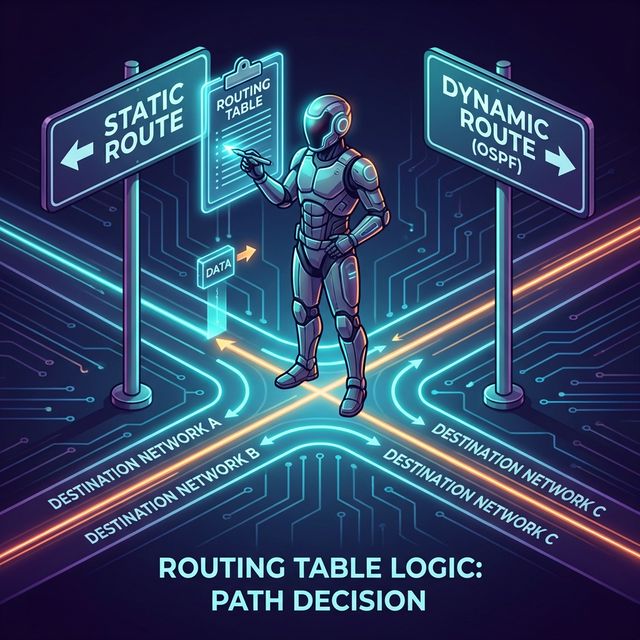
Routing Table Structure:
# Linux routing table
ip route show

default via 192.168.1.1 dev eth0
192.168.1.0/24 dev eth0 proto kernel scope link src 192.168.1.100
10.0.0.0/8 via 192.168.1.254 dev eth0

# Reading the table:
# - Destination network
# - Next hop (gateway) or direct connection
# - Interface to use
# - Metric (preference when multiple routes exist)
Longest Prefix Match:
When multiple routes match, most specific wins:

Routes in table:
  0.0.0.0/0      → 192.168.1.1 (default)
  10.0.0.0/8     → 192.168.1.254
  10.1.0.0/16    → 192.168.1.253
  10.1.1.0/24    → 192.168.1.252

Packet to 10.1.1.50:
  Matches: /0, /8, /16, /24
  Winner: 10.1.1.0/24 (longest match = most specific)
  Next hop: 192.168.1.252
Key insight: Understanding routing tables helps you trace packet paths and identify where traffic might be misdirected.
2) Static vs. Dynamic Routing
Static Routing:
# Manually configured routes
ip route add 10.2.0.0/16 via 192.168.1.254

Pros:
- Simple, predictable
- No protocol overhead
- Full administrator control
- No route manipulation attacks

Cons:
- Doesn't adapt to failures
- Doesn't scale (many networks = many routes)
- Manual updates required

Security use:
- Small networks
- Stub networks with one exit
- When you don't trust dynamic routing
Dynamic Routing:
Routers exchange information and calculate best paths

Pros:
- Adapts to network changes
- Scales to large networks
- Automatic failover

Cons:
- Protocol complexity
- Vulnerable to route injection
- Can be manipulated by attackers

Types:
- Interior Gateway Protocols (IGP): Within an organization
  - OSPF, EIGRP, RIP
- Exterior Gateway Protocol (EGP): Between organizations
  - BGP (Border Gateway Protocol)
Routing Protocol Comparison:
Protocol  Type   Algorithm      Use Case
────────────────────────────────────────────
RIP       IGP    Distance-Vector  Small networks, legacy
OSPF      IGP    Link-State       Enterprise networks
EIGRP     IGP    Hybrid           Cisco networks
BGP       EGP    Path-Vector      Internet backbone
Key insight: Dynamic routing is powerful but introduces attack surface. An attacker who can inject routes controls traffic flow.
3) BGP: The Internet's Routing Protocol
BGP (Border Gateway Protocol) connects autonomous systems (AS)— the large networks that form the Internet:
Autonomous System (AS):
- Network under single administrative control
- Identified by AS Number (ASN)
- Examples: ISPs, large enterprises, cloud providers

BGP Basics:
- Routers exchange "announcements" of reachable networks
- Each announcement includes AS path (route history)
- Routers choose best path based on policies
BGP Route Selection:
BGP considers (in order):
1. Highest local preference
2. Shortest AS path
3. Lowest origin type
4. Lowest MED (Multi-Exit Discriminator)
5. eBGP over iBGP
6. Lowest IGP metric to next hop
7. Oldest route
8. Lowest router ID

Simplified: Prefer routes with fewer AS hops
BGP Hijacking:
Attack: Announce someone else's IP prefix

Scenario:
- Victim owns 203.0.113.0/24
- Attacker announces 203.0.113.0/24 from their AS
- Or more specific: 203.0.113.0/25 and 203.0.113.128/25
- Internet routers accept the announcement
- Traffic flows to attacker instead of victim

Real incidents:
- 2018: Traffic to Amazon DNS hijacked for crypto theft
- 2017: Russian AS hijacked major financial sites
- 2008: Pakistan Telecom hijacked YouTube globally

Why it works:
- BGP has no built-in authentication
- Routers trust announcements from peers
- More specific routes always win
BGP Security Measures:
RPKI (Resource Public Key Infrastructure):
- Cryptographically signed route origins
- Verifies ASN is authorized to announce prefix
- Adoption growing but not universal

BGP Route Filtering:
- Only accept expected prefixes from peers
- Reject announcements for your own space
- Limit prefix length (/24 max common)

BGPsec:
- Cryptographic path validation
- Not widely deployed yet

Monitoring:
- BGP monitoring services alert on hijacks
- Compare expected vs. actual routes
BGP Hijacking:
Attack: Announce someone else's IP prefix

Scenario:
- Victim owns 203.0.113.0/24
- Attacker announces 203.0.113.0/24 from their AS
- Or more specific: 203.0.113.0/25 and 203.0.113.128/25
- Internet routers accept the announcement
- Traffic flows to attacker instead of victim

Real incidents:
- 2018: Traffic to Amazon DNS hijacked for crypto theft
- 2017: Russian AS hijacked major financial sites
- 2008: Pakistan Telecom hijacked YouTube globally

Why it works:
- BGP has no built-in authentication
- Routers trust announcements from peers
- More specific routes always win
4) Traceroute: Mapping Packet Paths
Traceroute reveals the path packets take across networks:
# Linux
traceroute google.com

# Windows
tracert google.com

# Output:
 1  192.168.1.1 (192.168.1.1)  1.234 ms
 2  10.0.0.1 (10.0.0.1)  12.567 ms
 3  isp-router.example.net  15.890 ms
 4  core-router.backbone.net  25.123 ms
 5  google-peer.backbone.net  30.456 ms
 6  142.250.xxx.xxx  35.789 ms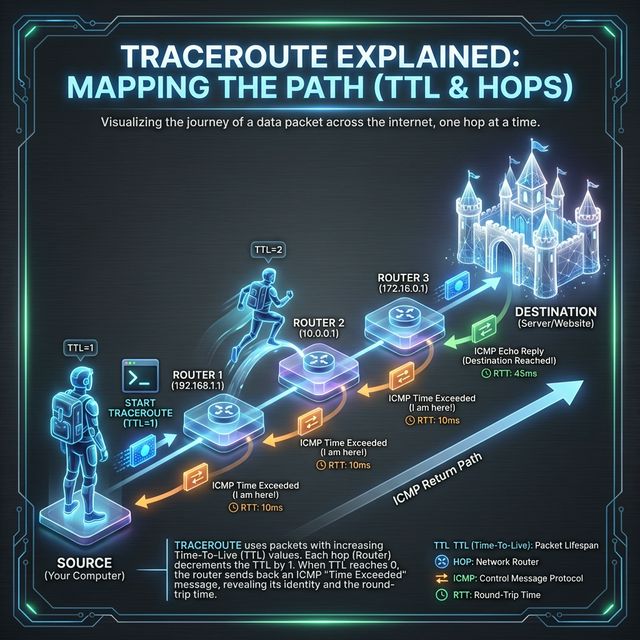
How Traceroute Works:
Uses TTL (Time To Live) field:

1. Send packet with TTL=1
   → First router decrements to 0, sends ICMP Time Exceeded
   → We learn first hop

2. Send packet with TTL=2
   → First router decrements to 1, forwards
   → Second router decrements to 0, sends ICMP Time Exceeded
   → We learn second hop

3. Continue until destination reached or max hops

Variations:
- ICMP traceroute (Windows default)
- UDP traceroute (Linux default)
- TCP traceroute (bypasses some filters)
Security Applications:
Legitimate uses:
- Troubleshooting connectivity issues
- Verifying traffic path
- Detecting routing changes
- Identifying network topology

Attacker uses:
- Mapping network infrastructure
- Identifying firewall locations
- Finding alternative paths
- Reconnaissance before attack

Defensive considerations:
- Many networks filter ICMP
- May show incomplete paths
- Asterisks (*) indicate no response
- Can reveal internal network structure
Key insight: Traceroute is a reconnaissance tool for both defenders and attackers. Know what it reveals about your network.
5) WAN Technologies and VPNs
WANs connect geographically dispersed locations:
Traditional WAN Technologies:
Leased Lines:
- Dedicated point-to-point connection
- Guaranteed bandwidth
- Expensive, inflexible

MPLS (Multiprotocol Label Switching):
- Provider-managed virtual circuits
- Traffic isolation between customers
- QoS capabilities
- Being replaced by SD-WAN

Metro Ethernet:
- Ethernet over fiber in metro areas
- Scalable bandwidth
- Common for data center connectivity
VPNs (Virtual Private Networks):
Site-to-Site VPN:
- Connects entire networks
- Usually IPsec tunnels
- Encrypts all traffic between sites
- Router or firewall terminates tunnel

Remote Access VPN:
- Individual users connect to network
- SSL/TLS VPN or IPsec
- Client software on endpoint
- Used for remote work

IPsec Components:
- IKE (Internet Key Exchange): Negotiates keys
- ESP (Encapsulating Security Payload): Encrypts data
- AH (Authentication Header): Integrity only (rare)

Modes:
- Transport: Encrypts payload only
- Tunnel: Encrypts entire original packet
SD-WAN (Software-Defined WAN):
Modern approach to WAN:
- Uses commodity Internet + intelligence
- Centralized control plane
- Application-aware routing
- Encrypted tunnels between sites

Security benefits:
- Traffic encryption by default
- Microsegmentation capabilities
- Centralized policy management
- Visibility into application traffic

Security concerns:
- New attack surface (control plane)
- Cloud management dependency
- Encryption doesn't prevent all attacks
Key insight: WAN encryption (VPNs) protects data in transit but doesn't protect endpoints. Compromised site = compromised VPN access.
Real-World Context: Routing in Security Operations
Routing knowledge applies across security domains:
Threat Intelligence: BGP hijack monitoring is part of threat intelligence. Services track route announcements and alert when your prefixes appear from unexpected ASes. Major hijacks make security news.
Incident Response: During incidents, traceroute helps determine if traffic is taking expected paths. Unexpected routes might indicate compromise or hijacking. VPN logs show which sites/users accessed resources.
Network Forensics: Router logs reveal traffic patterns across WAN links. NetFlow data from routers shows connection metadata—what talked to what, how much data transferred.
MITRE ATT&CK Reference:
- T1557.001 - LLMNR/NBT-NS Poisoning: Local routing manipulation
- T1090 - Proxy: Routing traffic through intermediaries
- T1572 - Protocol Tunneling: Hiding traffic in legitimate protocols
Key insight: Understanding routing helps you trace attacks across network boundaries and understand how adversaries redirect traffic.
Guided Lab: Routing Analysis
Let's examine routing tables and trace packet paths across networks.
Step 1: Examine Your Routing Table
# Linux
ip route show
# or
netstat -rn

# Windows
route print

# Identify:
# - Default gateway
# - Directly connected networks
# - Any static routes
Step 2: Trace Routes to Different Destinations
# Trace to major sites
traceroute google.com
traceroute cloudflare.com
traceroute 8.8.8.8

# Windows
tracert google.com

# Compare paths:
# - Do they share common hops?
# - Where do paths diverge?
# - How many hops to reach destination?
Step 3: Use MTR for Continuous Analysis
# Install mtr (combines ping + traceroute)
sudo apt install mtr

# Run continuous trace
mtr google.com

# Observe:
# - Packet loss at each hop
# - Latency variation
# - Route stability
Step 4: Examine BGP Data (Public Tools)
# Use online BGP looking glasses:
# - https://bgp.he.net/
# - https://www.ripe.net/analyse/internet-measurements/routing-information-service-ris

# Look up:
# - Your ISP's ASN
# - Routes to major websites
# - AS path to reach destinations
Step 5: Test Path Changes
# If you have VPN access:
# 1. Traceroute without VPN
traceroute example.com

# 2. Connect to VPN
# 3. Traceroute again
traceroute example.com

# Compare: How did the path change?
Step 6: Reflection (mandatory)
- How many autonomous systems does your traffic cross to reach google.com?
- What information does traceroute reveal that could help an attacker?
- Why might some hops show asterisks (*) in traceroute output?
- How would you detect if your traffic was being routed through an unexpected country?
Week 6 Outcome Check
By the end of this week, you should be able to:
- Explain how routers make forwarding decisions
- Read and interpret routing tables
- Compare static and dynamic routing
- Describe BGP and its security implications
- Use traceroute to analyze packet paths
- Explain VPN technologies and their security role
Next week: DNS—the Internet's naming system and a critical target for attackers.
🎯 Hands-On Labs (Free & Essential)
Practice routing concepts and path analysis before moving to reading resources.
🎮 TryHackMe: Intro to Networking (Routing Focus)
What you'll do: Revisit routing basics, gateways, and how packets traverse networks.
Why it matters: Route manipulation is a core network security risk.
Time estimate: 1-1.5 hours
📝 Lab Exercise: Traceroute Path Mapping
Task: Run traceroute to three destinations and map the hop sequence.
Deliverable: Hop list + one paragraph explaining which hops are inside your ISP vs
outside.
Why it matters: Traceroute shows real routing paths and highlights choke points.
Time estimate: 45-60 minutes
🏁 PicoCTF Practice: General Skills (Networking Tools)
What you'll do: Complete beginner challenges that use networking commands (netcat,
ping, traceroute).
Why it matters: Tool fluency helps you validate routing assumptions quickly.
Time estimate: 1-2 hours
💡 Lab Tip: Unexpected routing hops often indicate NAT, VPNs, or CDN edges. Note them.
Resources
Complete the required resources to build your foundation.
- Cloudflare - What is BGP? · 20-30 min · 50 XP · Resource ID: csy104_w6_r1 (Required)
- MANRS - Routing Security Resources · 30-45 min · 50 XP · Resource ID: csy104_w6_r2 (Required)
- BGPStream - Real-time BGP Monitoring · Reference tool · 25 XP · Resource ID: csy104_w6_r3 (Optional)
Lab: Route Analysis and Anomaly Detection
Goal: Analyze routing behavior and identify potential anomalies in packet paths.
Linux/Windows Path (same methodology)
- Document your baseline routing:
# Record your routing table ip route show > baseline_routes.txt # Traceroute to 5 different destinations traceroute google.com > trace_google.txt traceroute amazon.com > trace_amazon.txt traceroute microsoft.com > trace_microsoft.txt traceroute cloudflare.com > trace_cloudflare.txt traceroute 1.1.1.1 > trace_cloudflare_ip.txt - Analyze AS paths using online tools:
- Go to bgp.he.net
- Look up each destination IP
- Document the AS path
- Research a real BGP hijack incident:
- 2018 Amazon Route 53 hijack
- 2017 Russian BGP hijacks
- Or another documented incident
- Create a report covering:
- Your routing table analysis
- Common ASes in your traces
- BGP hijack case study summary
- How RPKI could have prevented the hijack
Deliverable (submit):
- Baseline routing documentation
- Traceroute outputs with AS path annotations
- BGP hijack case study (1 page summary)
- One paragraph: How would an organization detect if their prefixes were hijacked?
Checkpoint Questions
- What is the difference between a router and a switch?
- What does "longest prefix match" mean in routing?
- What is an Autonomous System (AS)?
- How does BGP hijacking work?
- What is the purpose of TTL in traceroute?
- What is the difference between site-to-site and remote access VPN?
Weekly Reflection
Reflection Prompt (200-300 words):
This week you learned how packets traverse networks—from local routing decisions to global BGP announcements. You saw how routing can be manipulated and what defenses exist.
Reflect on these questions:
- The Internet's routing system is built on trust between networks. What are the implications of this design for security?
- BGP hijacking has been used for surveillance, theft, and censorship. How does this change your understanding of Internet security?
- Organizations often assume their traffic takes expected paths. How would you verify this assumption?
- VPNs are often seen as "secure." What security does a VPN provide, and what doesn't it protect against?
A strong reflection will consider the systemic nature of routing security and its implications for organizations and individuals.
Verified Resources & Videos
- BGP Security: NIST - Secure Inter-Domain Routing
- RPKI: RPKI Documentation
- MITRE ATT&CK: Proxy (T1090)
Routing is the nervous system of the Internet. Understanding how packets find their way—and how that process can be subverted—is essential knowledge for security professionals. Next week: DNS, another foundational Internet service with major security implications.