Opening Framing: The Web is the Attack Surface
HTTP is everywhere. Web applications, APIs, mobile apps, IoT devices— all communicate over HTTP/HTTPS. This ubiquity makes web traffic the primary attack vector for modern threats. Malware downloads over HTTP. Phishing sites use HTTPS. Command and control hides in web traffic.
Understanding HTTP deeply is essential for security professionals. You need to read HTTP traffic in packet captures, understand how attacks exploit web protocols, and recognize malicious patterns hiding in legitimate-looking requests.
This week covers HTTP fundamentals, HTTPS/TLS security, and how attackers abuse web protocols.
Key insight: Because HTTP is always allowed through firewalls, attackers tunnel everything through it. Learning to analyze web traffic is learning to find hidden threats.
1) HTTP Fundamentals
HTTP (Hypertext Transfer Protocol) is a request-response protocol:
Client sends REQUEST:
GET /index.html HTTP/1.1
Host: www.example.com
User-Agent: Mozilla/5.0 (Windows NT 10.0; Win64; x64)
Accept: text/html,application/xhtml+xml
Accept-Language: en-US,en;q=0.9
Cookie: session=abc123

Server sends RESPONSE:
HTTP/1.1 200 OK
Content-Type: text/html; charset=UTF-8
Content-Length: 1234
Set-Cookie: tracking=xyz789
Server: Apache/2.4.41

<!DOCTYPE html>
<html>...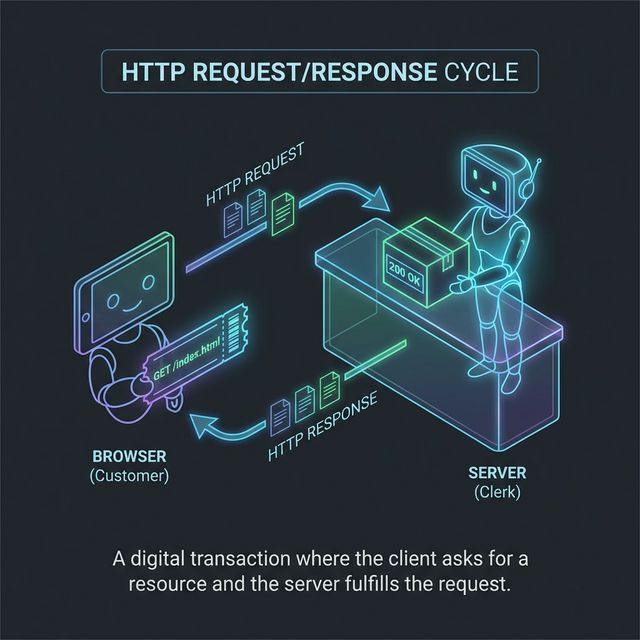
HTTP Methods:
GET     - Retrieve resource (no body)
POST    - Submit data (has body)
PUT     - Replace resource
PATCH   - Partial update
DELETE  - Remove resource
HEAD    - GET without body (metadata only)
OPTIONS - Query supported methods
TRACE   - Echo request (debugging, often disabled)
CONNECT - Establish tunnel (used for HTTPS proxy)
HTTP Status Codes:
1xx - Informational
2xx - Success
    200 OK
    201 Created
    204 No Content
3xx - Redirection
    301 Moved Permanently
    302 Found (temporary redirect)
    304 Not Modified (cached)
4xx - Client Error
    400 Bad Request
    401 Unauthorized
    403 Forbidden
    404 Not Found
    429 Too Many Requests
5xx - Server Error
    500 Internal Server Error
    502 Bad Gateway
    503 Service Unavailable
Key insight: Status codes reveal information. 403 vs 404 tells attackers if a resource exists. 500 errors may leak stack traces.
2) HTTP Headers: Security Implications
Headers carry metadata—and security-relevant information:
Request Headers (Client → Server):
Host: target.com
  - Required in HTTP/1.1
  - Enables virtual hosting
  - Can be manipulated for host header attacks

User-Agent: Mozilla/5.0...
  - Identifies client software
  - Often spoofed by attackers
  - Can fingerprint vulnerable browsers

Cookie: session=abc123
  - Session tokens, authentication
  - XSS target (steal cookies)
  - Should have Secure, HttpOnly flags

Referer: https://previous-page.com
  - Shows where user came from
  - Can leak sensitive URL parameters
  - Privacy concern

Authorization: Bearer eyJ...
  - API authentication tokens
  - JWT tokens in modern APIs
  - Must be protected in transit
Response Headers (Server → Client):
Set-Cookie: session=xyz; Secure; HttpOnly; SameSite=Strict
  - Secure: Only send over HTTPS
  - HttpOnly: JavaScript can't access
  - SameSite: CSRF protection

Content-Security-Policy: default-src 'self'
  - Controls what resources can load
  - Mitigates XSS attacks
  - Complex but powerful

Strict-Transport-Security: max-age=31536000; includeSubDomains
  - Forces HTTPS
  - Prevents downgrade attacks
  - Remember to preload

X-Frame-Options: DENY
  - Prevents clickjacking
  - DENY or SAMEORIGIN

X-Content-Type-Options: nosniff
  - Prevents MIME sniffing
  - Browser trusts Content-Type header

Server: Apache/2.4.41
  - Reveals server software
  - Helps attackers target vulnerabilities
  - Should be removed/obscured
Key insight: Security headers are defenses. Their absence is a vulnerability. Check headers on any site you're assessing.
3) HTTPS and TLS
HTTPS wraps HTTP in TLS encryption:
HTTP:  Client ←──plain text──→ Server
HTTPS: Client ←──encrypted──→ Server

TLS provides:
- Confidentiality: Traffic is encrypted
- Integrity: Tampering is detected
- Authentication: Server identity verified (certificates)
TLS Handshake (Simplified):
Client                              Server
   │                                   │
   │──── ClientHello ─────────────────>│
   │     (supported ciphers, random)   │
   │                                   │
   │<─── ServerHello ──────────────────│
   │     (chosen cipher, random)       │
   │<─── Certificate ──────────────────│
   │     (server's public key)         │
   │<─── ServerHelloDone ──────────────│
   │                                   │
   │──── ClientKeyExchange ───────────>│
   │     (encrypted pre-master secret) │
   │──── ChangeCipherSpec ────────────>│
   │──── Finished ────────────────────>│
   │                                   │
   │<─── ChangeCipherSpec ─────────────│
   │<─── Finished ─────────────────────│
   │                                   │
   │<════ Encrypted Application Data ═>│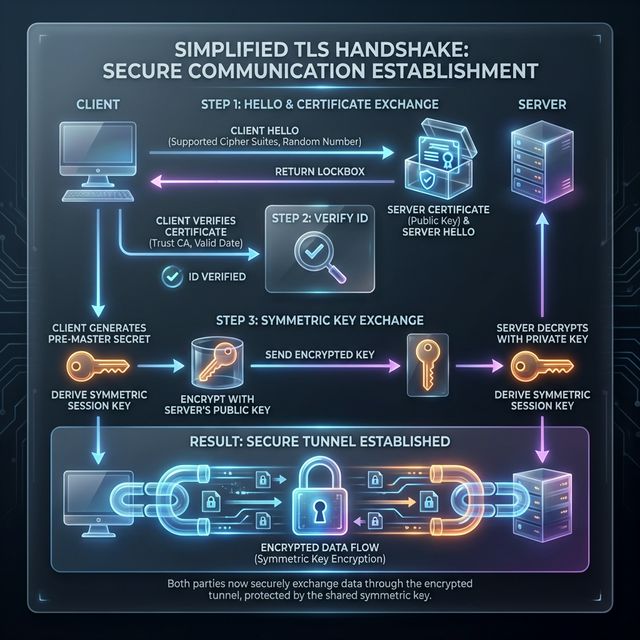
Certificate Validation:
Browser validates server certificate:
1. Is it expired?
2. Is it for this domain?
3. Is it signed by trusted CA?
4. Is it revoked? (CRL/OCSP check)

Certificate chain:
Server Cert → Intermediate CA → Root CA
              (signed by)      (trusted)
TLS Versions:
TLS 1.0 - Deprecated (POODLE, BEAST)
TLS 1.1 - Deprecated
TLS 1.2 - Current minimum standard
TLS 1.3 - Modern, faster, more secure
          - Removed weak ciphers
          - Faster handshake (1-RTT)
          - Forward secrecy required
Key insight: HTTPS protects data in transit, but doesn't make a site trustworthy. Phishing sites use HTTPS. Malware uses HTTPS. The lock icon means encrypted, not safe.
4) Web-Based Attacks
Man-in-the-Middle (MitM) on HTTP:
Attack: Intercept unencrypted HTTP traffic

Victim ──HTTP──> Attacker ──HTTP──> Server

Attacker can:
- Read all traffic (credentials, data)
- Modify responses (inject malware)
- Redirect to phishing sites

Defense: HTTPS everywhere, HSTS
SSL Stripping:
Attack: Downgrade HTTPS to HTTP

1. Victim requests http://bank.com
2. Bank redirects to https://bank.com
3. Attacker intercepts redirect
4. Attacker connects to bank via HTTPS
5. Attacker serves HTTP to victim

Victim ──HTTP──> Attacker ──HTTPS──> Bank

Victim sees: http://bank.com (no lock)
Attacker sees: All traffic in clear

Defense: HSTS (browser remembers to use HTTPS)
HTTP Request Smuggling:
Attack: Exploit parsing differences between servers

Front-end proxy and back-end server disagree on
where one request ends and next begins.

Attacker smuggles malicious request that:
- Bypasses security controls
- Poisons web cache
- Hijacks other users' requests

Complex attack targeting infrastructure misconfigurations
HTTP Response Splitting:
Attack: Inject headers via user input

Vulnerable code includes user input in headers:
Location: /page?user=INPUT

If INPUT = "value\r\n\r\nMalicious Content"
Response becomes:
Location: /page?user=value

Malicious Content

Attacker controls response body
Session Attacks:
Session Hijacking:
- Steal session cookie (via XSS, sniffing)
- Use cookie to impersonate user

Session Fixation:
- Attacker sets victim's session ID
- Victim authenticates with that ID
- Attacker uses same ID to access account

Defense:
- Regenerate session ID on login
- HttpOnly, Secure cookie flags
- Short session timeouts
Key insight: HTTP attacks exploit the protocol's flexibility. Every header, every parameter is potential attack surface.
5) Analyzing Web Traffic
Wireshark HTTP Analysis:
# Capture HTTP traffic
# Filter: http

# Useful display filters:
http.request.method == "POST"
http.response.code == 200
http.host contains "suspicious"
http.user_agent contains "curl"
http.cookie contains "session"

# Follow HTTP Stream:
Right-click packet → Follow → HTTP Stream
See complete request/response conversation
Analyzing HTTPS (Encrypted):
# HTTPS traffic is encrypted - you see:
- TLS handshake (visible)
- Server certificate (visible)
- Application data (encrypted)

# Server Name Indication (SNI):
- Domain name visible in ClientHello
- Filter: tls.handshake.extensions_server_name

# With decryption key (if you have it):
Edit → Preferences → Protocols → TLS
Add pre-master secret log file
Browser Developer Tools:
Network tab shows:
- All HTTP requests/responses
- Headers, cookies, timing
- Response bodies

Security tab shows:
- Certificate details
- TLS version and cipher
- Security issues

Useful for:
- Understanding application behavior
- Finding hidden API endpoints
- Identifying security misconfigurations
Command-Line Tools:
# curl - HTTP client
curl -v https://example.com  # Verbose output
curl -I https://example.com  # Headers only
curl -X POST -d "data=value" https://example.com

# wget - Download files
wget https://example.com/file

# httpie - User-friendly HTTP client
http GET https://example.com
http POST https://api.com/login username=admin password=test
Key insight: Analyzing web traffic requires multiple tools. Wireshark for packets, browser tools for application behavior, curl for manual testing.
Real-World Context: HTTP/S in Security Operations
Web traffic analysis is daily work in security:
Malware Analysis: Malware communicates via HTTP/S. Analyzing traffic reveals C2 servers, exfiltration patterns, and malware capabilities. HTTP headers and URLs provide IOCs.
Web Application Security: Penetration testers analyze HTTP traffic to find vulnerabilities. Every parameter, header, and cookie is tested for injection flaws.
Incident Response: Web server logs show attack attempts. Proxy logs reveal what users accessed. Understanding HTTP helps you trace intrusion paths.
MITRE ATT&CK Reference:
- T1071.001 - Web Protocols: C2 over HTTP/HTTPS
- T1102 - Web Service: Using legitimate web services for C2
- T1189 - Drive-by Compromise: Malware via web browsing
Key insight: HTTP knowledge is foundational for web app security, malware analysis, and network forensics. Master it thoroughly.
Guided Lab: HTTP Traffic Analysis
Let's capture and analyze real HTTP/HTTPS traffic to understand what's visible and what's hidden.
Step 1: Capture HTTP Traffic
# Start Wireshark capture on your interface

# Generate HTTP traffic (find a site still using HTTP)
curl -v http://httpforever.com

# Or use neverssl.com (designed to never use SSL)
curl -v http://neverssl.com
Step 2: Analyze HTTP in Wireshark
# Filter for HTTP
http

# Find your request:
# - Look for GET request
# - Expand HTTP layer
# - Examine all headers

# Right-click → Follow → HTTP Stream
# See complete conversation
Step 3: Examine Request Headers
Document these headers from your capture:
- Host
- User-Agent
- Accept
- Accept-Language
- Cookie (if any)

Question: What information does your browser reveal?
Step 4: Compare with HTTPS
# Capture HTTPS traffic
curl -v https://example.com

# In Wireshark, filter:
tls

# What can you see?
# - TLS handshake
# - Server certificate
# - SNI (Server Name Indication)

# What can't you see?
# - HTTP headers
# - Request path
# - Response body
Step 5: Examine Certificate
# In Wireshark, find Certificate message
# Expand: TLS → Handshake → Certificate

# Or use openssl:
openssl s_client -connect example.com:443 -servername example.com

# Note:
# - Certificate subject
# - Issuer (CA)
# - Validity dates
# - SANs (Subject Alternative Names)
Step 6: Check Security Headers
# Use curl to see response headers
curl -I https://google.com

# Look for security headers:
# - Strict-Transport-Security
# - Content-Security-Policy
# - X-Frame-Options
# - X-Content-Type-Options

# Try a few different sites - compare security headers
Step 7: Reflection (mandatory)
- What information is visible in HTTP that's hidden in HTTPS?
- What can you still learn from HTTPS traffic without decryption?
- Which security headers were present on the sites you tested?
- How would you detect malicious HTTP traffic in a capture?
Week 8 Outcome Check
By the end of this week, you should be able to:
- Explain HTTP request/response structure
- Identify security-relevant HTTP headers
- Describe how TLS/HTTPS protects web traffic
- Analyze HTTP traffic in Wireshark
- Recognize common web-based attacks
- Use command-line tools for HTTP testing
Next week: Email Protocols and Security—understanding SMTP, phishing infrastructure, and email authentication.
🎯 Hands-On Labs (Free & Essential)
Inspect web traffic and HTTPS behaviors before moving to reading resources.
🎮 TryHackMe: HTTP in Detail
What you'll do: Analyze HTTP requests/responses, headers, and status codes with guided
exercises.
Why it matters: Most attacks ride on HTTP—understanding it is essential for
detection.
Time estimate: 1.5-2 hours
📝 Lab Exercise: HTTP vs HTTPS Capture
Task: Capture a plain HTTP request and an HTTPS request in Wireshark.
Deliverable: Two screenshots showing readable HTTP vs encrypted TLS traffic.
Why it matters: Seeing encryption at work helps you understand what defenders can
and cannot see.
Time estimate: 45-60 minutes
🏁 PicoCTF Practice: Web Exploitation (Beginner)
What you'll do: Attempt beginner challenges that require understanding HTTP requests
and parameters.
Why it matters: Many web attacks start by manipulating requests you can see in
traffic.
Time estimate: 1-2 hours
💡 Lab Tip: If you can read payloads in plain HTTP, so can attackers. HTTPS is non-negotiable.
Resources
Complete the required resources to build your foundation.
- MDN - HTTP Overview · 30-45 min · 50 XP · Resource ID: csy104_w8_r1 (Required)
- OWASP - Secure Headers Project · 30-45 min · 50 XP · Resource ID: csy104_w8_r2 (Required)
- Security Headers Scanner · Interactive tool · 25 XP · Resource ID: csy104_w8_r3 (Optional)
Lab: Web Traffic Security Assessment
Goal: Capture and analyze web traffic, assess security headers, and identify potential vulnerabilities.
Linux/Windows Path (same methodology)
- Capture web browsing traffic:
# Start Wireshark capture # Browse to 5 different websites (mix of HTTP and HTTPS) # Save capture as web_traffic.pcap - Analyze HTTP traffic:
# Filter: http # For each HTTP site found: # - Document full URL # - List all request headers # - List all response headers # - Note any sensitive data visible - Analyze HTTPS metadata:
# Filter: tls.handshake.type == 1 # For each HTTPS connection: # - Document SNI (server name) # - Note TLS version # - Extract certificate info - Security header assessment:
# Test 5 websites with curl: curl -I https://[site] # Create table documenting: # - Site name # - HSTS present? (yes/no) # - CSP present? (yes/no) # - X-Frame-Options present? # - Server header revealed? - Identify security issues:
# Look for:
# - Sites still using HTTP
# - Missing security headers
# - Outdated TLS versions
# - Sensitive data in URLs
Deliverable (submit):
- PCAP file of captured traffic
- HTTP analysis document (headers, visible data)
- Security headers comparison table
- List of security issues found
- One paragraph: How would an attacker use this information?
Checkpoint Questions
- What is the difference between GET and POST requests?
- What does HTTP status code 403 indicate?
- What three things does TLS provide?
- What is the purpose of the HSTS header?
- How does SSL stripping work?
- What information is visible in HTTPS traffic without decryption?
Weekly Reflection
Reflection Prompt (200-300 words):
This week you explored HTTP/HTTPS—the protocols that carry most Internet traffic and most attacks. You learned both how the protocols work and how they're exploited.
Reflect on these questions:
- HTTPS is now ubiquitous, yet attacks continue. What does HTTPS protect against, and what doesn't it prevent?
- Security headers provide defense-in-depth for web applications. Why do you think many sites still don't implement them?
- Consider the trade-off between encrypted traffic and network security monitoring. How do organizations balance privacy and security visibility?
- How has understanding HTTP at the packet level changed your view of web browsing and web security?
A strong reflection will consider both the security benefits of HTTPS and the challenges it creates for defenders.
Verified Resources & Videos
- HTTP/2 and HTTP/3: Cloudflare - HTTP/2 vs HTTP/1.1
- TLS Deep Dive: The Illustrated TLS 1.3 Connection
- MITRE ATT&CK: Web Protocols (T1071.001)
HTTP knowledge is essential for web application security, malware analysis, and network forensics. You'll use these skills constantly in security work. Next week: email protocols and the infrastructure behind phishing attacks.