Opening Framing: The Weakest Link
Email was designed in the early Internet era when everyone on the network was trusted. There was no authentication, no encryption, no verification that senders were who they claimed to be. Decades later, we've bolted on security mechanisms, but the fundamental architecture remains exploitable.
This is why phishing works. An attacker can send email that appears to come from your CEO, your bank, or your IT department. Without proper email authentication, recipients have no reliable way to verify the sender's identity.
This week covers email protocols (SMTP, POP3, IMAP), email authentication (SPF, DKIM, DMARC), and how attackers exploit email infrastructure.
Key insight: Email spoofing is trivially easy by default. Authentication mechanisms exist but require proper configuration—and many organizations still don't implement them correctly.
1) Email Protocol Fundamentals
Email involves three main protocols:
SMTP (Simple Mail Transfer Protocol) - Port 25, 587, 465
  - Sends and relays email
  - Server-to-server communication
  - Client submission to server

POP3 (Post Office Protocol) - Port 110, 995
  - Downloads email to client
  - Typically deletes from server
  - Simple, older protocol

IMAP (Internet Message Access Protocol) - Port 143, 993
  - Syncs email across devices
  - Keeps email on server
  - More features than POP3
Email Flow:
Sender                                          Recipient
  │                                                 │
  │──SMTP──> Sender's Mail Server                   │
  │          (submission, port 587)                 │
  │                                                 │
  │          Sender's Server ──SMTP──> Recipient's  │
  │                           (relay)   Mail Server │
  │                                     (port 25)   │
  │                                                 │
  │                          Recipient <──IMAP/POP──│
  │                          (retrieval)            │
SMTP Conversation:
Client connects to server port 25...

S: 220 mail.example.com ESMTP ready
C: EHLO sender.com
S: 250-mail.example.com Hello
S: 250-SIZE 35882577
S: 250-AUTH LOGIN PLAIN
S: 250 STARTTLS
C: MAIL FROM:<alice@sender.com>
S: 250 OK
C: RCPT TO:<bob@example.com>
S: 250 OK
C: DATA
S: 354 Start mail input
C: From: alice@sender.com
C: To: bob@example.com
C: Subject: Hello
C:
C: This is the message body.
C: .
S: 250 OK: Message queued
C: QUIT
S: 221 Bye
Key insight: Notice how the sender specifies both "MAIL FROM" (envelope) and "From:" header. These can be different—and attackers exploit this mismatch.
2) Email Headers: The Trail of Evidence
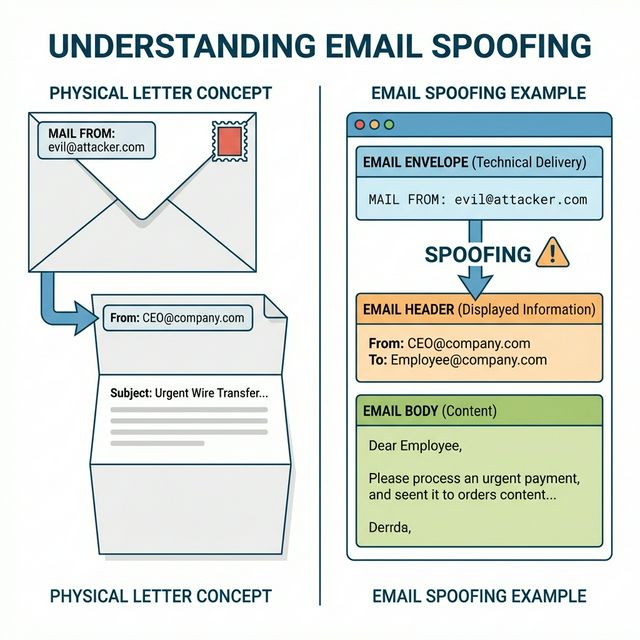
Email headers contain metadata about the message's journey:
Received: from suspicious-server.com (1.2.3.4)
        by mail.example.com (10.0.0.1)
        for <victim@example.com>;
        Mon, 15 Jan 2024 09:30:00 -0500
Received: from localhost (127.0.0.1)
        by suspicious-server.com
        Mon, 15 Jan 2024 09:29:55 -0500
From: CEO <ceo@company.com>
Reply-To: attacker@evil.com
To: victim@example.com
Subject: Urgent Wire Transfer
Date: Mon, 15 Jan 2024 09:29:50 -0500
Message-ID: <abc123@suspicious-server.com>
X-Mailer: Evil Phishing Tool 1.0
MIME-Version: 1.0
Content-Type: text/html; charset="UTF-8"
Key Headers for Investigation:
Received: (read bottom to top)
  - Shows path email traveled
  - Each server adds a Received header
  - First Received (bottom) is closest to sender
  - Can reveal true origin

From: - Displayed sender (easily spoofed!)
Reply-To: - Where replies go (watch for mismatch)
Return-Path: - Envelope sender for bounces
Message-ID: - Unique identifier
X-Originating-IP: - Sometimes reveals sender IP

Authentication-Results:
  - SPF, DKIM, DMARC results
  - Added by receiving server
  - Key for identifying spoofing
Reading Received Headers:
# Headers are added top-down, read bottom-up:

Received: by final-server (closest to recipient)
Received: by intermediate-server
Received: by first-server (closest to sender) ← Start here

# Look for:
# - IP addresses that don't match claimed domain
# - Suspicious server names
# - Time gaps or inconsistencies
# - "from" claims that don't match IP
Key insight: Email headers are your forensic trail. When investigating phishing, always examine the full headers—the visible "From" line lies.
3) Email Spoofing and Phishing Infrastructure
Why Spoofing is Easy:
# SMTP has no built-in sender verification
# Anyone can claim to be anyone:

MAIL FROM:<ceo@bigcompany.com>  ← Attacker types this
RCPT TO:<victim@target.com>
DATA
From: CEO <ceo@bigcompany.com>  ← And this
Subject: Urgent Action Required

# Without authentication, server accepts it!
Phishing Infrastructure Components:
1. Sending Infrastructure:
   - Compromised mail servers
   - Bulletproof hosting
   - Cloud services (AWS SES, SendGrid abuse)
   - Botnets

2. Domain Infrastructure:
   - Look-alike domains (g00gle.com, microsoft-login.com)
   - Recently registered domains
   - Compromised legitimate domains
   - Subdomains of legitimate services

3. Landing Pages:
   - Cloned login pages
   - Credential harvesting forms
   - Malware download sites
   - Redirectors to evade detection

4. Collection Infrastructure:
   - Servers receiving stolen credentials
   - Dead drops (paste sites, cloud storage)
   - Telegram bots
Business Email Compromise (BEC):
Sophisticated targeted attack:

1. Reconnaissance
   - Research company structure
   - Identify executives and finance team
   - Learn communication patterns

2. Impersonation
   - Spoof or compromise executive email
   - Create urgency ("confidential merger")
   - Request wire transfer or gift cards

3. Execution
   - Target complies (often bypassing controls)
   - Money goes to attacker-controlled account
   - Quickly laundered

FBI IC3 reports billions in BEC losses annually
Check Authentication Results:
Key insight: Phishing is an industry with specialized roles— some create kits, others send campaigns, others cash out. Understanding the infrastructure helps with detection and takedown.
4) Email Authentication: SPF, DKIM, DMARC
Three mechanisms work together to authenticate email:
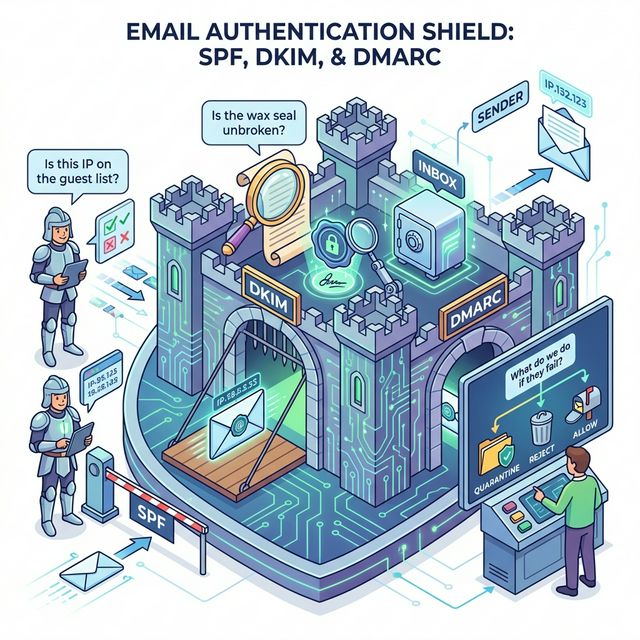
SPF (Sender Policy Framework):
Purpose: Specify which servers can send for your domain

DNS TXT record:
example.com TXT "v=spf1 include:_spf.google.com ip4:203.0.113.0/24 -all"

Components:
v=spf1           - Version
include:         - Include another domain's SPF
ip4:             - Authorized IP range
a                - Domain's A record IPs
mx               - Domain's MX record IPs
-all             - Reject all others (hard fail)
~all             - Soft fail (mark suspicious)
?all             - Neutral (no policy)

Checking SPF:
dig example.com TXT | grep spf
DKIM (DomainKeys Identified Mail):
Purpose: Cryptographically sign email content

How it works:
1. Sender's server signs message with private key
2. Signature added as DKIM-Signature header
3. Public key published in DNS
4. Receiver verifies signature with public key

DKIM-Signature header:
DKIM-Signature: v=1; a=rsa-sha256; d=example.com;
  s=selector1; c=relaxed/relaxed;
  h=from:to:subject:date;
  bh=base64hash;
  b=signature

DNS record:
selector1._domainkey.example.com TXT "v=DKIM1; k=rsa; p=publickey"

Benefits:
- Proves message wasn't modified
- Proves it came from claimed domain
- Survives forwarding (unlike SPF)
DMARC (Domain-based Message Authentication):
Purpose: Policy for handling SPF/DKIM failures

DNS TXT record:
_dmarc.example.com TXT "v=DMARC1; p=reject; rua=mailto:dmarc@example.com"

Components:
v=DMARC1         - Version
p=none           - Monitor only (no action)
p=quarantine     - Send to spam
p=reject         - Reject message
rua=             - Aggregate report destination
ruf=             - Forensic report destination
pct=             - Percentage to apply policy

DMARC alignment:
- SPF: MAIL FROM domain matches From header domain
- DKIM: d= domain matches From header domain
- Either passing + aligned = DMARC pass

Checking DMARC:
dig _dmarc.example.com TXT
Key insight: All three are needed. SPF alone has gaps, DKIM alone doesn't specify policy, DMARC ties them together with enforcement.
5) Analyzing Email Security
Checking Authentication Results:
Look for Authentication-Results header:

Authentication-Results: mx.google.com;
       dkim=pass header.d=example.com;
       spf=pass (sender IP is 203.0.113.50) smtp.mailfrom=example.com;
       dmarc=pass (policy=reject) header.from=example.com

Interpretation:
- dkim=pass: Signature valid
- spf=pass: Sender IP authorized
- dmarc=pass: Alignment verified
- All three passing = legitimate email
Red Flags in Phishing Emails:
Header red flags:
- SPF/DKIM/DMARC failures
- Mismatched domains (From vs envelope vs Reply-To)
- Suspicious Received headers
- Recently registered sending domain
- Unusual X-headers

Content red flags:
- Urgency/pressure tactics
- Generic greeting ("Dear Customer")
- Grammar/spelling errors
- Mismatched links (hover vs displayed)
- Requests for credentials/money/action
- Unexpected attachments
Command-Line Analysis:
# Check SPF record
dig example.com TXT | grep spf

# Check DKIM selector (need to know selector name)
dig selector1._domainkey.example.com TXT

# Check DMARC policy
dig _dmarc.example.com TXT

# Test sending server
# Connect directly to see banner
nc -v mail.example.com 25

# Online tools:
# - MXToolbox.com
# - mail-tester.com
# - dmarcanalyzer.com
Email Security Gateway Features:
Modern email security includes:
- SPF/DKIM/DMARC verification
- Spam filtering
- Malware scanning
- URL reputation/sandboxing
- Attachment sandboxing
- Impersonation detection
- Data loss prevention (DLP)
- Encryption enforcement
Key insight: Email security requires multiple layers. Authentication prevents spoofing, but content inspection catches malware and phishing that passes authentication.
Real-World Context: Email in Security Operations
Email security is a major focus area:
Phishing Response: When users report phishing, analysts examine headers to trace origin, identify infrastructure, and create blocking rules. Header analysis is a core IR skill.
Threat Intelligence: Phishing campaigns reveal attacker infrastructure—domains, IPs, and TTPs. This intelligence feeds into detection rules and blocklists.
Email Authentication Projects: Implementing SPF/DKIM/DMARC is a significant security project. Getting to "p=reject" requires careful inventory of all legitimate senders.
MITRE ATT&CK Reference:
- T1566.001 - Phishing: Spearphishing Attachment: Malware via email
- T1566.002 - Phishing: Spearphishing Link: Credential theft via email
- T1586.002 - Compromise Accounts: Email Accounts: Using compromised email
Key insight: Email remains the top initial access vector. Strong email security prevents a majority of attacks from ever reaching users.
Guided Lab: Email Header Analysis
Let's analyze real email headers to understand authentication and identify potential phishing indicators.
Step 1: Get Full Email Headers
# Gmail:
Open email → Three dots menu → "Show original"

# Outlook:
Open email → File → Properties → "Internet headers"

# Save the full headers to a text file
Step 2: Identify Key Headers
# Find and document these headers:

From: (displayed sender)
Return-Path: (envelope sender)
Reply-To: (where replies go)
Received: (all of them, read bottom-up)
Message-ID:
Authentication-Results:
X-Originating-IP: (if present)
Step 3: Trace the Email Path
# Read Received headers from bottom to top
# For each hop, note:
# - Server name
# - IP address
# - Timestamp

# Draw the path:
# Origin → Server1 → Server2 → Your inbox
Step 4: Check Authentication Results
# Find Authentication-Results header
# Document:
# - SPF result (pass/fail/softfail/none)
# - DKIM result (pass/fail/none)
# - DMARC result (pass/fail/none)

# If any failed, why?
Step 5: Verify Domain Configuration
# Check the sending domain's DNS records:

# SPF
dig [sending-domain] TXT | grep spf

# DMARC
dig _dmarc.[sending-domain] TXT

# Compare with email headers:
# Does the configuration match what you see?
Step 6: Analyze a Suspicious Email
# If you have a spam/phishing email (from spam folder):
# Compare headers to legitimate email:

# Red flags to look for:
# - Authentication failures
# - Domain mismatches
# - Suspicious server names
# - Recent domain registration
# - Reply-To different from From
Step 7: Reflection (mandatory)
- What differences did you find between legitimate and suspicious emails?
- How does reading Received headers reveal the true origin?
- What authentication results would you see in a spoofed email?
- Why might a legitimate email fail SPF but pass DKIM?
Week 9 Outcome Check
By the end of this week, you should be able to:
- Explain SMTP, POP3, and IMAP protocols
- Read and interpret email headers
- Understand how email spoofing works
- Explain SPF, DKIM, and DMARC authentication
- Analyze email authentication results
- Identify phishing indicators in email headers
Next week: Firewalls and Network Defense—implementing security controls at network boundaries.
🎯 Hands-On Labs (Free & Essential)
Analyze email abuse patterns and authentication failures before moving to reading resources.
🎮 TryHackMe: Phishing Fundamentals
What you'll do: Explore how phishing campaigns work and how email protocols are abused.
Why it matters: Email security failures are the most common initial access vector.
Time estimate: 1-1.5 hours
📝 Lab Exercise: Email Header Investigation
Task: Collect headers from three emails and identify `From`, `Reply-To`, `Return-Path`,
and SPF/DKIM results.
Deliverable: Header table + short assessment of whether each email is authentic.
Why it matters: Headers are the forensic trail in email investigations.
Time estimate: 45-60 minutes
🏁 PicoCTF Practice: Forensics (Email Artifacts)
What you'll do: Solve beginner forensics challenges that involve email or metadata
analysis.
Why it matters: Email incidents often require careful artifact review.
Time estimate: 1-2 hours
💡 Lab Tip: Always compare `From` and `Reply-To`. Mismatches are a classic phishing sign.
Resources
Complete the required resources to build your foundation.
- Cloudflare - DMARC, DKIM, and SPF · 30-45 min · 50 XP · Resource ID: csy104_w9_r1 (Required)
- Proofpoint - Business Email Compromise · 20-30 min · 50 XP · Resource ID: csy104_w9_r2 (Required)
- MXToolbox - Email Testing Tools · Interactive tool · 25 XP · Resource ID: csy104_w9_r3 (Optional)
Lab: Email Security Assessment
Goal: Assess email authentication configuration for multiple domains and analyze phishing email samples.
Part 1: Domain Authentication Audit
- Select 5 domains to assess (mix of large companies, small businesses, your organization if applicable)
- For each domain, check:
# SPF Record dig [domain] TXT | grep spf # DMARC Policy dig _dmarc.[domain] TXT # MX Records (for context) dig [domain] MX - Create an assessment table:
| Domain | SPF | SPF Policy | DMARC | DMARC Policy | |--------|-----|------------|-------|--------------| | ... | Yes | -all | Yes | reject | - Rate each domain's email security (Poor/Fair/Good)
Part 2: Phishing Header Analysis
- Obtain 2-3 phishing/spam emails (from your spam folder)
- Extract full headers from each
- For each email, document:
- Claimed sender vs actual origin
- Full path (all Received headers)
- Authentication results
- Red flags identified
- Compare to a legitimate email from the same claimed sender (if possible)
Part 3: Recommendations Report
- For domains with weak configuration, write recommendations
- Explain the risks of missing authentication
Deliverable (submit):
- Domain authentication audit table
- Phishing email header analysis (sanitized)
- Red flags identified with explanations
- Recommendations for improving email security
- One paragraph: Why is email authentication so important?
Checkpoint Questions
- What is the difference between SMTP, POP3, and IMAP?
- Why can the "From:" header be different from the actual sender?
- What does SPF authenticate?
- What does DKIM authenticate?
- What is the purpose of DMARC?
- How do you read Received headers to trace an email's path?
Weekly Reflection
Reflection Prompt (200-300 words):
This week you explored email protocols and security—the infrastructure behind the most common attack vector. You learned why email spoofing is so easy and what mechanisms exist to prevent it.
Reflect on these questions:
- Email was designed without security. What does this tell us about designing new protocols and systems today?
- SPF, DKIM, and DMARC exist, yet phishing remains effective. Why do you think adoption is incomplete?
- Consider the trade-offs in DMARC policy. Why might an organization choose "p=none" over "p=reject"?
- How has understanding email internals changed how you view the emails you receive daily?
A strong reflection will consider both technical and organizational challenges in securing email infrastructure.
Verified Resources & Videos
- Email Authentication: DMARC.org - Overview
- Phishing Analysis: PhishTank - Phishing Database
- MITRE ATT&CK: Phishing (T1566)
Email security is a critical skill. The ability to analyze headers, verify authentication, and identify phishing is used daily in security operations. Next week: firewalls and network defense— implementing security at network boundaries.