Opening Framing: Controlling Traffic Flow
Firewalls are the gatekeepers of network security. They examine traffic and decide what passes and what's blocked. Every organization relies on firewalls—from simple home routers to enterprise next-gen firewalls with advanced threat detection.
Understanding firewalls means understanding network security architecture. Where are the boundaries? What rules govern traffic? How do attackers bypass these controls? As a security professional, you'll configure firewalls, review rules, and investigate incidents involving them.
This week covers firewall types, rule logic, common configurations, and how to analyze and test firewall effectiveness.
Key insight: Firewalls are only as good as their rules. Misconfigurations are among the most common security weaknesses. Understanding rule logic helps you find gaps before attackers do.
1) Firewall Fundamentals
Firewalls filter traffic based on defined rules:
Basic Firewall Function:
1. Packet arrives at firewall
2. Firewall examines packet headers
3. Compares against rule set (top to bottom)
4. First matching rule determines action
5. Action: ALLOW, DENY, DROP, LOG

Rule components:
- Source (IP, network, zone)
- Destination (IP, network, zone)
- Service/Port (TCP 443, UDP 53, etc.)
- Action (permit, deny)
- Optional: logging, scheduling
Firewall Placement:
                    INTERNET
                        │
                   [Perimeter FW]  ← External boundary
                        │
                   ┌────┴────┐
                   │   DMZ   │    ← Public-facing servers
                   └────┬────┘
                   [Internal FW]  ← Protect internal from DMZ
                        │
              ┌─────────┼─────────┐
              │         │         │
           [Users]  [Servers] [Management]
              │         │         │
         [Host FW]  [Host FW]  [Host FW] ← Endpoint protection
Defense in Depth:
Multiple firewall layers:

1. Perimeter firewall - Internet boundary
2. Internal firewalls - Segment internal zones
3. Host firewalls - Protect individual systems
4. Application firewalls - Protect specific apps

Each layer catches what others miss
Compromise of one doesn't mean total access
Key insight: One firewall isn't enough. Defense in depth means multiple layers, each reducing attack surface further.
2) Firewall Types and Technologies
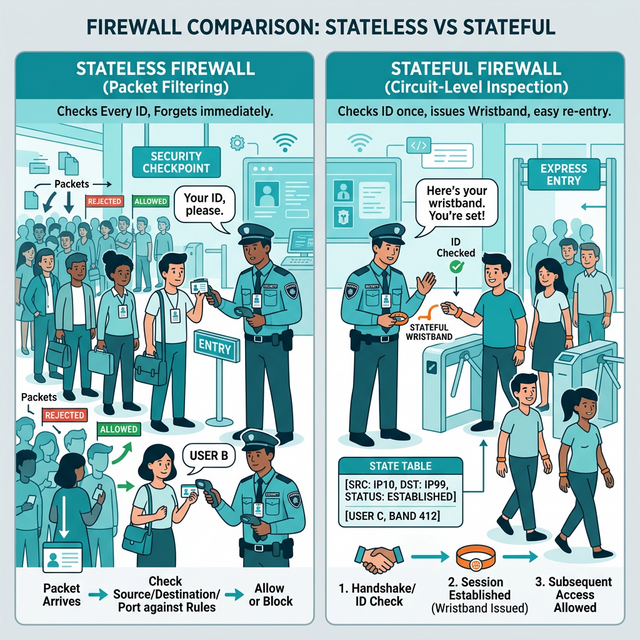
Packet Filtering (Stateless):
Examines each packet independently:
- Source/destination IP
- Source/destination port
- Protocol

Limitations:
- No connection tracking
- Can't understand application context
- Vulnerable to fragmentation attacks

Example rule:
ALLOW TCP any → 192.168.1.10:80
(Allows any source to reach web server)
Stateful Inspection:
Tracks connection state:
- Remembers established connections
- Allows return traffic automatically
- Understands TCP handshake states

Connection table:
SRC IP      DEST IP       SRC PORT  DEST PORT  STATE
10.0.0.5    93.184.216.34  52431     443       ESTABLISHED
10.0.0.5    8.8.8.8        51234     53        CLOSED

Benefits:
- Only need rule for outbound; return traffic allowed
- Detects invalid packets (RST without connection)
- More secure than stateless
Application Layer / Next-Gen Firewall (NGFW):
Deep packet inspection:
- Understands application protocols
- Can identify apps regardless of port
- Content inspection (files, URLs)

Features:
- Application identification (Facebook, BitTorrent, SSH)
- User identification (via AD integration)
- Threat prevention (IPS, malware detection)
- URL filtering
- SSL/TLS inspection

Example rules:
ALLOW User-Group "Engineers" → Application "GitHub"
DENY Application "BitTorrent" → Any
ALLOW → URL-Category "Business" ; DENY → "Gambling"
Web Application Firewall (WAF):
Protects web applications specifically:
- Inspects HTTP/HTTPS traffic
- Blocks SQL injection, XSS, etc.
- Understands application context

Operates at Layer 7 (Application)
Complements network firewalls

Common WAF rules:
- Block requests with SQL keywords in parameters
- Block requests with script tags
- Rate limit login attempts
- Validate input formats
Key insight: Different firewall types protect different layers. Network firewalls protect infrastructure; WAFs protect applications. Most organizations need both.
3) Firewall Rules and Policies
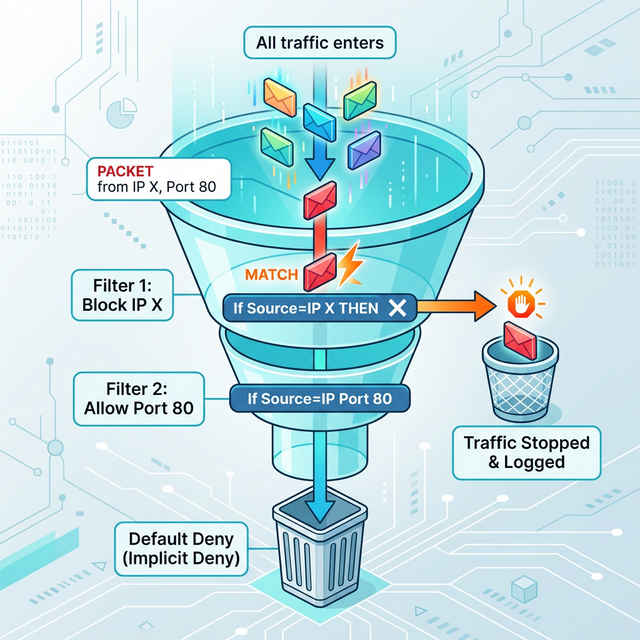
Rule Processing Order:
Rules processed TOP to BOTTOM
FIRST match wins

Example ruleset:
1. ALLOW TCP 10.0.0.0/24 → 192.168.1.10:443
2. DENY TCP any → 192.168.1.10:443
3. ALLOW TCP any → 192.168.1.10:80
4. DENY any → any (implicit default)

Traffic from 10.0.0.50 to 192.168.1.10:443
→ Matches rule 1 → ALLOWED

Traffic from 8.8.8.8 to 192.168.1.10:443
→ Doesn't match rule 1
→ Matches rule 2 → DENIED
Common Rule Mistakes:
1. Overly permissive rules:
   ALLOW any → any (defeats purpose!)

2. Rule shadowing:
   Rule 1: DENY any → 10.0.0.0/24
   Rule 2: ALLOW 192.168.1.5 → 10.0.0.50
   (Rule 2 never matches - shadowed by Rule 1)

3. Missing deny rule:
   Relying on implicit deny that may not exist

4. Wrong rule order:
   More specific rules should come BEFORE general rules

5. Forgotten rules:
   Temporary rules that become permanent
   Rules for decommissioned systems
Best Practices:
1. Default deny (whitelist approach)
   - Explicit deny all at bottom
   - Only allow what's needed

2. Principle of least privilege
   - Minimum necessary access
   - Specific sources and destinations
   - Specific ports, not ranges

3. Documentation
   - Comment every rule
   - Include ticket/change number
   - Record who requested and why

4. Regular review
   - Audit rules quarterly
   - Remove unused rules
   - Verify rules still needed

5. Logging
   - Log denied traffic
   - Log security-relevant allowed traffic
   - Send logs to SIEM
Key insight: Firewall rule reviews find vulnerabilities. Old rules, overly broad rules, and misconfigurations are common findings in security assessments.
4) Linux Firewalls: iptables and nftables
iptables Fundamentals:
# iptables structure:
Tables → Chains → Rules

Tables:
- filter (default): Accept/drop packets
- nat: Network address translation
- mangle: Packet modification

Chains (in filter table):
- INPUT: Traffic destined for this host
- OUTPUT: Traffic from this host
- FORWARD: Traffic passing through (routing)

Targets:
- ACCEPT: Allow packet
- DROP: Silently discard
- REJECT: Discard and send error
- LOG: Log packet (then continue)
Common iptables Commands:
# View current rules
sudo iptables -L -n -v

# Allow established connections
sudo iptables -A INPUT -m state --state ESTABLISHED,RELATED -j ACCEPT

# Allow SSH from specific network
sudo iptables -A INPUT -s 192.168.1.0/24 -p tcp --dport 22 -j ACCEPT

# Allow HTTP/HTTPS
sudo iptables -A INPUT -p tcp --dport 80 -j ACCEPT
sudo iptables -A INPUT -p tcp --dport 443 -j ACCEPT

# Drop all other incoming
sudo iptables -A INPUT -j DROP

# Delete a rule (by number)
sudo iptables -D INPUT 3

# Save rules (Debian/Ubuntu)
sudo iptables-save > /etc/iptables/rules.v4
nftables (Modern Replacement):
# nftables uses unified syntax
# Replacing iptables, ip6tables, arptables, ebtables

# View rules
sudo nft list ruleset

# Create table and chain
sudo nft add table inet filter
sudo nft add chain inet filter input { type filter hook input priority 0 \; }

# Add rules
sudo nft add rule inet filter input tcp dport 22 accept
sudo nft add rule inet filter input tcp dport {80, 443} accept
sudo nft add rule inet filter input drop

# nftables advantages:
# - Cleaner syntax
# - Better performance
# - IPv4/IPv6 unified
UFW (Uncomplicated Firewall):
# User-friendly frontend for iptables

# Enable firewall
sudo ufw enable

# Default policies
sudo ufw default deny incoming
sudo ufw default allow outgoing

# Allow services
sudo ufw allow ssh
sudo ufw allow 80/tcp
sudo ufw allow from 192.168.1.0/24 to any port 22

# View status
sudo ufw status verbose

# Delete rule
sudo ufw delete allow 80/tcp
Key insight: Linux firewall skills are essential. Many servers rely on iptables/nftables as the only firewall. Know how to configure and troubleshoot them.
5) Firewall Evasion and Testing
Common Evasion Techniques:
Port-based evasion:
- Use allowed ports (80, 443, 53)
- Tunnel protocols through HTTP/HTTPS
- DNS tunneling through port 53

Protocol evasion:
- Encapsulate blocked protocols in allowed ones
- Use ICMP for covert channels
- IPv6 when only IPv4 is filtered

Fragmentation:
- Split packets to confuse inspection
- Overlap fragments
- Send out-of-order

Application layer:
- Obfuscate payloads
- Use encryption (legitimate HTTPS)
- Mimic normal traffic patterns
Testing Firewall Rules:
# Nmap for port discovery
nmap -sS -p 1-1000 target.com  # SYN scan
nmap -sU -p 53,161 target.com  # UDP scan
nmap -sA target.com            # ACK scan (detect stateful FW)

# Specific port test
nc -zv target.com 443          # TCP port test
nc -zuv target.com 53          # UDP port test

# Firewall detection
nmap -sA target.com            # ACK scan detects filtering
# filtered = stateful firewall
# unfiltered = no firewall or stateless

# Traceroute through firewall
traceroute -T -p 80 target.com  # TCP traceroute
Firewall Log Analysis:
# What to look for in firewall logs:

Reconnaissance indicators:
- Port scans (many ports, one source)
- Host scans (one port, many destinations)
- Repeated denied connections

Attack indicators:
- Allowed then denied (probing)
- Internal → External unusual ports
- Spike in denied traffic
- Known bad IPs

Example log entry (iptables):
Jan 15 10:23:45 fw kernel: DROP IN=eth0 OUT=
SRC=203.0.113.50 DST=192.168.1.10 PROTO=TCP
SPT=54321 DPT=22

Parse: External IP tried SSH, was blocked
Key insight: Attackers will try to bypass your firewall. Testing your own rules and monitoring logs helps you find weaknesses before attackers exploit them.
Real-World Context: Firewalls in Security Operations
Firewall management is a core security function:
Change Management: Firewall rule changes follow strict processes. Security teams review proposed rules, assess risk, and document approvals. Bad changes can expose entire networks.
Incident Response: During incidents, firewalls provide crucial data. What was blocked? What was allowed? Emergency rules can contain breaches by blocking attacker IPs or isolating compromised segments.
Compliance: Regulations (PCI-DSS, HIPAA) require firewall protections. Auditors review firewall rules, looking for proper segmentation and access controls.
MITRE ATT&CK Reference:
- T1562.004 - Disable or Modify System Firewall: Attackers disabling protections
- T1090 - Proxy: Bypassing firewall through proxies
- T1572 - Protocol Tunneling: Hiding in allowed protocols
Key insight: Firewalls are both preventive control and detection source. Their logs are goldmines for threat hunting and investigations.
Guided Lab: Linux Firewall Configuration
Let's configure a Linux firewall using iptables and UFW, then test our rules.
Step 1: Check Current Firewall Status
# Check iptables rules
sudo iptables -L -n -v

# Check UFW status
sudo ufw status verbose

# Note: Start with clean slate for learning
# (Don't do this on production systems!)
sudo iptables -F  # Flush all rules
Step 2: Configure Basic iptables Rules
# Allow loopback
sudo iptables -A INPUT -i lo -j ACCEPT

# Allow established connections
sudo iptables -A INPUT -m state --state ESTABLISHED,RELATED -j ACCEPT

# Allow SSH (adjust network as needed)
sudo iptables -A INPUT -p tcp --dport 22 -j ACCEPT

# Allow ICMP (ping)
sudo iptables -A INPUT -p icmp -j ACCEPT

# Log dropped packets
sudo iptables -A INPUT -j LOG --log-prefix "DROPPED: "

# Drop everything else
sudo iptables -A INPUT -j DROP

# Verify rules
sudo iptables -L -n -v --line-numbers
Step 3: Test Your Rules
# From another machine (or use localhost tests):

# Test SSH (should work)
ssh user@your-ip

# Test HTTP (should be blocked)
curl http://your-ip

# Test ping (should work)
ping your-ip

# Check logs for dropped packets
sudo tail -f /var/log/syslog | grep DROPPED
Step 4: Try UFW (Simpler Interface)
# Reset iptables first
sudo iptables -F

# Enable UFW with default deny
sudo ufw default deny incoming
sudo ufw default allow outgoing

# Add rules
sudo ufw allow ssh
sudo ufw allow from 192.168.1.0/24 to any port 80

# Enable firewall
sudo ufw enable

# Check status
sudo ufw status numbered
Step 5: Simulate Attack and Review Logs
# From another machine, run a port scan
nmap -sS your-ip

# On firewall host, watch logs
sudo tail -f /var/log/ufw.log

# Or for iptables
sudo tail -f /var/log/syslog | grep DROPPED

# Note the scan activity in logs
Step 6: Reflection (mandatory)
- Why is the rule order important in iptables?
- What happens to traffic that doesn't match any rule?
- How did the firewall logs show the port scan activity?
- What rules would you add for a web server?
Week 10 Outcome Check
By the end of this week, you should be able to:
- Explain different firewall types and their capabilities
- Understand firewall rule processing order
- Configure Linux firewalls (iptables/UFW)
- Identify common firewall misconfigurations
- Test firewall effectiveness
- Analyze firewall logs for security events
Next week: Intrusion Detection and Monitoring—detecting threats that get past the firewall.
🎯 Hands-On Labs (Free & Essential)
Practice firewall logic and rule design before moving to reading resources.
🎮 TryHackMe: Intro to Defensive Security
What you'll do: Explore defensive concepts and how network controls reduce attack
surface.
Why it matters: Firewalls are foundational defensive controls you will configure
and review.
Time estimate: 45-60 minutes
📝 Lab Exercise: Firewall Rule Set Draft
Task: Draft a firewall policy for a small office (web, DNS, email, admin SSH).
Deliverable: Rule table with source, destination, port, action, and justification.
Why it matters: Good firewall rules are specific, minimal, and auditable.
Time estimate: 45-60 minutes
🏁 PicoCTF Practice: General Skills (Networking Tools)
What you'll do: Use networking commands to validate which ports/services are reachable.
Why it matters: Testing firewall assumptions is a core defensive practice.
Time estimate: 1-2 hours
💡 Lab Tip: A default-deny policy with explicit allow rules is easier to audit and safer.
Resources
Complete the required resources to build your foundation.
- Netfilter - Packet Filtering HOWTO · 45-60 min · 50 XP · Resource ID: csy104_w10_r1 (Required)
- Palo Alto - What is a NGFW? · 20-30 min · 50 XP · Resource ID: csy104_w10_r2 (Required)
- nftables Wiki · Reference · 25 XP · Resource ID: csy104_w10_r3 (Optional)
Lab: Firewall Rule Analysis and Hardening
Goal: Analyze a firewall ruleset for security issues and create a hardened configuration.
Part 1: Analyze Sample Ruleset
Review this iptables ruleset and identify issues:
# Sample ruleset with problems
sudo iptables -A INPUT -j ACCEPT
sudo iptables -A INPUT -s 10.0.0.0/8 -j ACCEPT
sudo iptables -A INPUT -p tcp --dport 22 -j ACCEPT
sudo iptables -A INPUT -p tcp --dport 3306 -j ACCEPT
sudo iptables -A INPUT -p tcp --dport 80 -j ACCEPT
sudo iptables -A INPUT -p tcp --dport 443 -j ACCEPT
sudo iptables -A INPUT -j DROP- Identify at least 3 security issues with this ruleset
- Explain why each issue is problematic
- Propose corrected rules
Part 2: Build Hardened Ruleset
Create a firewall configuration for this scenario:
- Web server (HTTP/HTTPS from anywhere)
- SSH only from management network (192.168.100.0/24)
- MySQL only from application server (192.168.1.50)
- Allow ping from internal network (192.168.0.0/16)
- Log and drop all other traffic
# Write your iptables rules here:
# Include comments explaining each rule
Part 3: Test Your Configuration
- Implement your rules on a test system (VM)
- Test each rule works as expected
- Verify blocked traffic is logged
- Run a port scan and capture the logs
Deliverable (submit):
- Analysis of sample ruleset (issues found)
- Your hardened ruleset with comments
- Test results showing rules work correctly
- Log samples showing blocked traffic
- One paragraph: What makes a firewall ruleset "secure"?
Checkpoint Questions
- What is the difference between stateless and stateful firewalls?
- In what order are firewall rules processed?
- What is the difference between DROP and REJECT in iptables?
- What is a Next-Generation Firewall (NGFW)?
- Why should firewall rules follow the principle of least privilege?
- How can attackers evade firewall rules?
Weekly Reflection
Reflection Prompt (200-300 words):
This week you learned about firewalls—the fundamental network security control. You configured rules, tested them, and analyzed logs for security events.
Reflect on these questions:
- Firewalls have existed for decades, yet breaches still occur. What are the limitations of firewalls as a security control?
- Consider the balance between security and usability in firewall rules. How do you decide what to allow vs. block?
- Many organizations have firewall rules that have accumulated over years. What risks does this create?
- How has configuring a firewall yourself changed your understanding of network security?
A strong reflection will consider firewalls as one part of a defense-in-depth strategy, not a complete solution.
Verified Resources & Videos
- iptables Guide: Iptables Tutorial
- Firewall Best Practices: CIS Controls - Network Security
- MITRE ATT&CK: Disable or Modify System Firewall (T1562.004)
Firewall skills are essential for every security role. Whether you're defending networks, responding to incidents, or testing security, you'll work with firewalls constantly. Next week: intrusion detection—finding threats that bypass the firewall.